
Zombie Shark - Blank Canvas
Print Profile(1)
Description
Zombie Skull Shark (Diorama)
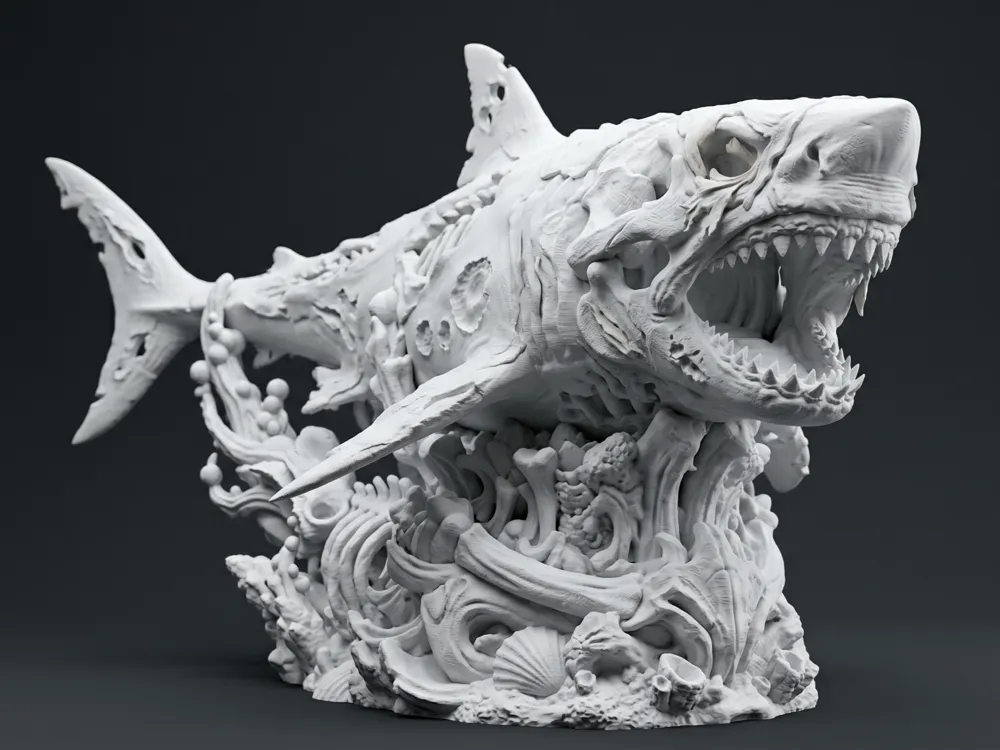
The terror of the deep has arrived! Presenting the Zombie Shark, a high-level sculpture where an undead great white emerges from a reef of abyssal bones. Its skull head and torn body showing its ribs make it an imposing display piece.
THE BLANK CANVAS CHALLENGE This model is intentionally uploaded in solid white. With all the textures of rotting flesh, bone, and coral, it is the ultimate challenge for the "Paint Bucket" of Bambu Studio. Use your best filaments to bring it to life (or death) and upload your result to the comments!
Print Recommendations (Important!): This is a highly detailed model, follow these steps for success:
- Nozzle: 0.4 mm (though a 0.2 mm nozzle will make the bone details museum-quality).
- Supports: MANDATORY! Use Tree Supports (Auto). Make sure to have the "Supports on build plate only" (Build plate only) option enabled if possible, so as not to damage the fine details of the body.
- Infill: 10% (Gyroid).
- Layer Height: 0.16 mm or 0.12 mm. Do not use 0.20 mm here! Take your time so the teeth and wounds come out perfect.
English
Zombie Skull Shark - Blank Canvas Edition
The terror of the deep has arrived! Presenting the Zombie Shark, a high-level sculpture where an undead great white emerges from a reef of abyssal bones. Its skull head and torn body showing its ribs make it an imposing display piece.
THE BLANK CANVAS CHALLENGE This model is intentionally uploaded in solid white. With all the textures of rotting flesh, bone, and coral, it is the ultimate challenge for the Bambu Studio "Paint Bucket". Use your best filaments to bring it to life (or death) and upload your result to the comments!
Print Recommendations (Crucial!): This is a highly detailed model, follow these steps for success:
- Nozzle: 0.4 mm (though a 0.2 mm nozzle will make the bone details museum-quality).
- Supports: MANDATORY! Use Tree Supports (Auto). Try to use "Build plate only" if possible to avoid scarring the fine details on the body.
- Infill: 10% (Gyroid).
- Layer Height: 0.16 mm or 0.12 mm. Do not use 0.20 mm here! Take your time so the teeth and wounds come out perfect.
License

You shall not share, sub-license, sell, rent, host, transfer, or distribute in any way the digital or 3D printed versions of this object, nor any other derivative work of this object in its digital or physical format (including - but not limited to - remixes of this object, and hosting on other digital platforms). The objects may not be used without permission in any way whatsoever in which you charge money, or collect fees.


Comment & Rating (0)