
Customisable Blue Plaque - No AMS required!
Print Profile(1)
Description
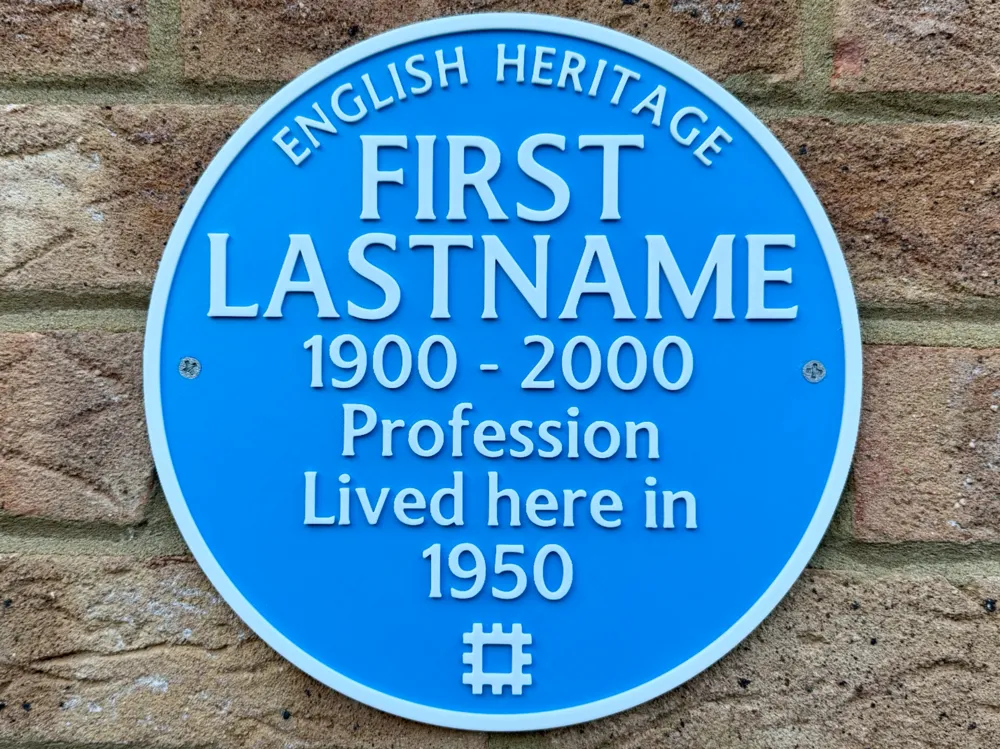
🔵 Customisable Blue Plaque, no AMS required! 🔵
Ever walked past one of those iconic blue plaques on a building and wondered about the person who once lived there or the moment in history that happened inside?
This print lets you create your own. Despite being a two colour print, no AMS is needed if you add a pause in Bambu Slicer at layer 14, you can then swap the filament and it'll use the new colour once you resume.
Inspired by the familiar plaques seen across the UK, this design includes two separate styles based on the well known layouts used by English Heritage and Historic England. Each version is provided on its own plate so you can print whichever style you prefer.
Every line of text on the plaque can be customised, allowing you to recreate a traditional commemorative plaque or have a bit of fun with it. Whether you're marking the birthplace of a family legend, celebrating a memorable moment in your home, or simply installing a plaque declaring that “nothing of importance ever happened here”, this model gives you complete freedom.
The plaque includes countersunk screw holes for wall mounting. If you’d rather stick the plaque to the wall instead, I’ve also included two faux screw heads that can be printed separately and glued into place so the plaque still has the classic mounted appearance.
While these plaques are often used to mark notable people or historical events, they also work brilliantly as humorous or novelty plaques around the home or workplace.
For anyone new to changing settings within Bambu Studio, don't panic! - I've walked through each step with screenshots - If at any point you've made changes that you aren't happy with, just hit undo (Ctrl-Z/Command-Z) and start those changes again.
Boost Me (for free)
🔵 If you like this design, a boost is a great way to support me on here 🔵
🧰 Before you begin
To ensure the text displays and prints correctly, please install the required font. If you want to match the style used here, you’ll need to install the LT Museum font.
It’s free to download from: https://www.dafont.com/lt-museum.font
For the closest match to the plaque design, LT Museum Medium is recommended.
After installing, restart Bambu Studio before opening the 3MF file, this ensures the font loads correctly and avoids it being substituted with a default font.
There is a more accurate font out there called Blue Plaque, but due to the ‘imperfect’ design of it (it has the appearance of hand crafted letters), it was causing errors when importing the design, so I've gone for a cleaner looking font that is similar in appearance.
·····
✏️ Customising your Blue plaque
All of the editable text can be modified directly inside Bambu Studio.
What can be edited
Every text line on the plaque is editable except the top title/logo text:
- ENGLISH HERITAGE
- HISTORIC ENGLAND
These are built into the design and cannot be edited directly. If you prefer, you may remove these objects entirely (letter by letter under parts) and replace them with your own text, but they cannot be modified using the Edit Text tool.
Editing the text
- Open the provided 3MF file in Bambu Studio.
In the Objects list for your chosen plaque design, locate the text object you want to edit.
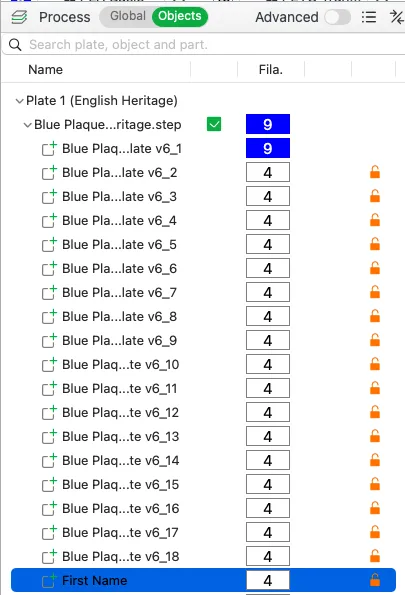
- Right-click the text object.
- Select Edit Text.
Replace the placeholder text with your own wording.
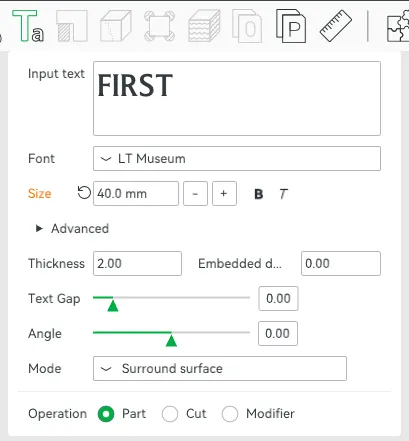
Text placeholders
The plaque contains the following editable text fields:
- First Name
- Surname
- Years
- Profession
- Lived here in (or Lived here for the second plate)
- Year (or as a for the second plate)
💡 Tip: To retain the look of the supplied design, try to keep the length of each line similar to the placeholder text to maintain the original layout.
If you want to completely change the text / layout, you can do this, but it may require you to edit font sizes (under Edit Text) and using the move tool to correctly position them. Z height is important after any changes, please see below.
Important Z height setting
For the colour change to work correctly without an AMS and to reduce the number of changes with an AMS, the Z height of all editable text must remain at 3.50 mm.
If this value changes, the colour swap will not align with the text during printing.
To check this:
- Select the text object.
- Open the Move tool.
Confirm the Z value is 3.50 mm.
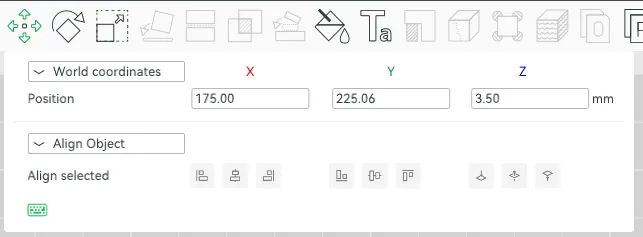
Do not adjust the Z axis when moving text and change back to 3.50 if it does get adjusted.
Moving text (if required)
If you need to adjust spacing:
- Select the text object.
- Use the Move tool.
- Adjust position on the X or Y axis only, put the Z height back to 3.50 if it changes (Bambu Studio has a habit of reverting it!)
If anything looks wrong after editing, close the file without saving and reopen the original 3MF to start again.
Save before slicing
Once you’re happy with your text:
- Save the project as a new 3MF file.
- Slice the model.
- Check the preview to confirm the text appears correctly.
·····
🔥 Tips before you start
Having a clean print bed and hot end(s) free from filament is essential in getting that crisp, clean look. Here's some tips on what to do to get the best print possible;
🧼 Cleaning
Clean your plate first, following your usual routine. Dish soap works best, clean and then rinse thoroughly, ensure the plate is dry and free of debris before putting back in the printer.
Leftover filament residue on your hot end can cause unwanted colour streaks, which will show very clearly against the white parts of the print. Please inspect your hot end before starting the print, if you spot any clumps or leftover filament, follow Bambu's recommended cleaning guide to remove.
·····
🖨️ Printing setup
The model includes two plaque designs:
- English Heritage style
- Historic England style
Each plaque is placed on its own plate so you can edit and print whichever version you prefer.
A separate accessory plate contains the optional faux screw heads which can be printed if you plan to stick the plaque to the wall rather than mount it with screws.
Default print setup
Recommended baseline settings:
- Nozzle: 0.4 mm
- Filament: Blue and White
- Supports: Not required
- Build plate: Any
Printing without an AMS
This model does not require an AMS.
Instead, the colour change can be done using a manual filament swap (if you have an AMS, just load it up as normal).
Steps:
- Slice the model.
- In the preview, locate Layer 14.
- Add a Pause at this layer.
- Start the print using blue filament.
- When the printer pauses at Layer 13, unload the filament and switch to white filament.
- Resume the print.
Because the editable text sits at Z = 3.50 mm, the white filament will print the raised lettering cleanly.
Mounting options
You have two ways to install the plaque;
1. Screw mounting
The plaque includes countersunk screw holes so it can be fixed directly to a wall.
2. Adhesive mounting
If you prefer not to drill:
- Mount the plaque using suitable adhesive strips or mounting tape.
- Print the faux screw heads.
- Glue them into the countersunk holes for the same visual appearance (these are a tight fit, so depending on printer tolerances, they may be fine as 'push fit').
Outdoor use
If the plaque will be installed outside, choose a filament that can handle weather exposure such as:
- PETG
- ASA
- ABS (where appropriate)
Standard PLA may degrade over time when exposed to sunlight and moisture.
·····
🧰 Troubleshooting
Model Doesn’t Match Preview / Wrong Colours / Odd Layout / Dots instead of lines or shapes
If your model looks misaligned, missing colours, or prints incorrectly, please make sure you are using the supplied 3MF print profiles, not the raw STL or STEP files.
The 3MF files contain all the model specific tuning, including:
- Correct object positioning including Z height
- Colour allocations
- Line width settings
- Print specific adjustments
To use them properly:
- Either click “Open in Bambu Studio” directly from MakerWorld,
- Or download the .3MF file and open it manually in Bambu Studio.
Avoid using the raw STL or STEP files unless you specifically want to rebuild your own profiles, they do not include the tuned print settings.
·····
⚠️ Copyright / Safety / Final notes
This design is inspired by the familiar UK blue plaque style and is intended as a tribute product for personal use, historical appreciation, and novelty plaques.
It is not affiliated with or endorsed by English Heritage or Historic England.
If installing the plaque outdoors, ensure you choose a weather-resistant filament and use appropriate fixings suitable for the wall surface.
License

You shall not share, sub-license, sell, rent, host, transfer, or distribute in any way the digital or 3D printed versions of this object, nor any other derivative work of this object in its digital or physical format (including - but not limited to - remixes of this object, and hosting on other digital platforms). The objects may not be used without permission in any way whatsoever in which you charge money, or collect fees.


Comment & Rating (13)