Search models, users, collections, and posts

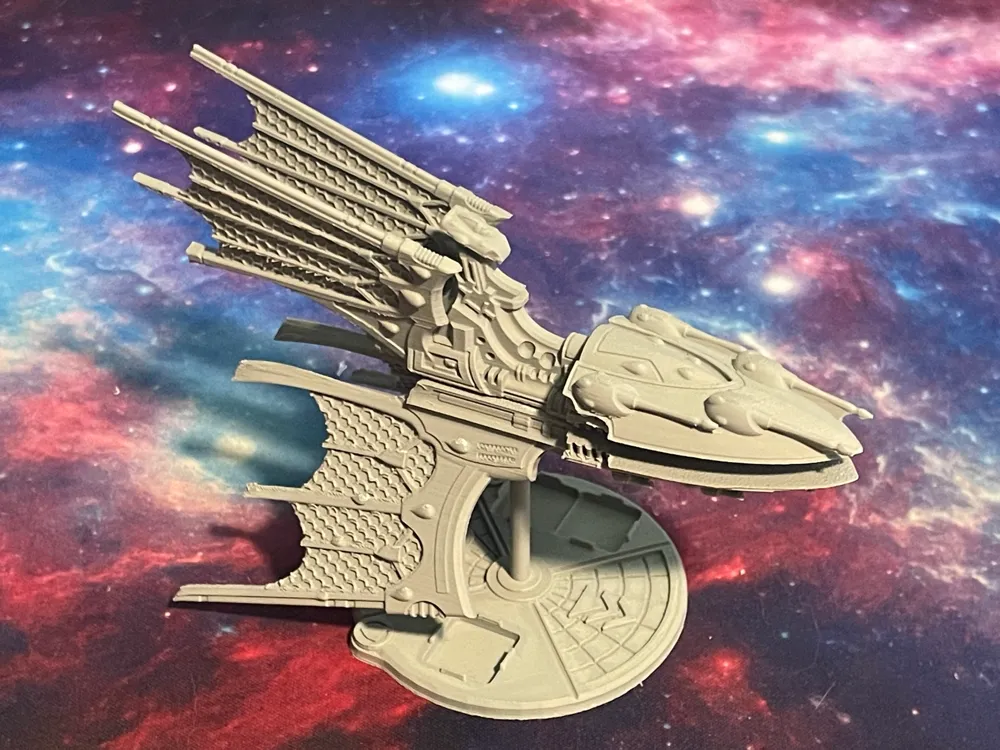
BFG Eldar Void Stalker Class Battleship

Remixed by

Print Profile(1)

All
A1 mini
X1E
P2S
P1P
X1 Carbon
H2C
A1
H2D Pro
H2D
P1S
H2S
X1
X2D
A2L

Void Stalker
Void Stalker
Designer
11.5 h
1 plate
5.0(1)

Open in Bambu Studio
Boost
18
63
9
1
27
10
Released 

Bill of Materials

Bambu Filaments
Select all
Gray (10103) / Filament with spool / 1kg

Description

Taken from Italianmoose's Elfdar Battleship Mk. 1b (https://cults3d.com/en/3d-model/game/eldar-battleship-mk-1b).


Print profiles have been built for Eldar Battleships as found in the BFG Remastered Fleets PDF, and the unofficial BFG:XR - Ships of the Xenos PDF. Check out my Eldar Battleships Collection for other battleship profiles.


Printed with the FDG Custom Bambu Studio Miniatures Profile using their 0.08mm Layer 0.2 Nozzle preset with auto Tree supports.


Bases in pics are by Minimalistix (https://www.thingiverse.com/thing:6551229).

Boost Me (for free)

Thanks for checking out my prints! Let me know how much you like this print with a free boost!

Comment & Rating (9)

(0/1000)

Boosted
Hi! I'm a big fan of your work and have printed many of your models. However, I’m running into a persistent issue with this specific file and the Eldar Battleship. One half of the print consistently turns into spaghetti.I’ve ruled out hardware issues by testing different build plates and filaments, and other models (like your Chaos and Imperial ships) print flawlessly. It seems like there might be a manifold issue or a support problem in the geometry of these two specific models. Could you please double-check the files?
(Edited)
The designer has replied
0
Reply
Hey sorry to hear you're having problems. Is it one particular part that's going spaghetti? Have you tried printing the problem part(s) separately on their own? Sometimes when I've had issues with other prints I've found that not doing it all in one hit reduces the chance of a failure.
0
Reply
I've checked my original files and downloaded this upload, and everything looks fine. There's no errors in the geometry reported by Bambu Studio and all the supports look correct when sliced.
0
Reply
Boosted
Replying to @ArcaneEternal :
Thanks for checking the file. I´ll try printing again with printing all parts separately. The Part that failed was always the main hull and always the right side of it turning into total spaghetti from very early on in the print while the other half of it printed just normal. I´ll give an update if printing separately helped.
0
Reply
Boosted
Print Profile
Void Stalker
Hey, I finally managed to print this after many, many unsuccessful tries! I was honestly starting to think my printer was faulty because nothing would stick to the build plate anymore. However, when I tried printing something else, everything worked perfectly. Then I tried exporting the model as an STL from your .3mf file and importing it into a clean, new project—and bam, it worked flawlessly! As far as I can tell, there must be some custom G-code in your .3mf file that modifies the Z-offset and sets it slightly too high. I don't have any other explanation for why everything fails using the downloaded file. Even if I added a new plate to that specific project and tried to print a simple cube, it wouldn't stick. The exact same models in a fresh, clean project work without any issues. Maybe you could check and update the model with a fresh .3mf file that doesn't contain any accidental custom machine code? Thanks!
The profile uploader has replied
0
Reply
Hey, that's probably it - my later uploads all use the custom printer and filament presets by FatDragonGames (which I do link in the description), but I don't know why the Z-offset would change - I've had a quick look over their printer g-code and couldn't see anything that suggests a Z-offset adjustment. Thanks for flagging it though - if I get around to it I'll throw up some profiles for my later uploads with default printer settings.
0
Reply
Having said that - and I've just checked this by starting a new upload - MakerWorld says it strips any modified Machine G-Code in an upload, and Bambu Handy App resets them to system defaults when it's sent to print. So I'm still not sure why that's happened!
0
Reply
Boosted
Replying to @ArcaneEternal :
Maybe that's a new thing. I downloaded the file some time ago and I remember that when I first opened it, it showed a pop-up about custom G-code. When I opened it again, the pop-up didn't appear, but based on my results, the custom code still seems to be there. At least, I don't have any other explanation for why nothing sticks to the print bed when printed from this 3mf file, while everything works perfectly fine if it's exported and put into a new project.
0
Reply
No more