
Itachi Uchiha HueForge Wall Art AMS – Naruto Anime
Print Profile(2)

Description
English
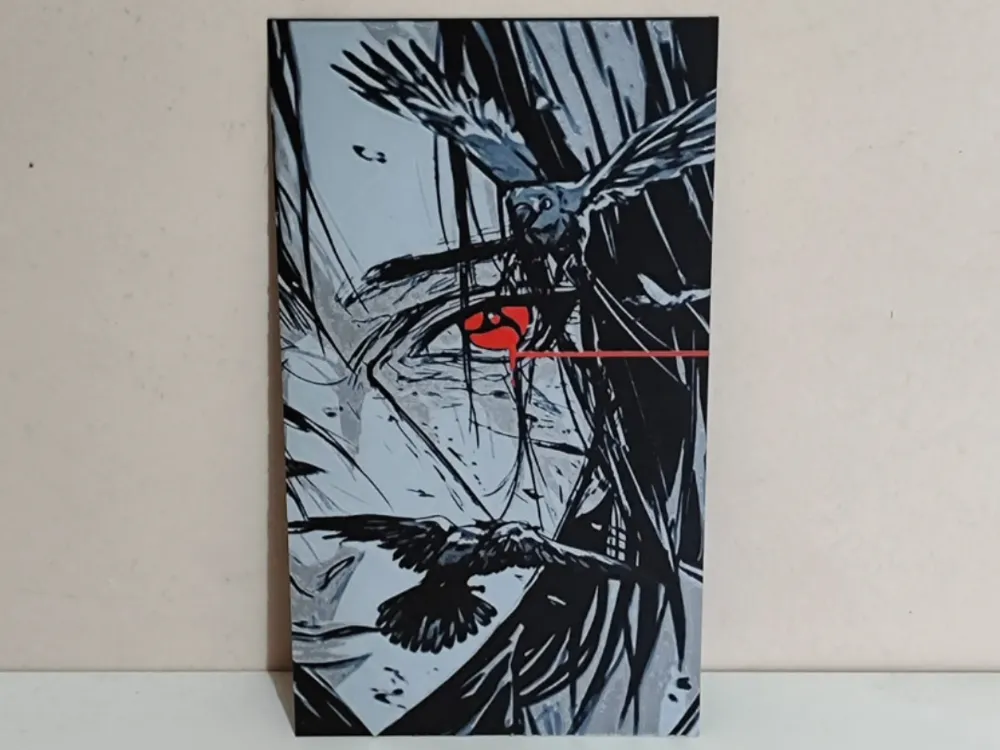
Dark and high-contrast HueForge wall art inspired by Itachi Uchiha from Naruto.
Designed for multicolor 3D printing with strong depth, shadows, and a striking red Sharingan accent.
Includes two versions: borderless and with border, allowing you to choose the style that best fits your display.
Personal use only. Non-commercial fan-made artwork.
Spanish
Dark and high-contrast HueForge wall art inspired by Itachi Uchiha from Naruto.
Designed for multicolor 3D printing, with great depth, strong shadows and the iconic red Sharingan.
Includes two versions: borderless and with border, so you can choose the one that best suits your display.
Personal use only. Non-commercial fan-made artwork.
* DESCRIPCIÓN SIN BORDE / BORDERLESS *
English
Print at 100% infill with a layer height of 0.08mm with a base layer of 0.16mm
The Model is 112.67x200mm in size
You may print at higher layer heights below the Base Thickness of 0.48mm
The Max allowed Thickness is 2.24mm and the Actual Thickness is 2.24mm
#080a0d PLA PolyLite Black Transmission Distance: 0.3
#4c5f71 PLA BambuLab Basic Blue Gray Transmission Distance: 3
#a6a9aa PLA BambuLab Basic Silver Transmission Distance: 0.5
#e2dedb PLA PolyLite White Transmission Distance: 5
#c00d1e PLA BambuLab Basic Red Transmission Distance: 4
This print uses 5 unique filaments
Swap Instructions:
- Start with Black
- At layer #9 (0.8mm) swap to Blue Gray
- At layer #14 (1.2mm) swap to Silver
- At layer #17 (1.44mm) swap to White
- At layer #20 (1.68mm) swap to Red for the rest
Spanish
Print at 100% infill with a layer height of 0.08 mm and a base layer of 0.16 mm
The model is 112.67 × 200 mm in size
You can print at higher layer heights below the base thickness of 0.48 mm
The maximum allowed thickness is 2.24 mm and the actual thickness is 2.24 mm
#080a0d PLA PolyLite Black Transmission Distance: 0.3
#4c5f71 PLA BambuLab Basic Blue Gray Transmission Distance: 3
#a6a9aa PLA BambuLab Basic Silver Transmission Distance: 0.5
#e2dedb PLA PolyLite White Transmission Distance: 5
#c00d1e PLA BambuLab Basic Red Transmission Distance: 4
This print uses 5 unique filaments
Swap Instructions:
- Start with Black
- At layer #9 (0.8 mm) swap to Blue Gray
- At layer #14 (1.2 mm) swap to Silver
- At layer #17 (1.44 mm) swap to White
- At layer #20 (1.68 mm) swap to Red for the rest
* DESCRIPCIÓN CON BORDE / WITH BORDER *
English
Print at 100% infill with a layer height of 0.08mm with a base layer of 0.16mm
The Model is 112.67x200mm in size
You may print at higher layer heights below the Base Thickness of 0.48mm
The Max allowed Thickness is 2.24mm and the Actual Thickness is 2.24mm
#080a0d PLA PolyLite Black Transmission Distance: 0.3
#4c5f71 PLA BambuLab Basic Blue Gray Transmission Distance: 3
#a6a9aa PLA BambuLab Basic Silver Transmission Distance: 0.5
#e2dedb PLA PolyLite White Transmission Distance: 5
#c00d1e PLA BambuLab Basic Red Transmission Distance: 4
This print uses 5 unique filaments
Swap Instructions:
- Start with Black
- At layer #9 (0.8mm) swap to Blue Gray
- At layer #14 (1.2mm) swap to Silver
- At layer #17 (1.44mm) swap to White
Border Only Colors from here until the end.
- At layer #20 (1.68mm) swap to Red for the rest
Spanish
Print at 100% infill with a layer height of 0.08 mm and a base layer of 0.16 mm
The model is 112.67 × 200 mm in size
You can print at higher layer heights below the base thickness of 0.48 mm
The maximum allowed thickness is 2.24 mm and the actual thickness is 2.24 mm
#080a0d PLA PolyLite Black Transmission Distance: 0.3
#4c5f71 PLA BambuLab Basic Blue Gray Transmission Distance: 3
#a6a9aa PLA BambuLab Basic Silver Transmission Distance: 0.5
#e2dedb PLA PolyLite White Transmission Distance: 5
#c00d1e PLA BambuLab Basic Red Transmission Distance: 4
This print uses 5 unique filaments
Swap Instructions:
- Start with Black
- At layer #9 (0.8 mm) swap to Blue Gray
- At layer #14 (1.2 mm) swap to Silver
- At layer #17 (1.44 mm) swap to White
Border Only Colors from here until the end.
- At layer #20 (1.68 mm) swap to Red for the rest
⚠️ IMPORTANTE / IMPORTANT
To print with more than 4 colors, it is necessary to change a filament spool mid-print,
for example, if black is used at the beginning and red at the end, once the black color finishes
printing, you must change to the red color for the print to be successful. It is possible to change it while
the model is printing. For this, it is necessary to select that the black and red colors will be obtained from the same
AMS position. This can be done with any color but must be done with care and attention to avoid
spoiling the print.
It is possible to change the border to any color you like, following the same process explained above.
To print with more than four colors, it is necessary to change a filament spool mid-print. For example, if black
is used at the beginning and red at the end, once the black section finishes, you must swap it for the red spool
to ensure a successful print.
It is possible to perform this swap while the model is printing. To do so, you must configure the software so that
both the black and red colors are pulled from the same AMS slot. This can be done with any color, but it must be
handled with care and attention to avoid ruining the print.
You can also change the border to any color you like by following the same process described above.
License

You shall not share, sub-license, sell, rent, host, transfer, or distribute in any way the digital or 3D printed versions of this object, nor any other derivative work of this object in its digital or physical format (including - but not limited to - remixes of this object, and hosting on other digital platforms). The objects may not be used without permission in any way whatsoever in which you charge money, or collect fees.


Comment & Rating (0)