Search models, users, collections, and posts


Center Point Finder

GIF

Print Profile(1)

All
A1
H2S
P1P
P2S
H2D
X1
A1 mini
X1 Carbon
X1E
P1S
H2D Pro
H2C
X2D
A2L

0.2mm layer, 2 walls, 15% infill
Designer
1.9 h
1 plate
4.7(26)

Open in Bambu Studio
Boost
477
1487
66
35
474
289
Released 

Description

Congratulations on finally discovering FunOrNothing :)


This model is a completely new, innovative Center point finder.
 

(But then I found out that there was a similar commercial product after I posted this.)


Conventionally, to find the center point of a circular cross-section, a centerline finder was used to mark at least two centerlines, and then the intersection of those lines was used to determine the center point.

However, this method can incur errors depending on the type of tool or marker (writing instrument) used.


This device accurately locates the center point of a circular cross-section with a single use (measuring range: 15 mm to 130 mm in diameter).

 

Another thing is that this device can instantly find the center point of any cross-section that is symmetrical about both the x-axis and y-axis, such as a circle, a square, or a hexagon.
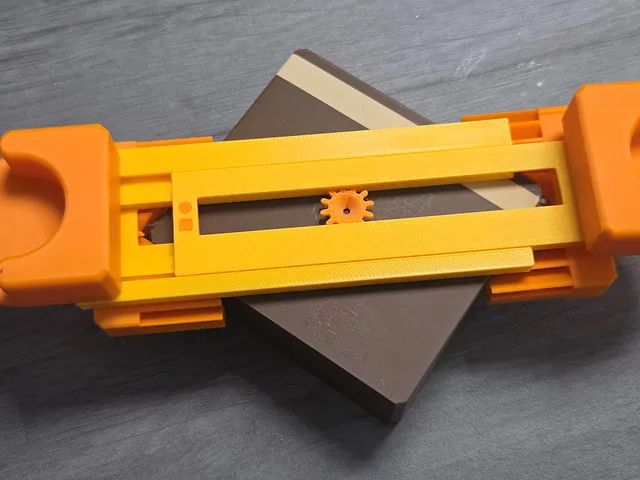
 

It can also be used to find the center of a side of a piece of lumber with both edges parallel.
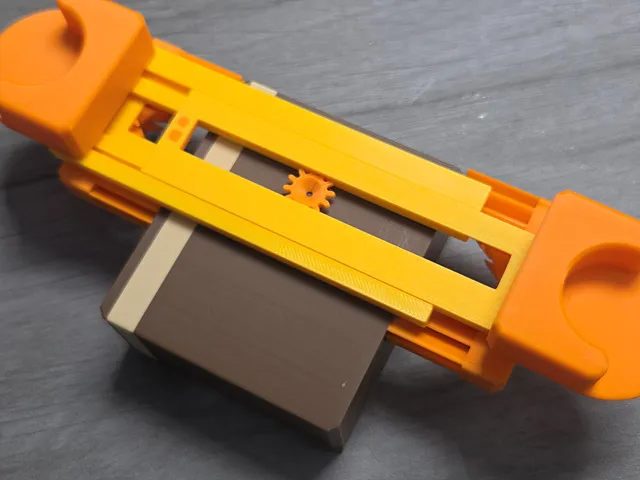
 

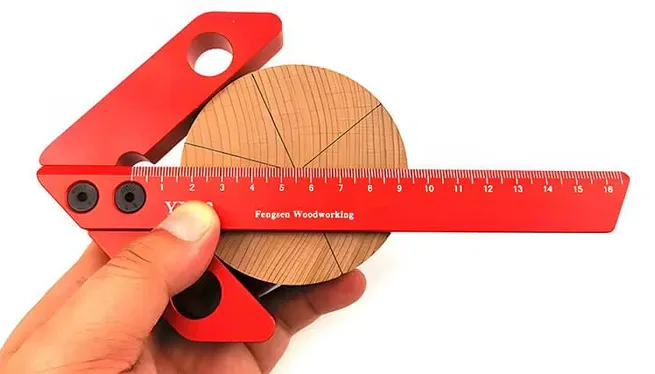
After I made this and showed it to people, someone told me there was a similar product, so I looked it up.

https://bridgecitytools.com/products/cs-3-centerscribe?keyword=CENTER

It was both bad news and good news for me that a device similar to my design was available as a commercial product.
It was bad news that my design wasn't the first, but it was good news that there was at least a demand for such a device.
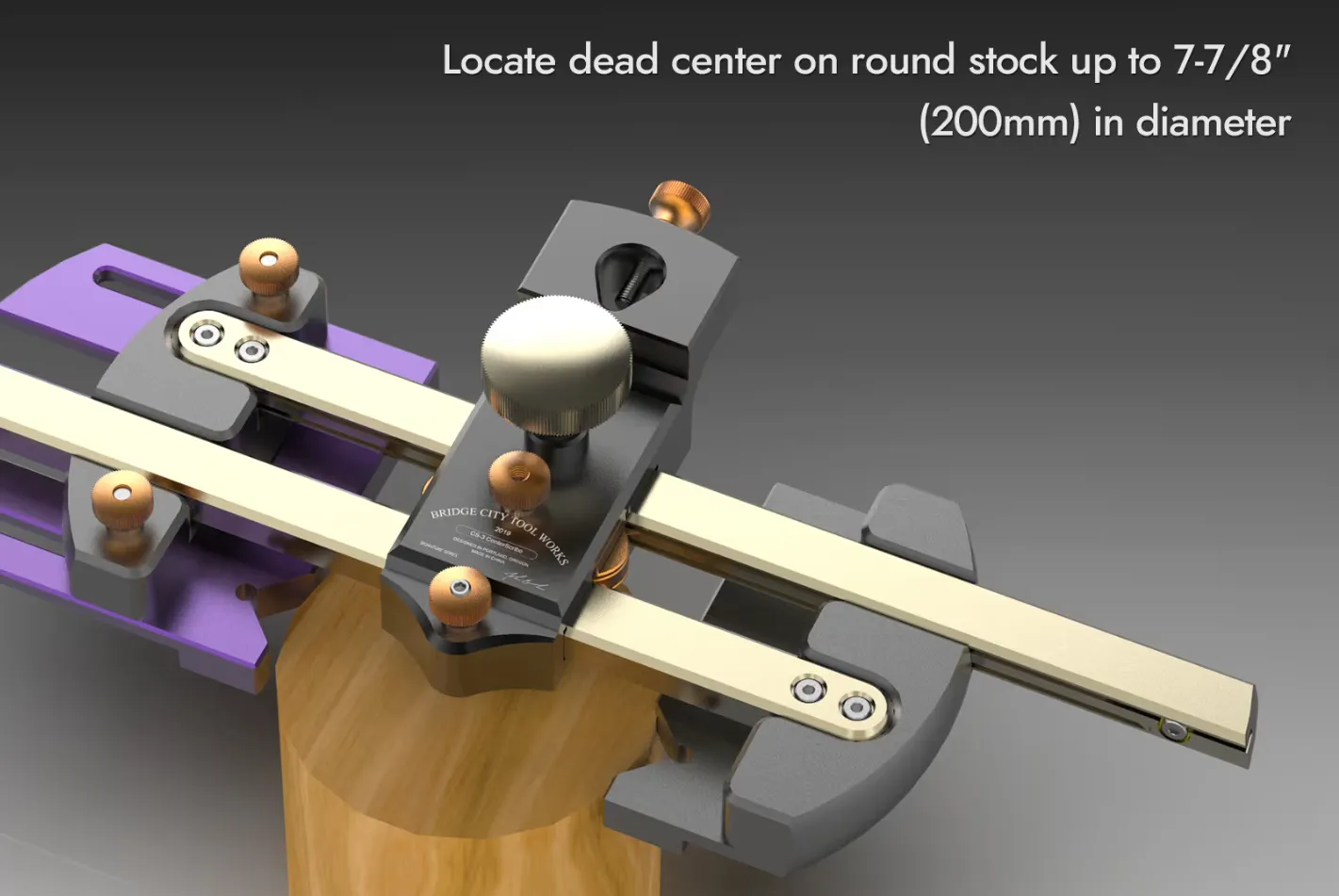
If you have the money, this product looks good.
But we can afford to buy a printer, but we can't afford to buy these tools. :)


Boost Me (for free)

Your boost helps me spend more time creating better designs. And don’t forget to check my other models — you might discover something useful! 😊

Assembly method


  1. Position the gear between the two rails and assemble by simultaneously pushing the rails toward the center from both sides.
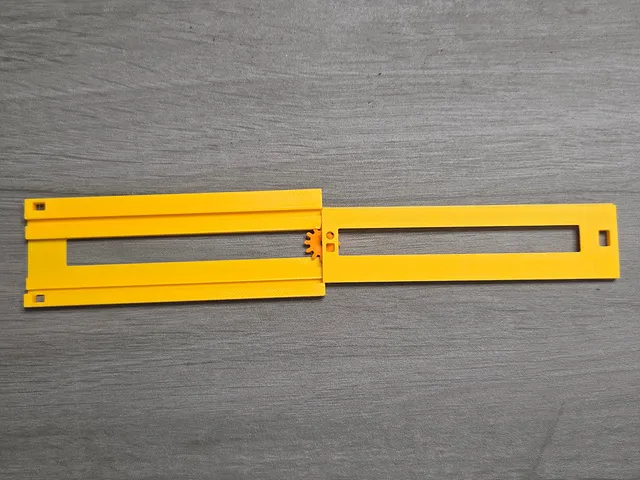

 

2. Assemble measuring plate A.
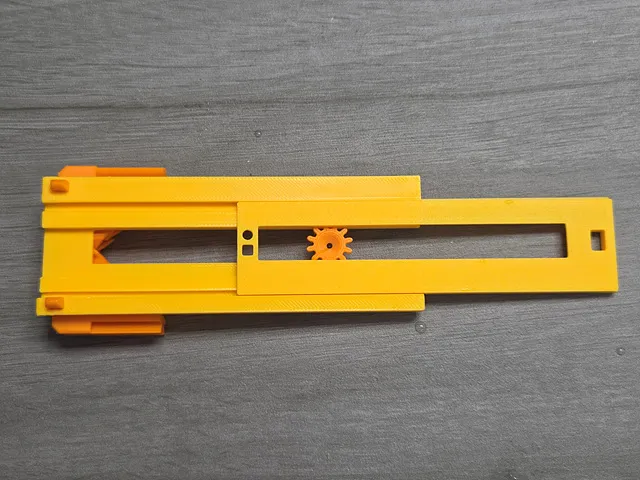
 

3. Assemble Handle A. (We recommend using adhesive. When using adhesive, be careful not to get it on the sliding area.)
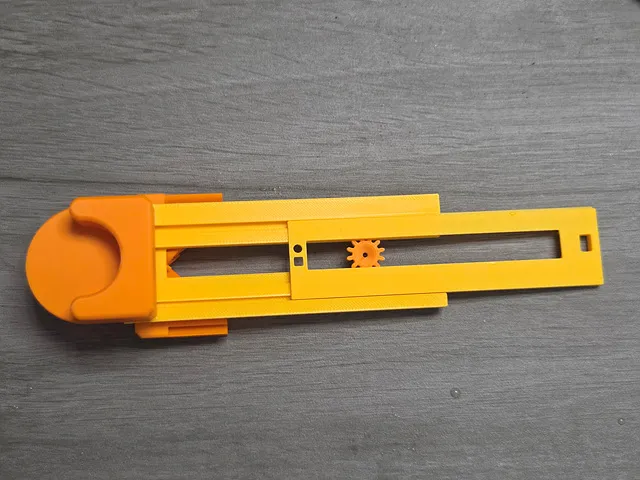
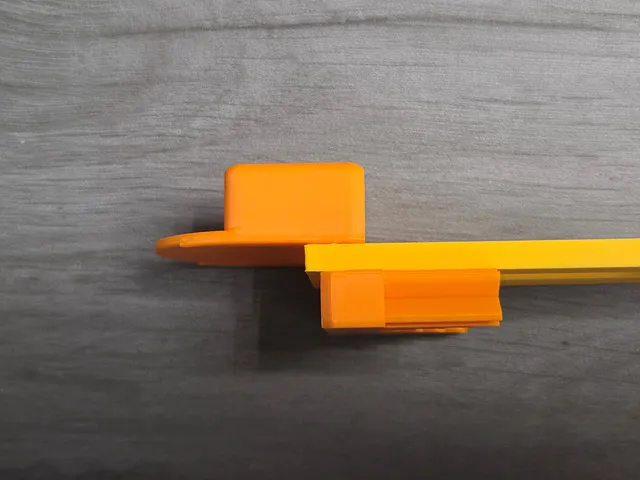
 

4. Insert measuring plate B.
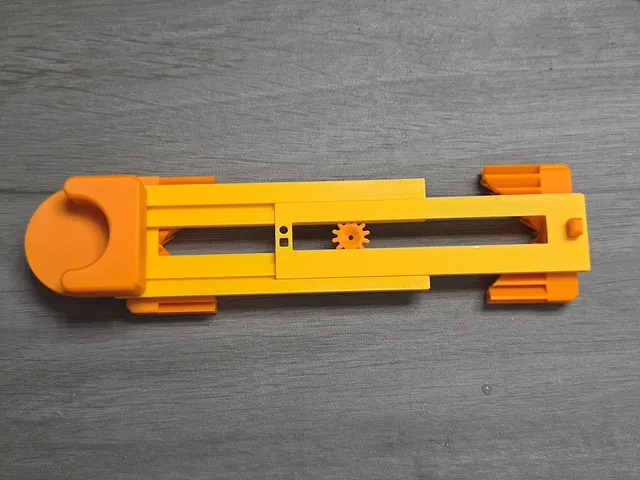
 

5. Assemble handle B. (Using adhesive is recommended.)
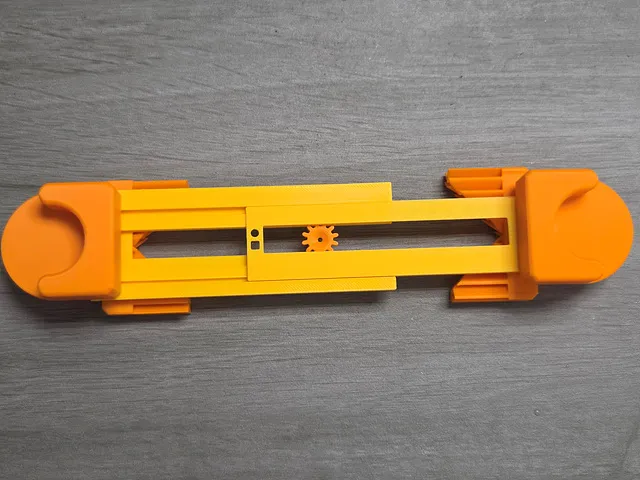
 

6. After the adhesive used in the above step has dried sufficiently, turn the device over and push it from both sides to make it look like the picture below.
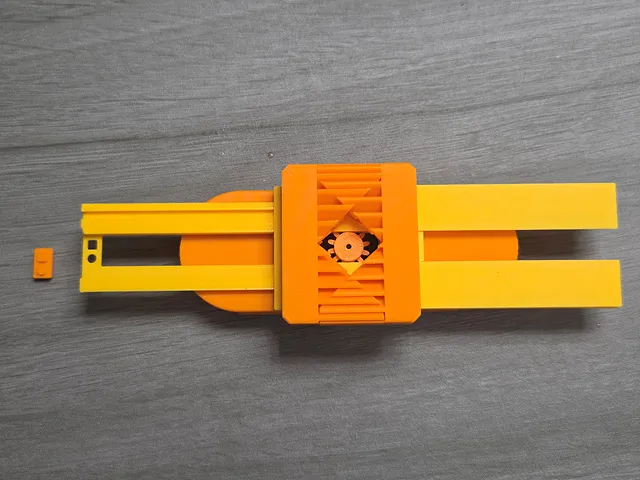
 

7. Assemble the anti-separation block as shown in the photo. (Use adhesive.)
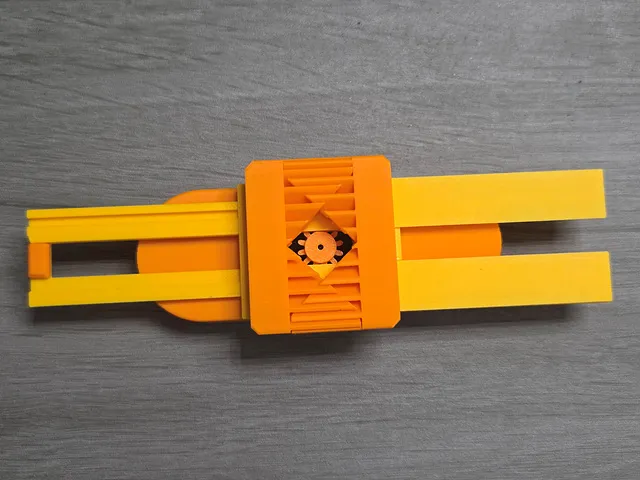
 

Congratulations, your assembly is complete.


Hope you Enjoy this model.

As always, I welcome your feedback.


Click to Check out FunOrNothing's interesting designs.

Boost Me (for free)

Your boost helps me spend more time creating better designs. And don’t forget to check my other models — you might discover something useful! 😊

Membership

The best way to support my work is to join the FON membership. You can be my Supporter, Seller, or Partner. If you join the membership, you can communicate more closely with me through Discord.

Join


You can be a friend who encourages me by buying me a cup of coffee.
Comment & Rating (66)

(0/1000)

super cool idea, but wouldn’t this only find the center correctly if it was a perfect circle? practically anything will have imperfections, and I feel like that’s more error than the human error from the line method
The designer has replied
2
Reply
There is an error in your opinion. If it's not a perfect circle, there is no center point. For shapes like that, neither the center point by the centerline method nor the center point found by my device is the center point
Show original
2
Reply
wow. what a pointless comment? “Erhm. if I don’t have a circle, this center finder for circles won’t work” come on man. have some common sense. if it’s close to a circle, you’ll get close to the center. sorry to the designer of this model.
designer
4
Reply
shoot, i bet it still gets it pretty close. so rotate the tool 2 or 3 more times and draw a line between those
2
Reply
Boosted
Printed without issue. I fumbled a bit getting the gear to center, but got it. Works great. Thanks!
The designer has replied
designer
1
Reply
Thanks, congrat!! :)
0
Reply
oh, the handles are reversed
1
Reply
Boosted
Replying to @FunOrNothing :
Yep. you caught me
0
Reply
Boosted
awesome model. I'll use this regularly. Can you make a super-beefy model that will stand up to tool box storage? I'll be printing this again in ASA, but still not sure how long it will last in my work truck
The designer has replied
0
Reply
If you can describe the situation where it is mainly measured, I will think of a strong design accordingly
Show original
0
Reply
Boosted
Replying to @FunOrNothing :
It will mainly be used to mark the center of various square posts with a center punch. This will work perfect for it, I just think it will break in storage.
0
Reply
Replying to @Gilcher :
What is the approximate size of the square you usually deal with
Show original
0
Reply
Sweet, I often need center of thin pieces when doing wood working! Love this.
The designer has replied
designer
1
Reply
If you encounter any inconveniences while using it, please let us know, and we will improve it in future models
Show original
0
Reply
Boosted
Print Profile
0.2mm layer, 2 walls, 15% infill
Printed great. I fumbled a bit centering the gear upon assembly, but got it. This is an old photo, I have reversed the cups as you pointed out. Thx.
The profile uploader has replied
profile
1
Reply
If you encounter any inconveniences while using it, please let us know, and we will improve it in future models
Show original
0
Reply
So cool and functional!
The designer has replied
0
Reply
Thanks for the picture.
0
Reply
Great Work!
The designer has replied
0
Reply
Thanks for the picture.
0
Reply
Boosted
Thank you for the great model.
0
Reply
Genius! good Work!
The designer has replied
1
Reply
Thanks. Why don't you share your print photo :)
0
Reply
Replying to @FunOrNothing :
I didn't print it, I just thought it was cool
0
Reply
Replying to @Revolver3D :
Haha :)
0
Reply
Boosted
Print Profile
0.2mm layer, 2 walls, 15% infill
You are a genius!!
The profile uploader has replied
0
Reply
haha, I'm not, but Thanks. :)
0
Reply
Boosted
I have been looking for something like this for months and it is extremely accurate, so own it! 🤣
(Edited)
profile
1
Reply

License

If you want to use this model commercially, please join my membership.
Join Now
This user content is licensed under a Standard Digital File License.

You shall not share, sub-license, sell, rent, host, transfer, or distribute in any way the digital or 3D printed versions of this object, nor any other derivative work of this object in its digital or physical format (including - but not limited to - remixes of this object, and hosting on other digital platforms). The objects may not be used without permission in any way whatsoever in which you charge money, or collect fees.