
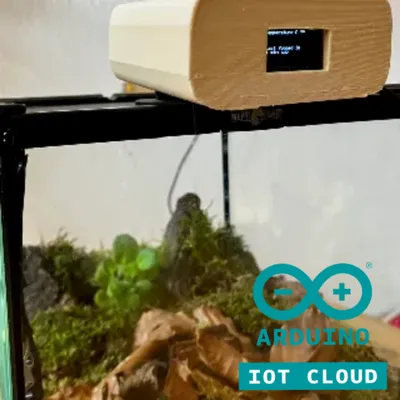
Automatic fogger with ventilator and wifi




Print Profile(0)
Description
Introduction
So first of all I would like to stress out the fact that I'm actually fifteen and this is one of my first big projects. This was very good experience for me and without printer i wouldn't be able to achieve that. I wanted to make automatic fogger for my cubaris panda kings and armadilidium vulgare isopods because isopods are very sensitive to humidity, temperature air quality. Wrong conditions can cause death to whole colony and since it's very hard to keep the same conditions all the time manually, why not make it automatic?
Note: the fogger is ultrasonic atomizer and some species of toad can hear/communicate ultrasonic waves and it can be dangerous for them. So I wouldn't use this device for these animals.
Also i highly recommend using higher humidity because plants and moss in terraium dont absorb humidity that much with this method so at least 85% im using 90%
And also update code frequently and i dont really write it down because changes arent big but there are many of them , so be sure to have latest update
13.4 Cloud update - I have found out that arduino developed their own cloud and is very easy to configure with my projects so I added updated code
idk bigger tank update - water can last up to month
I also made some small desktop aplication that collects data from cloud and prints them on graph. Here's link to my github:
https://github.com/weingartmia/terrarium_api
What does it do
- Measures humidity and temperature and prints it on oled display
- Turns on fogger when is humidity too low
- Prints last time when was fogger turned on
- Prints message if the fogger isn't working
- Keeps ventilating terrarium all the time
- In case there's a problem reading from DHT11/DHT22 fogger will turn on fully automatic mode. It will bee visible on oled
- Prints time when will fogger turn on (in case of fully automatic mode)
- You can control fogging in real time with arduino cloud
Software
I made standart version code on arduino ide 2.3, updated cloud version is in files. Note that each version uses diffrent sensor libraries ( dht11 later dht22)
Components
Since arduino nano doesn't have enough gnd and vcc pins I had to use digital pins instead but it's safe even though digital pins have lower current. Fogger must be powered via transistor and with 5V suply and current smaller then 0.5A because arduino can't generate such a high current, so some soldering is needed. Vin pin can be used as output for ventilator.
Hardware
| Material | Number |
| sensor | dht11/dht22 |
| Fogger | STDZ-1810 |
| Oled display | SSD1306 128x64 |
| Transistor npn | S9013 |
| Ventilator | SAF 5V DC |
| 4-5 volts input | - |
| Arduino nano(without cloud) | A000005 |
| Arduino esp32 or other esp32 device with wifi module (for arduino cloud) | esp-32 |
Other material
| Material | Amount |
| Sponge or cotton | 3-4 cm2 |
| Wires | 10-12 pieces |
| Solder | 1 |
| Solder materials | 5g |
| Flux | 1 |
| Tinned breadboard | 3-4 cm2 |
| Masking tape | 0.5 m |
Printing
Printed parts can be printed from most of non-flexible filament. I used Prusament woodfill and the quality of the print was slightly worse than regular PLA/ PET-G. I used infill 15% and standart temperature for nozzle 230 and heatbed 60 C for woodfill I used 195 C for nozzle.
The best printing for main box is rotating by 45 degrees in x axis and painting on supports. Box for oled display must be oriented downwards.
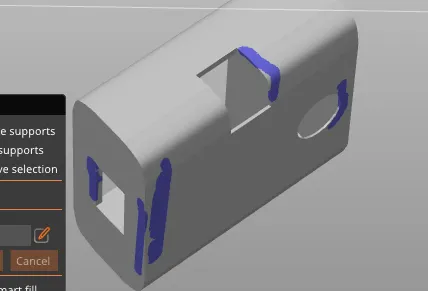
Best supports for this print are organic.
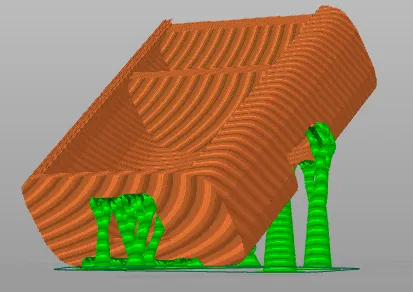
Other parts can be printed without supports
Final initialization
- Clean printed parts from supports
2. Glue fogger top to main box
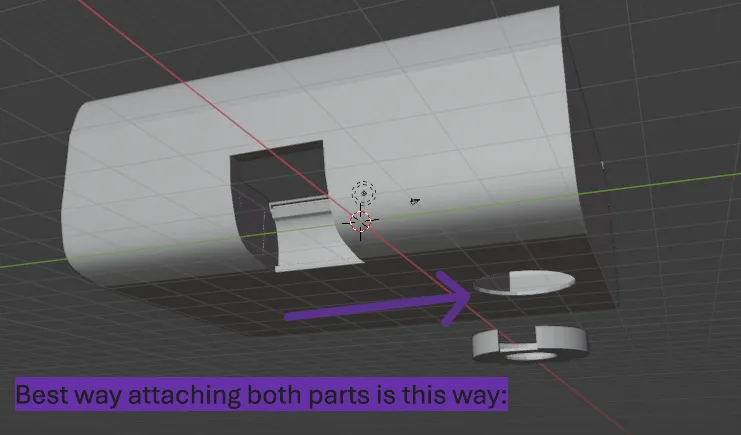
3. Solder transistor with wires and tinned breadboard (dremel/trim it to make it fit into the box)
4. Plug hardware together. Make sure it's same as in wiring diagram picture.
5. Upload the code to arduino. In case you dont want to use cloud upload normal version to arduino nano otherwise upload cloud code to wifi arduino (you need have to arduino cloud account i recommend using their documentation). Aply humidity level corresponding your needs.
6. Fit hardware into main box. Put fogger into fogger holder.
7. Strap sensor wires with masking tape.
8. Add water to container with cotton and plug into the electricity. Good job, now you can enjoy fogging
Fogger will use water from wet cotton/sponge that is in seperate container next to hardware. Lit will protect components from high humidity that is in cotton
License



Comment & Rating (0)