
Running shoe keychain (Nike)


Print Profile(2)


Description
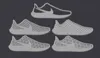
A simple keychain of a running shoe. Modeled using a picture of the Nike Air Zoom Pegasus
Here is a similar model of a Saucony and Adidas running shoe that I made.
Slicer instructions:
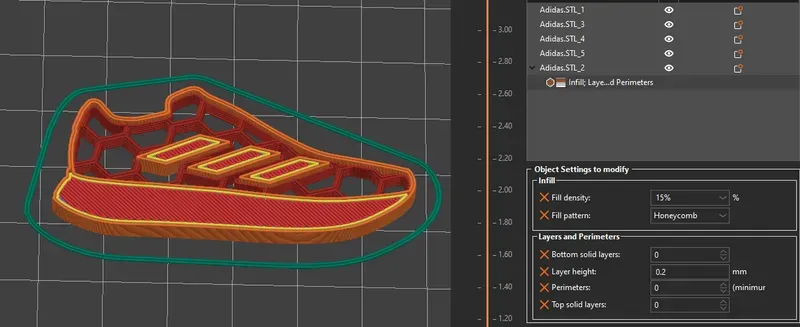
The STL has 5 different parts (bodies). You can customize the slicing of each part, but I would recommend changing the one I used like this:
PrusaSlicer:
-Open the .3MF as a model.
-Now right click the correct part and click ‘Infill’ and ‘Layers and Perimeters’ at the bottom of the menu.
-You can now edit the object settings as seen in the bottom right of the picture below. Change the fill pattern and density to your own liking.
Cura:
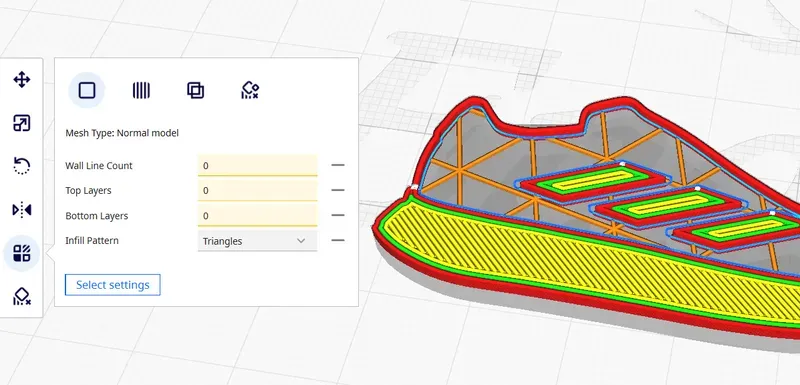
-Open the .3MF as a model.
-Click the area of the shoe that needs to be changed and select ‘Per Model Settings’ in the menu on the left.
-Click ‘Select settings’ and in the new window, select (at least) the four settings you see in the picture below. Change them all to 0 and select your favorite infill pattern.
Enjoy!
Boost Me (for free)
If you enjoyed this model, be sure to leave a boost 🚀🚀🚀 I really appreciate your support!
Hot search words 3D print model download STL A1 mini P1P P1S X1C P2S H2C H2D Carbon BambuLab Bambu Makerworld Printables model FDM
License



Comment & Rating (26)