Search models, users, collections, and posts

Bambu P2S WipeLogic – Custom G-Code for Start/End

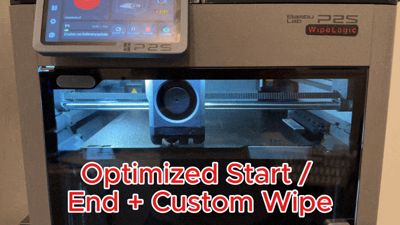
GIF

Print Profile(1)

All
P2S
X2D
A2L

Logo 0.2mm layer, 2 walls
Designer
14 min
1 plate

Open in Bambu Studio
Boost
52
182
38
7
166
2
Released 

Description

Designed with focus on fitment, print quality and everyday usability.

WipeLogic

To download the printer presets, click “Download STL/CAD file” in the download section.
The ZIP file contains the ready-to-use WipeLogic profiles.

See below for installation guide.


This G-Code is a targeted optimization of the start and end sequences for the Bambu P2S.
The focus is on a clean print start, improved nozzle cleaning, and a controlled print finish.

The printer’s heating and cooling strategy has been adjusted.
For example, the nozzle is heated to printing temperature only at the purge line, not already in the rear waste area. This significantly reduces stringing and oozing before the print starts.

The start G-Code includes a manual nozzle cleaning mode.
The nozzle moves to the front and remains there for 12 seconds, allowing manual cleaning with a brush before each print, if required.

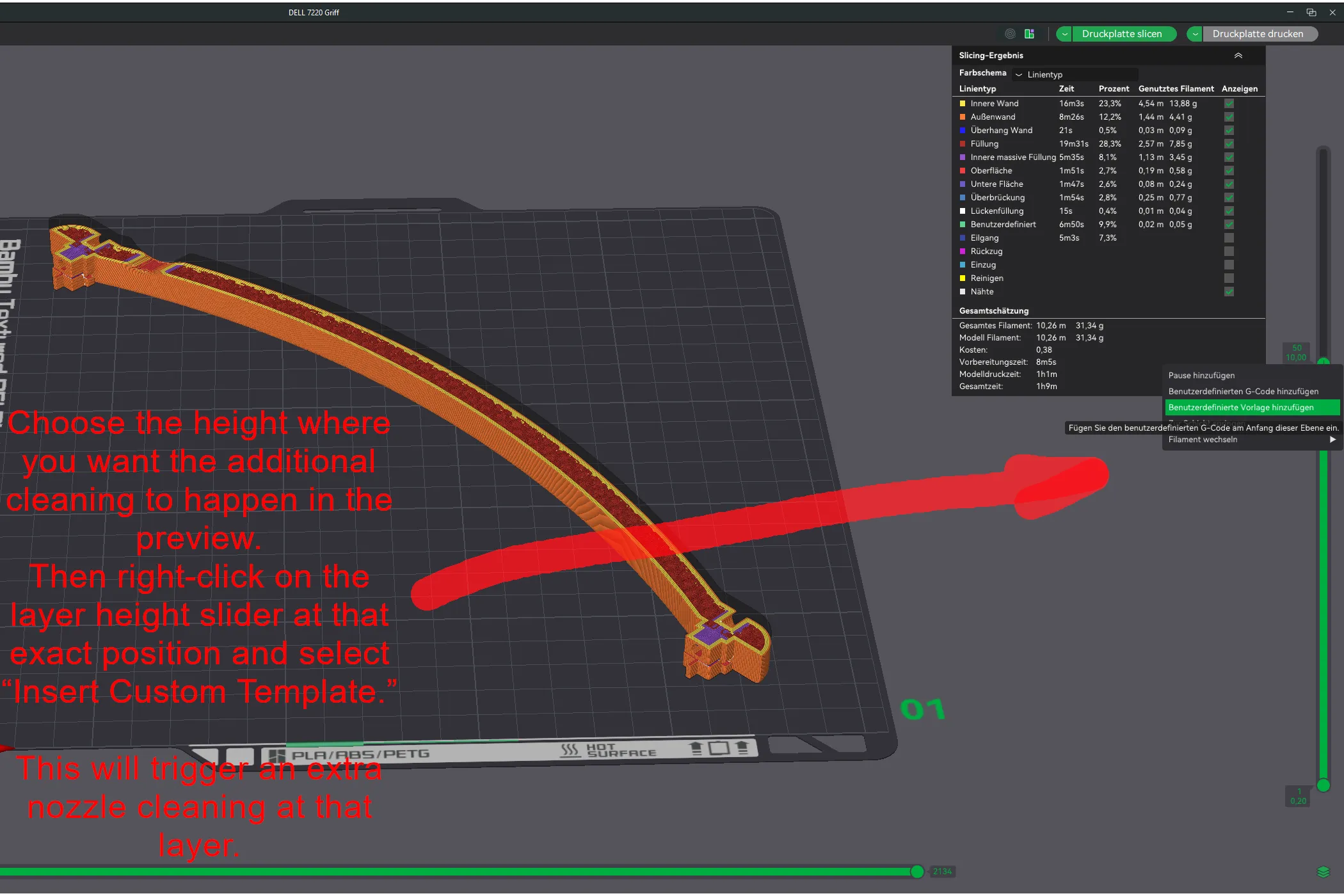

Additionally, a custom G-Code is included that can be inserted via right-click on the layer height slider in the slicer as a custom template.
This allows a targeted additional wipe operation to be triggered at any freely selectable layer height, enabling nozzle cleaning during the print when needed.

The end sequence is also optimized and ensures a clean finishing movement with improved nozzle cleaning at the end of the print.

By default, the vibration mechanism is disabled to avoid unnecessary noise.



Front start position for clean priming


Custom wipe at any layer with one Click


The nozzle pauses at the front for 12 seconds, allowing quick manual cleaning before the print starts.
 

Features Overview

  • Optimized start and end G-Code
  • Adjusted heating and cooling strategy
  • Reduced stringing before print start
  • Optional Manual nozzle cleaning mode (12 seconds)
  • Custom G-Code for additional wipe at a freely selectable layer height
  • Optimized end sequence (controlled cooling and wiping so the next print starts clean)
  • Vibration mechanism disabled by default (noise reduction)
  • Multiple functions switchable via G-Code annotations
  • Included presets for 0.2 / 0.4 / 0.6 / 0.8 mm nozzle sizes


G-Code Annotations & Function Control

Certain functions can be enabled or disabled via annotations in the G-Code.
Currently supported functions are:

  • VIBRATION_MECH_TEST
  • PRINTER_START_END_SOUND
  • MANUAL_NOZZLE_CLEAN_MOVE

A function is disabled by placing a semicolon (;) in front of the corresponding line.

Important:
Function names must appear exactly as shown in the G-Code:

  • No spaces
  • No changes in upper/lower case

Any deviation will cause the function to not be recognized and therefore remain disabled.

Example:


;VIBRATION_MECH_TEST    (disabled) VIBRATION_MECH_TEST     (enabled, correct) vIBRATION_MECH_TEST     (wrong, lowercase "v") VIBRATION_MECH_TEST    (wrong, leading or trailing space)


Installation & Usage

The G-Code is provided on MakerLab as a ZIP file.

  1. In the download section, click “Download STL/CAD file” to download the printer presets as .Zip .
  2. Extract the ZIP file on your desktop.
  3. Import the Printer presets you need in Bambu Studio / Orcaslicer. ( see pictures in presets folder )
  4. After import, you need to set your “WipeLogic – P2S ” printer profile in the top left corner.

BETA Notice & Disclaimer

This version is a BETA release and is under active development.
Changes to behavior and G-Code logic may occur at any time.

Feedback is explicitly welcome.
Suggestions for improvements as well as reports of errors or unexpected behavior are encouraged and will be considered for further development.

The G-Code directly affects the printer’s motion, heating, and control logic.
Usage is at your own risk.

I assume no liability for damage, crashes, or malfunctions to the printer or printed objects.


Boost Me (for free)

If you like the model and it works well for you, I’d really appreciate a boost or a rating. Thanks for the support and happy printing.


Comment & Rating (38)

(0/1000)

Trying to open the preset ZIP file for the but keep getting this error message saying the folder is empty/invalid? I have downloaded the STL/CAD file per instructions.
The designer has replied
0
Reply
It works for me with Winrar, I just tested it. You could try changing the file extension from ".zip" to ".rar". maybe that will work for unzipping.
Show original
0
Reply
Replying to @DG95 :
Cheers, extraction was successful after converting to .rar. Reminded me to reinstall 7-Zip which also worked. I will just note this here for others using Windows 11 extraction.
designer
1
Reply
Replying to @DG95 :
it does not work in Macos...
0
Reply
Boosted
I think it's very good, thank you. I can't figure out why it doesn't turn off the left fan after printing.
The designer has replied
designer
1
Reply
Thanks for the feedback. I’ve updated the end G-code so that the left fan is now explicitly turned off as well. My own P2S doesn’t have a left fan, which is why I didn’t notice the issue before. Download the new .ZIP and test it.
1
Reply
Boosted
Replying to @DG95 :
I tested it, it worked. Thank you! :-)
designer
1
Reply
Replying to @Geeo :
very good, I'm glad it works now 👍
Show original
0
Reply
Boosted
Hey do you happen to have programmed something for the X2D? ;) that would be awesome. I really enjoy using your optimization for the P2S
The designer has replied
Show original
0
Reply
I received my X2D today. I will look at it over the next few days to see if anything can be improved and possibly provide a Gcode for the X2D as well
Show original
2
Reply
Boosted
Replying to @DG95 :
that would be great. it definitely needs an adjustment. the order of cleaning and also the control line at the beginning need optimization
Show original
designer
1
Reply
Replying to @DaveGold :
X2D Code is Online
Show original
0
Reply
I will test it out soon. But I see this: "The nozzle moves to the front and remains there for 12 seconds, allowing manual cleaning with a brush before each print, if required." Isn't it better to do a few wipes if the print is done or between 230+c and 180 so it's clean to start with? Oh nevermind, I see that it's already included :P
(Edited)
The designer has replied
0
Reply
Yes, it is already built in. Manual cleaning is only optional in case there are filament residues on the nozzle and wiping did not remove them. After the print finishes, it always cools down to around 190 °C and then wipes again so that the next print starts clean.
0
Reply
Replying to @DG95 :
Yeah, it works really great. I don't even have to use any special wiper.
designer
1
Reply
Replying to @Hjalmar :
Glad to hear that you like it. I’d really appreciate a like or a boost.
0
Reply
brother i think bambu removed youre print profile
The designer has replied
2
Reply
I have added it again
Show original
0
Reply
I'm testing this profile for couple of days now, and must say, works perfect. Been doing small and large prints. Thank You for all the work and sharing ! Looking forward for more improvements :)
The designer has replied
designer
1
Reply
I'm really glad to hear that, that's exactly how it should be. Thank you for testing and for the feedback. This is extremely valuable to me, especially with different part sizes. I'll stick with it and will continue to optimize and further expand the profile (including additional nozzle sizes and fine-tuning individual parameters). If you notice anything else or have any suggestions for improvement, just let me know.
Show original
0
Reply
I think it's very good so far. However, I encountered the problem that I cannot select another nozzle size with this profile. Can someone tell me what I need to do for this?
The designer has replied
Show original
0
Reply
This is currently normal. The upload only contains the profile for the 0.4 mm nozzle so far. Therefore, you cannot select any other nozzle size. However, I will provide the missing variants and upload the profiles for 0.2 / 0.6 / 0.8 mm nozzles as well. After that, you can directly select the appropriate nozzle without the profile being reset.
Show original
0
Reply
Replying to @DG95 :
The new presets with all nozzle sizes have been uploaded and can now be downloaded
Show original
0
Reply
Nice! thank you very much! The start is going much better!
The designer has replied
Show original
designer
1
Reply
I am delighted you like it 👍
Show original
0
Reply
It has always worked flawlessly until recently I've been having problems with my first layer. It suddenly became rough and unclean. With the system preset, these problems then disappear
The designer has replied
Show original
0
Reply
That's strange. It still works perfectly for me. Even with the newer updates. You might need to recalibrate your printer completely. Especially after updates. Otherwise, you can fine-tune the nozzle distance to the print bed separately in the start code if you're having problems with it
Show original
0
Reply
Boosted
Super Preset, great job. Works really well !!
designer
1
Reply

License

This user content is licensed under a Standard Digital File License.

You shall not share, sub-license, sell, rent, host, transfer, or distribute in any way the digital or 3D printed versions of this object, nor any other derivative work of this object in its digital or physical format (including - but not limited to - remixes of this object, and hosting on other digital platforms). The objects may not be used without permission in any way whatsoever in which you charge money, or collect fees.