
Print Profile(1)

Description
Info:
Unfortunately Maker World limitations doesn't allow customizable scripts to import external stl files - so you have to run it locally on your own OpenSCAD software. Sorry for the inconvenience.
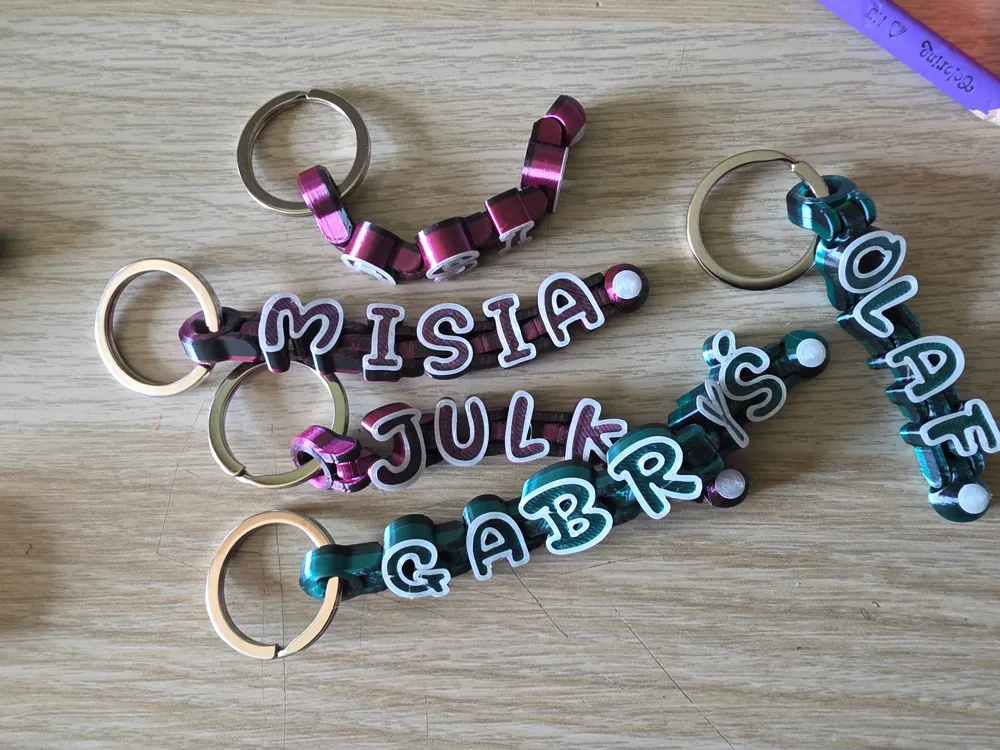
Create your flexible sign using only your slicer (or if you don't like manual work - there is OpenSCAD script that will do everything for you). This is my second version - all the letters have been redesigned and I've added numbers, special characters and Polish diacritics.
Manual way:
- Grab start piece, the letters you want, and end piece.
- (You can use attached profile and just copy the necessary letters from second plate to the first)
- Align roughly on a plate in your slicer.
- Zoom in a bit and carefully align each piece (small groves in pieces will help you in horizontal alignment).
- Don't worry if your precision is not great - there are some tolerances that will forgive you mistakes.
- After slicing swipe through the layers to ensure if there are no fused pieces or other displacement
- If everything is ok you can merge all the pieces into one - and then scale it if you want
- Add layer change if you want your letters to have color outlines.
- That's it - happy printing :)
OpenSCAD way:
- Open the script create.scad (all stl files must be in the same directory).
- Replace “TEST" string with your own (keep in mind that not all characters are covered, only capital letters, numbers ad some of the special characters are available).
- Hit preview button
 . If everything looks fine you can click render
  and then save as stl
  . '
. ' - After that you can import generated stl file to the slicer of your choice, add layer change or even paint the model.
- That's it - happy printing :)
Unfortunately Maker World limitations doesn't allow customizable scripts to import external stl files - so you have to run it locally on your own OpenSCAD software.
The keychains from preview are scaled down to 60%.
There is a Youtube video showing the manual way of assembly:
I used Drawliner Font by khurasan.d5849 - its free for personal and commercial use.
License



Comment & Rating (41)