Search models, users, collections, and posts

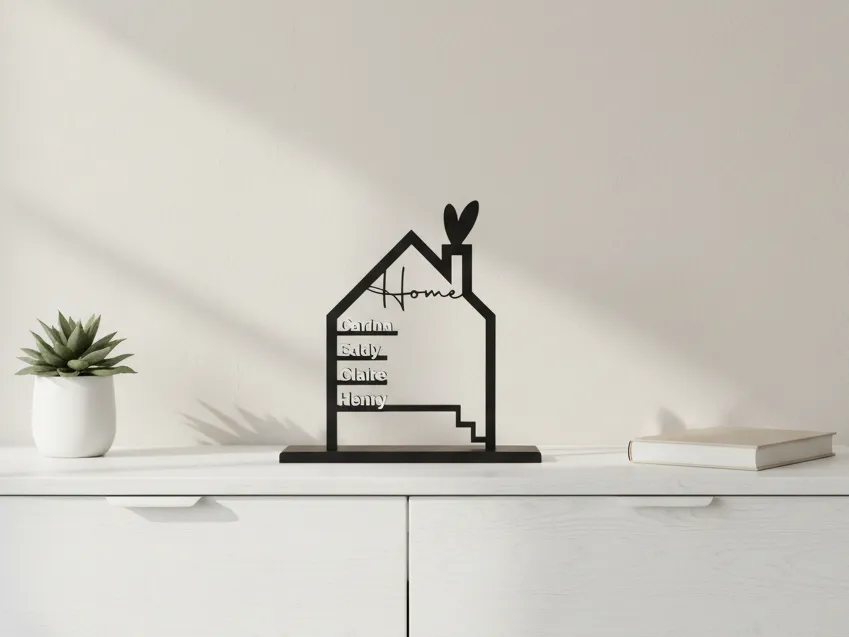
House Family Standee “Home” with Name Tags
IP Report

Print Profile(1)

All
X1 Carbon
H2D Pro
H2C
P1P
H2S
H2D
A1
X1E
X1
P1S
P2S
X2D
A2L

0.2mm layer, 2 walls, 15% infill
Designer
5.6 h
2 plates
4.8(37)

Open in Bambu Studio
Boost
631
2123
93
74
1.7 k
613
Released 

Bill of Materials

Bambu Filaments
Select all
Black (10101) / Filament with spool / 1kg
Jade White (10100) / Refill / 1kg

Description

Content has been automatically translated.
Show original

This 3D-printed model is a stylized house stand-up with the lettering "Home", serving as a decorative element for your home. Its special feature is the ability to individually attach multiple names – ideal for showcasing each family member or other important people. The design is perfect as a personalized gift, family decoration, or as an eye-catcher for the entryway, living room, or desk. Thanks to its timeless and modern look, it fits many interior styles and brings a personal touch to any home.


The names can be variably adjusted.


Up to 5 names can be added.


If anyone has questions, please feel free to ask them. If someone can't get it right, we can also discuss me providing it to them personalized.


Also check out Version 2, here is the link


Boost Me (for free)

Support my projects with a boost! Free for you, but a great help for me to realize new ideas and designs. If you like it: Follow me and give the model a like - that's also free for you - to give the project an extra push. Thank you!

Comment & Rating (93)

(0/1000)

Unfortunately, I have a faulty print on the plate. I have printed it twice and the same error has occurred both times. Does anyone have an idea what could be the problem
The designer has replied
Show original
0
Reply
Hi, that's strange... Does the problem always occur in the same place? If so, try printing the plate in a different position on the bed. I would also try reducing the print temperature for the filament by maybe 5-10°C
Show original
0
Reply
Replying to @LippertD :
Good evening, I have the same problem. I printed two plates and both looked equally bad. What exactly do you mean by reducing the printing temperature? Changing the filament settings? I have a P2S and print with SUNLU PLA+
Show original
0
Reply
Hi, that's exactly what I meant. just turn down the temperature of the hotend
Show original
0
Reply
Hello there, I am a complete beginner and I tried to change the names in Bambu Studio. I can manage that much, but then they sit in the middle of the lines and not on them. Is there a click to connect them or do I have to drag them as close as possible onto them? I have installed Fusion, but I need to get back to it to figure out how to create the lines and so on 😅
The designer has replied
Show original
4
Reply
Hi, here you can customize the little house
Show original
1
Reply
Replying to @LippertD :
Look here, you need to adjust the name variable. After that, enter the names and then click Generate
Show original
0
Reply
Replying to @LippertD :
@LippertD how do I put in 2 colors?
0
Reply
hoho great file How can I enter how many people I enter and how can I adjust it
The designer has replied
Show original
0
Reply
Hello Sabrina, look here (click Customize in the upper right corner)
Show original
0
Reply
Replying to @LippertD :
Thanks, but I don't get it with "Customize"
Show original
0
Reply
Is it possible that your browser is blocking pop-ups? Have you tried a different browser
Show original
0
Reply
Boosted
Wonderful idea, quickly printed souvenir. It would have been nice if I could have highlighted the names in a different color. But even in monochrome, very nice with matte filament
The designer has replied
Show original
0
Reply
Hi thanks for your feedback. Check out here, here I explained how to print the names in a different color. https://youtu.be/fzRnsBIb1xs
Show original
0
Reply
Boosted
Replying to @LippertD :
unfortunately it doesn't work. Thanks a lot for the update anyway. it might be a level too high for beginners
Show original
0
Reply
Nice idea! Is there also a template for the matching names as lettering
Show original
0
Reply
Thank you for your file and the video. Everything worked great and looks super! Printed with my H2D with PLA and PLA Marble. Unfortunately, I can't find it to rate it
The designer has replied
Show original
0
Reply
Hi, thanks for sharing your picture
Show original
0
Reply
Print Profile
0.2mm layer, 2 walls, 15% infill
Beautiful print result, great design! Printed with PLA
Show original
0
Reply
Print Profile
0.2mm layer, 2 walls, 15% infill
It took a while to get it right, but that's probably more on the user 🙈 thank you very much!
Show original
0
Reply
Boosted
How did you get it two-tone
The designer has replied
Show original
0
Reply
Hi, that's simple, you just need to change the last millimeter with a modifier in the slicer and then print it in a different color That's why the names also stand 1mm proud
Show original
1
Reply
Replying to @LippertD :
Can you add a few explinations on how to add a different colour to the text? (also the due tone) I'm not that expert with BambuStudio. Thank you.
0
Reply
Replying to @user_3067244569 :
Hi, check out this video on how to do it: https://youtu.be/fzRnsBIb1xs
Show original
0
Reply
The letters don't stick well, I don't know if it's because they are thin, the base printed well, I don't think it's a adhesion problem, any solutions?
The designer has replied
Show original
0
Reply
Hi, have you ever tried some 3D printer build plate glue
Show original
0
Reply
Replying to @LippertD :
No, the printer is new, I have done 2 prints
Show original
0
Reply
Replying to @AaronRoman :
So it could be due to many things, filament being too wet, printing speed being too high, etc
Show original
0
Reply
In the example pictures, a heart is used for the dot of the 'i' to make it printable. How do I achieve that? Sincerely
The designer has replied
Show original
1
Reply
Hello unfortunately this is not possible with the designer used in MakerWorld However you can download the STL model directly and edit it in Fusion 360 for example There you can add the names yourself I simply inserted the hearts as an SVG graphic placed them over the "i" and then extruded them If you cannot manage that at all you are welcome to send me the names and I will create the model for you Please note however that this may take 1-2 weeks as I am currently very busy with work Additionally Christmas time with family is also approaching :)
Show original
0
Reply

License

This user content is licensed under a Standard Digital File License.

You shall not share, sub-license, sell, rent, host, transfer, or distribute in any way the digital or 3D printed versions of this object, nor any other derivative work of this object in its digital or physical format (including - but not limited to - remixes of this object, and hosting on other digital platforms). The objects may not be used without permission in any way whatsoever in which you charge money, or collect fees.

