
Makita Battery Conversion for Flymo Hedge Trimmers
Print Profile(0)
Bill of Materials
- Small spring x 1: I got one out of my parts box, but maybe from a pen?
- Makita 643852 battery connector x 1: Either 3D print, or else buy from Ebay, Amazon, etc.
- 3x20mm woodscrews x 8: Used to hold the whole thing together - you could glue the layers instead, if you prefer
Description
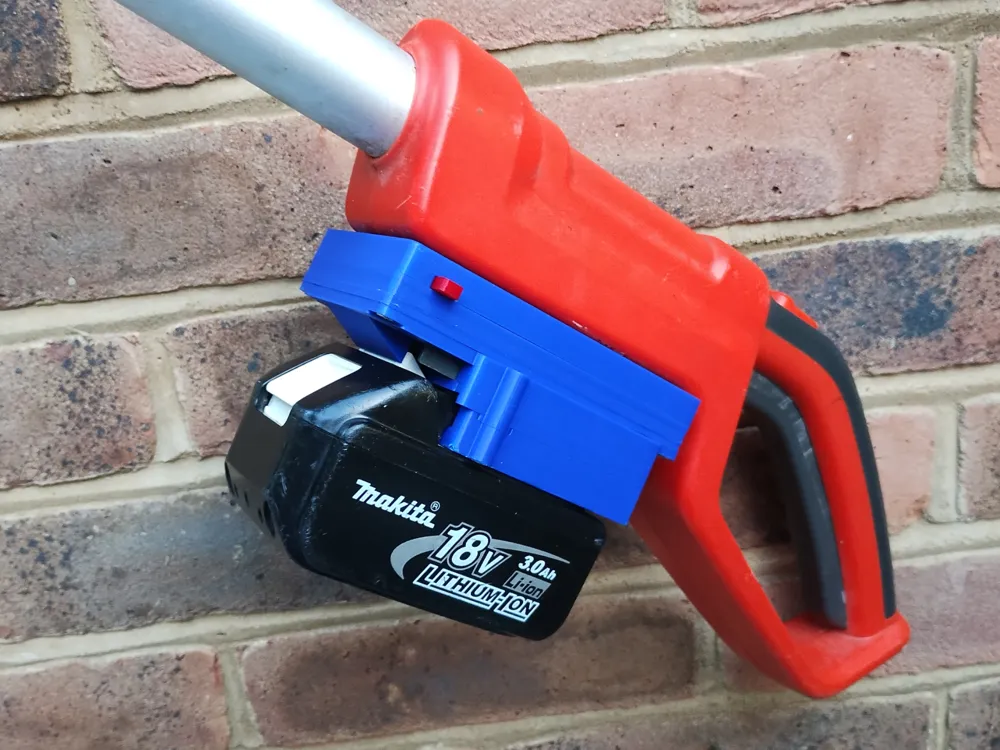
Forget your old Flymo NiMH battery and use a Makita battery instead! Convert “Flymo SabreCut XT Cordless Battery Telescopic Hedge Trimmer, 18 V” to use a Makita battery.
Flymo XT hedge trimmers are pretty cheap, but have an NiMH battery, which doesn't last. They don't even make replacements for it, so if you've got one of these trimmers, it's likely headed to the dustbin sooner or later. Not any more! With this simple conversion, you can use a Makita battery instead and best of all it keeps running at peak performance right up until the battery is empty. Honestly, the trimmers work like brand new, if not better. Makita batteries charge really fast (eg. 30 minutes, versus “all day” for the original Flymo), and the smallest Makita battery you can get is about twice the capacity of the Flymo, so you get loads of extra run time too.
The conversion requires a Makita battery connector (a little yellow piece of plastic, part number Makita 643852). It's possible to 3D print these, but you'd need to make some metal contacts for it. I found it easier to buy one (was £4.50, available on Amazon or Ebay). You'll also need a couple of spade connectors (or maybe just a soldering iron?), a little spring (perhaps from a pen?) and some 3x20mm wood screws.
I've written up a PDF to describe how to make this thing. You need the old connector from the Flymo battery, but then more or less just make a multi-layer sandwich of printed parts (this was to avoid printing overhangs, needing supports or anything else. Whilst there are a lot of parts, they print really easily (I just used standard PLA settings on my Bambu A1).
Documentation (1)
License



Comment & Rating (0)