Search models, users, collections, and posts

Carbon Fiber Print Settings
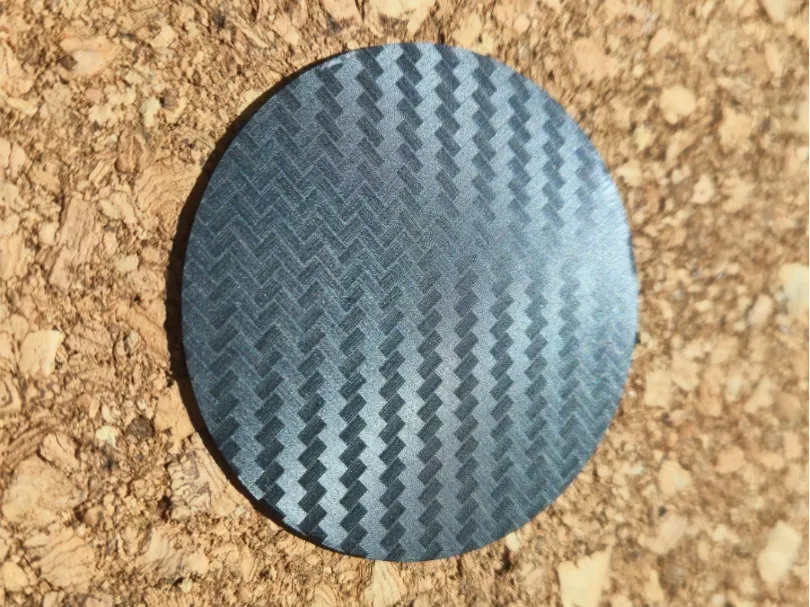
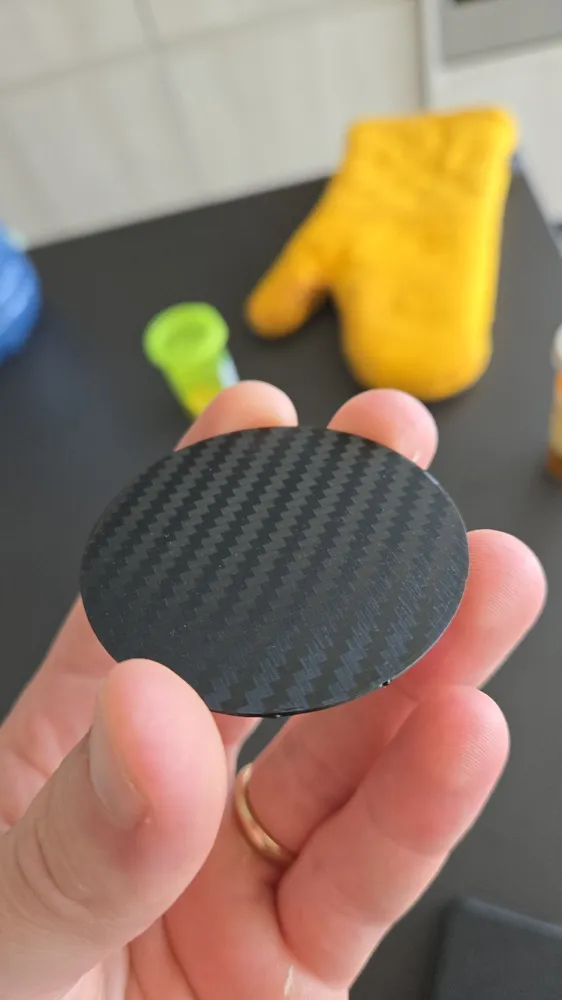
Print Profile(2)
All
A1
A1 mini
X1 Carbon
X1E
X1
P1P
H2D
P1S
H2D Pro
H2S
P2S
H2C
X2D
A2L

Carbon Fiber Effect
Carbon Fiber Effect
Designer
20 min
1 plate
4.8(64)

0.2mm layer, 2 walls, 100% infill
19 min
1 plate
5.0(10)

Open in Bambu Studio
Boost
638
1694
186
45
1.6 k
862
Released 

Description

PLEASE READ:

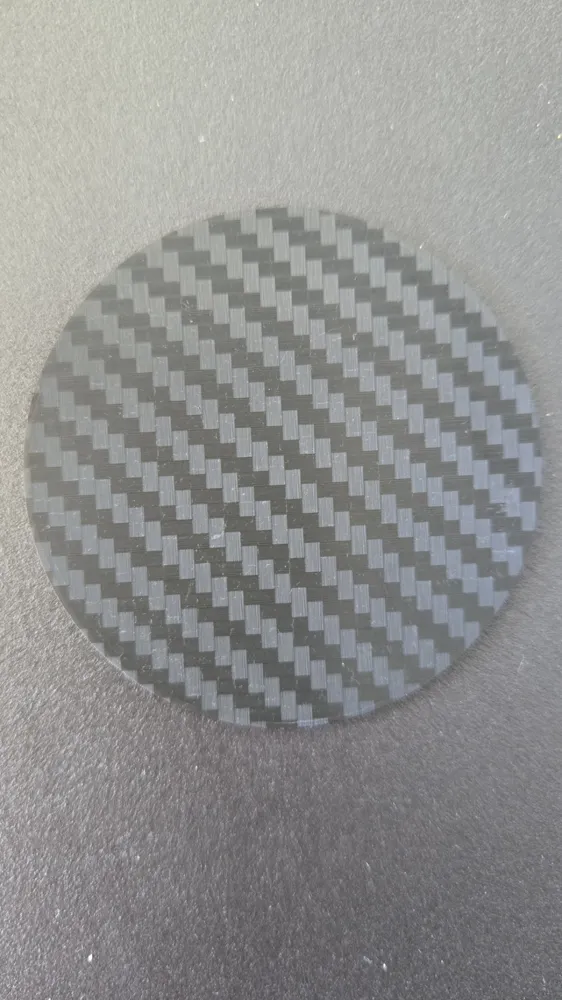
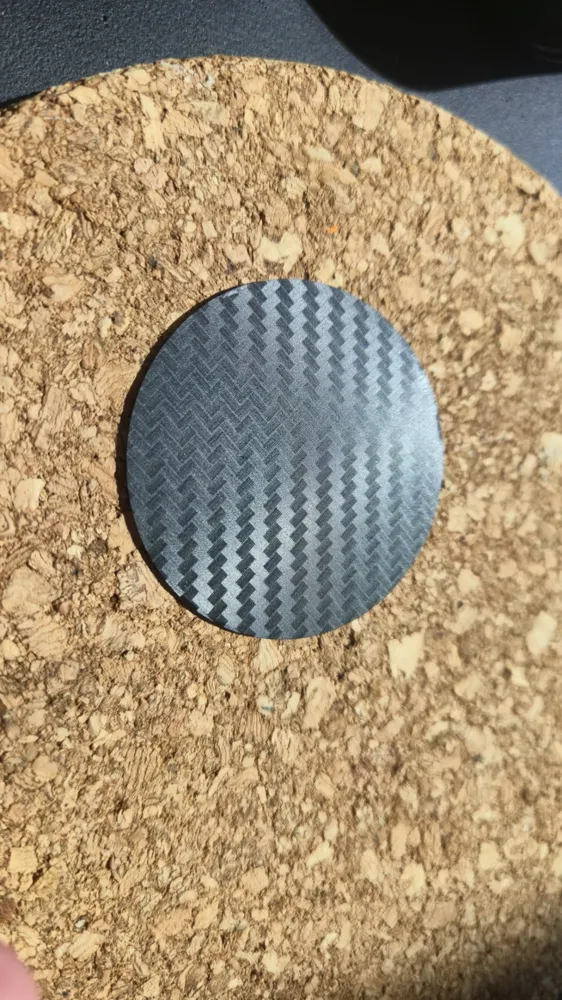
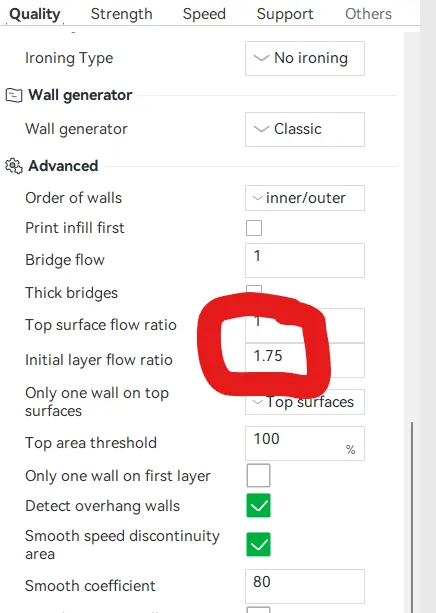
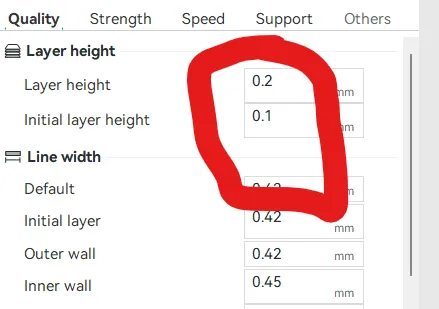
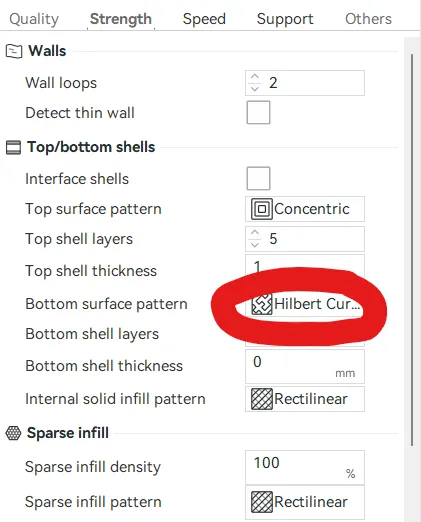
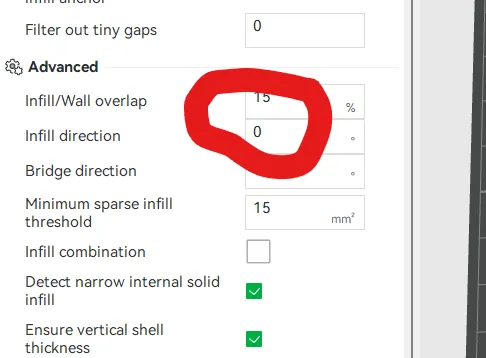
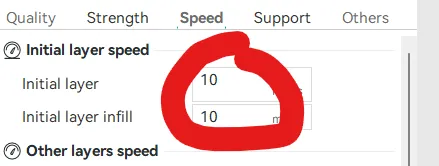
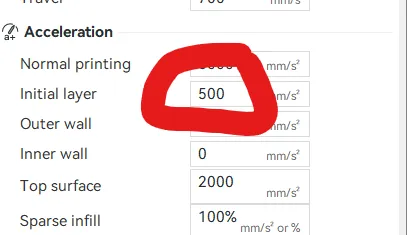
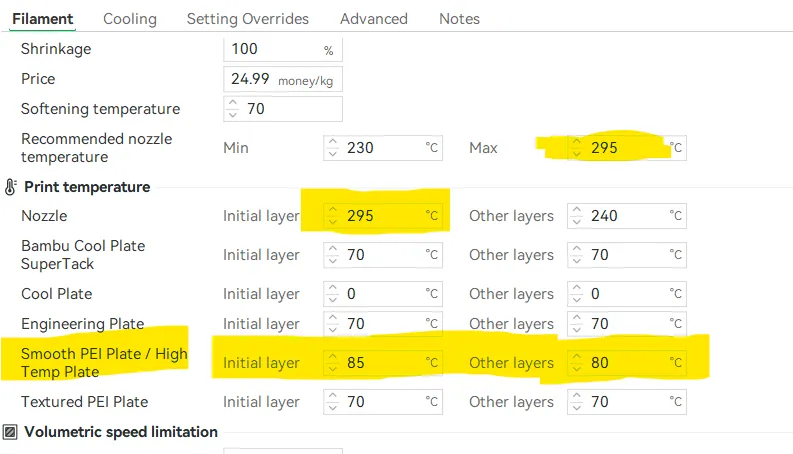
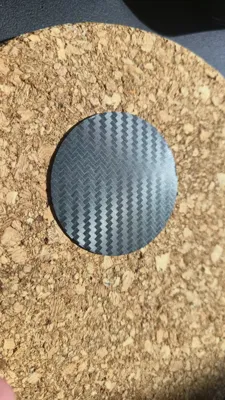
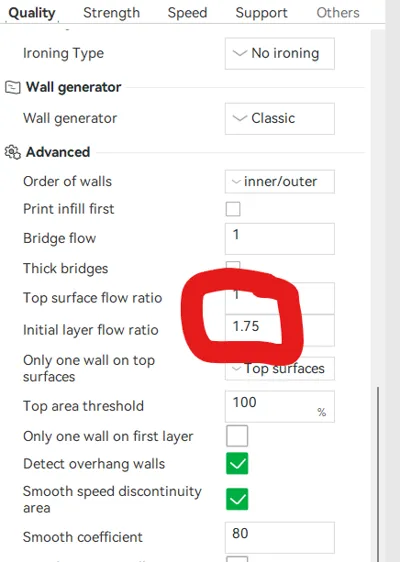
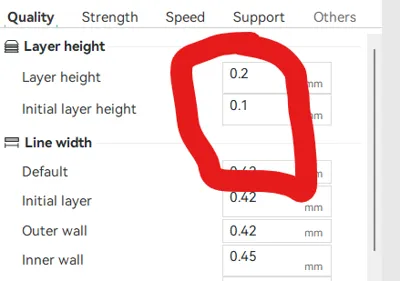
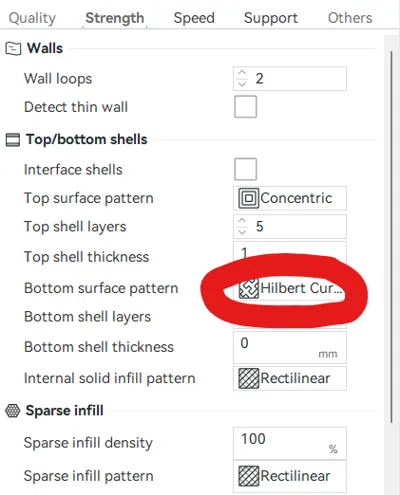
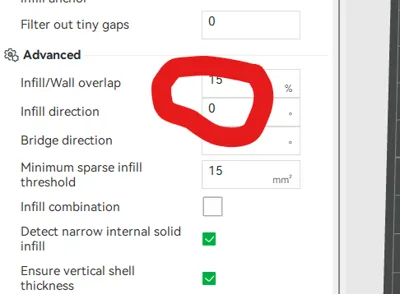
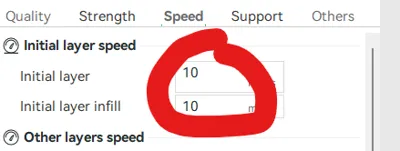
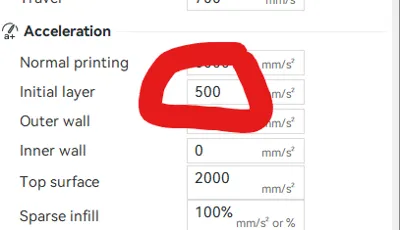
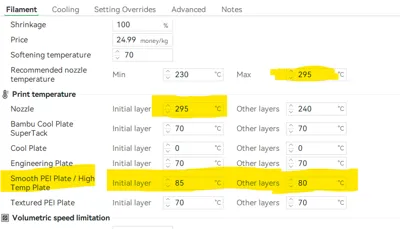
I have uploaded a profile to enable excellent printing on the carbon fiber effect plates. I believe this profile can be used on any effect plate as well. All you need to do is download and open the model, delete the disc loaded in, and add your part. I have also uploaded screenshots of all the settings I adjusted. I followed several reddit threads to make these settins, and attempted many prints. Trust me, this profile is the best I was able to achieve with PETG. If you want to print PLA, you should only need to decrease the plate temp to 75 degC for first layer (10 deg over default), and decrease the nozzle temp to 265 degC for first layer (35 degC over default). I have not tested PLA though but likely the effect will be better as PLA is easier to print over PETG.


ATTN: to print on the effect plates flawlessly, you require high nozzle temps which means the hardened steel nozzles are highly recommended for PLA and a must for PETG.


Dev Mode: development mode needs to be activated in the bambu slicer to access some of these settings!


Make sure to place the face down that you want the effect to appear on!

Boost Me (for free)

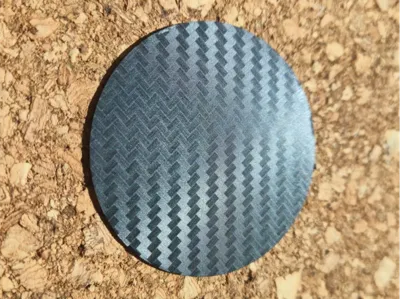
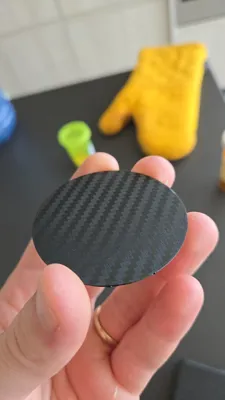
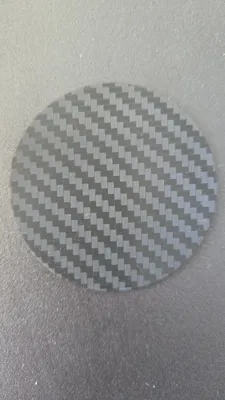
After some effort, I have found the optimal settings for the carbon fiber look!

Comment & Rating (186)

(0/1000)

Boosted
So I stumbled across your model while doing some before bedtime makerworld browsing in the handy app. I have had absolutely ZERO success printing on the Bambu Carbon effect plate. Nothing would stick to it. I cleaned it ten ways from Sunday and still no success. I happened to have the plate on one of my printers and figured what the hell, and kicked off a print from the handy app because what did I have to lose. I didn't swap out my desired model, I just let the disc 'fly.' You are on to something because this was the first and only time I had success with the print sticking to the bed. I did slow it down to silent speed to give it a better shot of success, but that alone was not successful in the past. I will keep experimenting with your settings as my base, but I just wanted to stop and give thanks for your contribution here. P.S, This was on a P1S, original (non-hardened) .4mm nozzle using Elegoo PLA.
The designer has replied
designer
13
Reply
I appreciate the acknowledgement. I have heard people have troubles with the effect plates but I went for it anyways. I am glad you had success. Ya I specified the hardened steel nozzle as I was not sure how the stainless would handle at these temps (not sure if it's 316SS or 304SS). Also, I am glad to hear you were able to print it well from the handy app. I know handy says it resets all the settings automatically if you print from the app.
(Edited)
1
Reply
I would recommend glue, no clue if it ruins the effect tho 😅😅😅
0
Reply
Boosted
Replying to @corneeme :
yeah, i didn't bother trying it because I assumed it would.
0
Reply
Boosted
Printed a front plate for my custom button box. Came out excellent! boosted
The designer has replied
designer
9
Reply
that looks excellent!
0
Reply
Hi dude I used your preset im using pla very good and smooth alot more progress but iam having very little gaps any suggestions cheers
The designer has replied
0
Reply
the first suggestion is to bump up the nozzle temp on the first layer by 5 or 10 deg. If you are using my PLA I know this is above the recommended range. Next suggestion would be a thinner first layer but it is already 0.12 mm, maybe 0.1 mm. my other suggestion is to use PETG if you can, it can handle the higher temps needed and seems to work better. I just did a large pixel 10 phone case without flaws.
(Edited)
1
Reply
Replying to @Aces101011 :
I just tried petg not having much luck yet not 100% sure what to try
0
Reply
Replying to @Louis2000 :
that is really strange. it looks like the plate isn't hot enough. did you select smooth high temp plate? sometimes it auto selects textured pei. I wish I could be of more help. also double check the settings in the screenshots I uploaded match the profile you have open in bambu studios. I am going to re-upload the profile just in case as bambu studios has been updated a few times since I first made it.
1
Reply
wow PLA
(Edited)
3
Reply
the rainbow effect is a film hat you’ve printed on, correct?
0
Reply
Replying to @NewTexCub :
I don't understand what you mean.. the rainbow effect is from the same print plate
Show original
2
Reply
Replying to @miguelags93 :
Thanks! I didn’t know that only a build plate could do that. Who makes that plate? I would love to buy one.
(Edited)
0
Reply
Boosted
Print Profile
0.2mm layer, 2 walls, 100% infill
Fantastic profile, this was printed with a 0.6mm nozzle and matte black PLA from Bambu.
profile
5
Reply
did u switch any settings from this profile? or u just change material to black matte?
0
Reply
Print Profile
Carbon Fiber Effect
Printed perfectly on matte black PETG. Very helpful settings, thanks for sharing.
The profile uploader has replied
profile
1
Reply
I am happy to hear it! I haven't seen matte black Petg before, I'll have I get some.
0
Reply
Replying to @Aces101011 :
It's "high speed matte PETG", the matte effect is a bit variable (it depends on print speed and temp iirc) but it's pretty nice stuff.
0
Reply
It works great. Thank you for sharing. Printed on my P1S. Bambu Lab, black PLA matte with some minor tweaks to your settings for PLA filament. I can upload a print profile if that is OK with you P.S. Don't mind the minor scratches, I used an old plate for testing.
The designer has replied
1
Reply
thank you for the comment and support. If you would like to upload that is great. More collaboration is better. Unfortunately this type of model doesn't get supported by MakerWorld because it isn't much of a model, but I have heard so many people having troubles with effect and smooth plates. I use this for smooth plates as well to get perfect finishes though the adhesion is very strong...
1
Reply
What temp you use? In print profile standart temperature for bed and first layer nozzle
0
Reply
Very impressive. for a toddler Formula 1 steering wheel, these surface settings were planned. In attempt 1, it unfortunately clogged my nozzle. in attempt 2 I reduced the nozzle temp to 288C, then this result. unfortunately only 95% great. if anyone has an idea what these misalignments are for the remaining 5% please share. did the filament not hold here, flow too low. an acceleration issue?
The designer has replied
Show original
1
Reply
sometimes this happens if the filament isn't dry or is lower quality unfortunately. could also be dirt or geasse on the plate in those spots
(Edited)
1
Reply
Print Profile
Carbon Fiber Effect
can someone help? i just bought the effect plate and this was my first print on it and there is still something wrong. Is the nozzle clogged?
The profile uploader has replied
0
Reply
first thing to ask. is the filament dry? I assume yes. second thing, did you wash the plate before using. even a brand new plate can have oils.
0
Reply
Replying to @Aces101011 :
thanks, I will try again
0
Reply
Print Profile
Carbon Fiber Effect
so it worked for a while but then it started to not work anymore. not sure it could be deff user error as I’m still new to 3d printing and understanding profiles and all that.
The profile uploader has replied
0
Reply
please share a picture. if it worked the first few times you used the profile but then it started to not work it could be nozzle issues, or plate issues. the pfilr is very flow and nozzle reliant
(Edited)
0
Reply
Replying to @Aces101011 :
it was a new hardened nozzle. pics of the fails or?
0
Reply
hmm, interesting. I wonder why then. maybe it is just the variability in 3D printing. I had a bad effect print once but that was because I accidentally changed the first layer speed to a faster velocity. Yes, share a picture and maybe I can recommend something!
(Edited)
0
Reply

License

This user content is licensed under a Standard Digital File License.

You shall not share, sub-license, sell, rent, host, transfer, or distribute in any way the digital or 3D printed versions of this object, nor any other derivative work of this object in its digital or physical format (including - but not limited to - remixes of this object, and hosting on other digital platforms). The objects may not be used without permission in any way whatsoever in which you charge money, or collect fees.