
Foildrive Lift No bolt/tape motor pod 15cm cable
Print Profile(1)

Description
Description
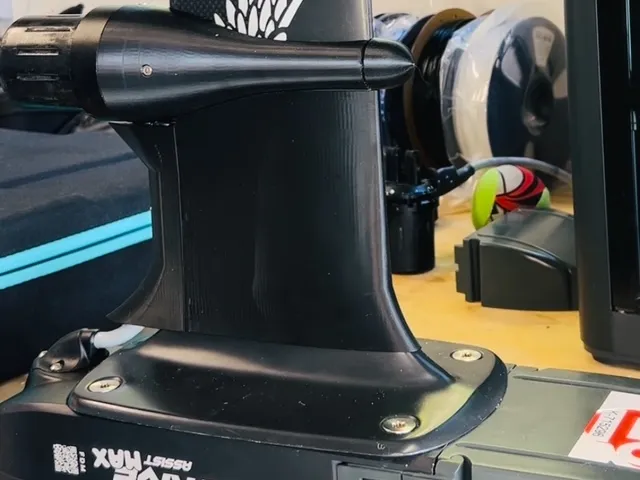
As simple as this looks it took many hours and months of product development, design, failed attempts, and trial and error but I finally got to a design that works well. This design lets you quickly attach and remove the foil drive motor and cable without messing with electrical tape and the bolts. It also is more streamlined than the default foildrive housing reducing drag. This is designed specifically for the lift classic mast and the lift M2 mast. It likely will not work for other masts with different profiles without modifications. Folks have successfully used it on the older FDA+ motor with the integrated cable.
Please boost me to help offset the costs of the trial and error that went into this design.
Important instructions:
There are some key printing instructions and other instructions that need to be followed.
- Do not over tighten the mounting bolts. The side bolts will sit flush but the top one will stick out about 1mm. I elected to keep this defect because the alternative was to make the whole thing thicker which would create even more drag. However, this means you can't overtighten the top bolt no matter how tempting it is to make it flush because it will crush the plastic. Depending on your printer, you may notice that the top bolt hole lip is not completely closed all the way around. This is intentional to minimize thickness of the part while still trying to get the bolt as deep as possible.
- I recommend wall thicknesses of at least 5 passes on the big body to keep it strong and keep it watertight. 5 passes works great but you can go even more if you want but you trade off more weight.
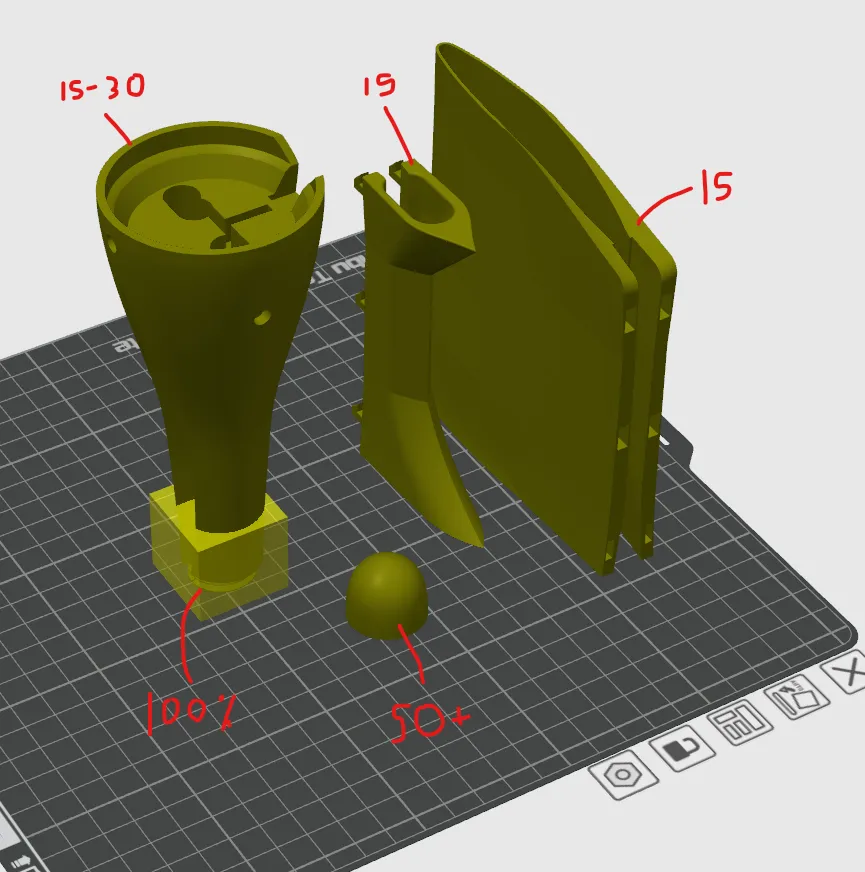
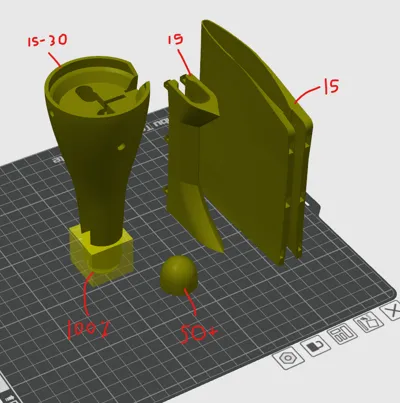
- The threaded section of the main body and the area about 1" behind it need to be 100% infill (see picture). This area experiences a lot of stress when sliding it over the mast.
- The cap should be at least 50% infill
- The rest of the main body can be 15%-25% infill (you can do more but it gets heavier and stiffer without much added benefit)
- Recommend printing in PETG and setting the print temperature at the higher end of the recommended heat range to ensure good layer adhesion (if you don't get good layer adhesion, you may get small exterior cracks and can get water inside the infill layers). This isn't the end of the world but it increases the weight.
- Installing the trailing edge on the cable you will need to clip the trailing edge around the cable first and then slide it up to get it around the rubber at the top of the cable. The housing will be tight but you will feel the cable 'pop' into its channel in the housing once you push it far enough in. I recommend 2 wall passes on the trailing edge otherwise it becomes too stiff to pop the cable in. Note: I have included 3 different trailing edge options. 1) tight tolerance - this is for the newer motors with the detachable cable. It is very tight tolerance which may be hard to put on but stays in place the best (this is what I use) 2) loose tolerance - this is for the newer motors with the detachable cable but has a little more room so it's easier to slip on the cable if the first one is too tight 3) integrated cable- this version is a lot larger to accommodate the additional rubber around where the cable connects to the motor. This is for the older motors which have an integrated cable that can't be removed from the motor or for the older assist+ model.
- To keep the cable mount as narrow as possible I removed the rubber cable protector that holds the cable off of the back of the mast. In place of the cable protector, use a thin piece of foam, a couple of layers of electrical tape, or a strip of tpu rubber to protect the cable from the back of the mast. You can wedge this protector in the trailing edge housing and leave the housing on the cable so it's always ready to go
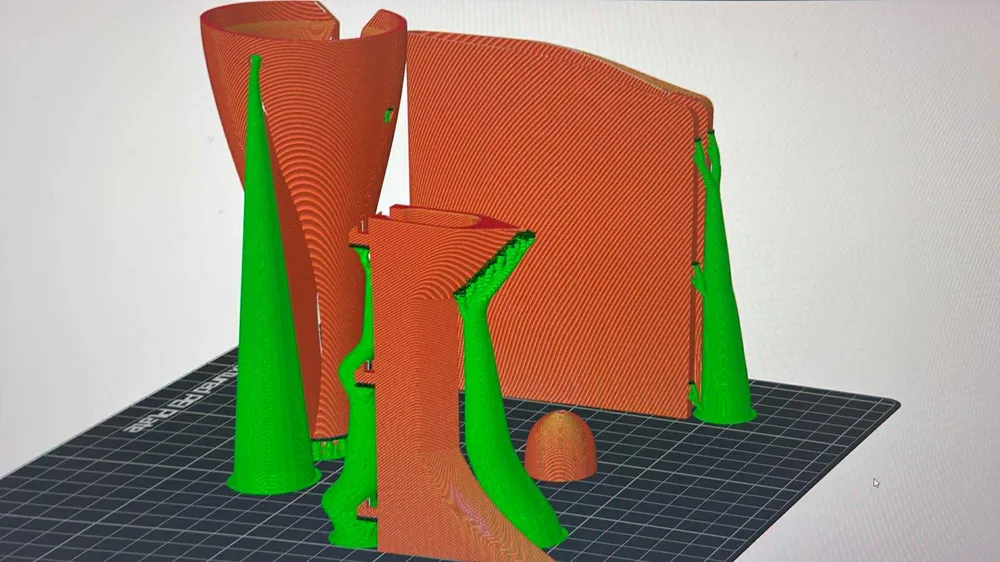
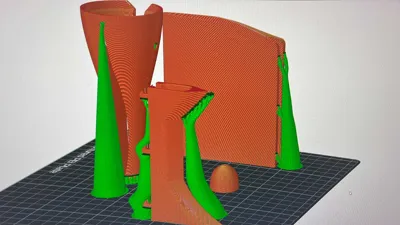
- Supports - recommend turning on slim tree supports (the supports are pretty hard to remove cleanly around the threaded connections and the cap. You want supports to make them high quality but you also want to avoid the support being too dense and being too hard to remove.
- See the attached picture to visualize the sections I'm calling out for infill density
- Watch the video on the foildrive owners facebook page on how to install: Video | Facebook
- If using the cable housing, don't force the clips into the holes or the clips will break. If it is not mating easily then check the holes to make sure there is not any loose filament. You may need to scrape the inside of the hole a little bit to make sure the clip isn't catching on anything. Tolerances are tight so depending on your machine it may need a little cleanup. The weakest clips are the bottom two.
- When printing, I recommend turning off “remove small overhangs” or similar settings
- I recommend printing the CAP pointy side down (unless you have the ability to print different support material). The supports are a pain to remove and printing pointy side down worked alot better than I expected and reduced the amount of support cleanup I had to do.
- After testing I recommend not using supports around the thread on the main body, they are difficult to remove and I got better results when I dropped these supports
If you have trouble printing the big body as shown, try flipping it 180deg with the motor side down and using regular supports. The motor/body interface won't be as clean but it may be easier in this configuration for some printers.
Disclaimer: This 3D model is provided “as is” without any warranties, express or implied. Use at your own risk. The creator assumes no responsibility for any issues, damages, or malfunctions that may arise from the use of this model, including but not limited to printing errors, structural failures, or alterations made by users.
This model is protected by copyright law. It is licensed for personal, non-commercial use only. Redistribution, resale, or use for commercial purposes is strictly prohibited without explicit written permission from the creator.
Boost Me (for free)
Consider boosting me!
Documentation (1)
License

You shall not share, sub-license, sell, rent, host, transfer, or distribute in any way the digital or 3D printed versions of this object, nor any other derivative work of this object in its digital or physical format (including - but not limited to - remixes of this object, and hosting on other digital platforms). The objects may not be used without permission in any way whatsoever in which you charge money, or collect fees.


Comment & Rating (0)