Search models, users, collections, and posts

Shadow Box

Print Profile(4)

All
X1 Carbon
P1S
P1P
X1
X1E
A1
H2D
H2D Pro
H2S
P2S
H2C
X2D
A2L

5 Slot Box - 0.2mm layer, 2 walls, 15% infill
Designer
4.3 h
1 plate
4.9(92)

10 Slot Box - 0.2mm layer, 2 walls, 15% infill
Designer
6.1 h
1 plate
5.0(11)

0.2mm layer, 2 walls, 15% infill
8.9 h
2 plates
4.7(7)

P1S/X1 Carbon Easier Supports
4.7 h
1 plate
4.7(7)

Open in Bambu Studio
Boost
619
1459
157
25
1.7 k
915
Released 

Description

Update 08-11-2023: Added additional boxes with varying slot counts from 2 up to 10.


5 or 10 slot shadow box to display the shadow box sets.


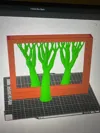
For a nice smooth front finish this box is best printed flat with front on build plate using regular supports. Increase support top Z distance to 2.2 or even 2.4 for easy support removal.


You can also print it standing upright using tree supports. This will reduce the supports needed but could create some less nicely looking bridges at the top.


ALL The Crafty Maker designs are protected by Copyright Law. By downloading, YOU HAVE NO RIGHT to sell any digital files or reproductions from those files. If you want a commercial license to LEGALLY SELL 3D prints, you'll need a The Crafty Seller Patreon subscription.

Comment & Rating (157)

(0/1000)

Print Profile
5 Slot Box - 0.2mm layer, 2 walls, 15% infill
Support Issue:this is winner of the useless print profile ever used. you can't be serious how you use supports here. 🫣
The profile uploader has replied
1
Reply
Well, all other ratings of this model and profile disagree with you. If you have issues removing the supports I suggest you (re)-calibrate your filament or printer or tweak support settings. If it's the amount of supports you are free to create your own profile to reduce it, but I will not guarantee a good finish if you do so. It's easy to complain. Having a conversation is way more productive.
(Edited)
17
Reply
Replying to @TheCraftyMaker :
Don't worry, I've already created my own because your support system is horrible. In my opinion, I don't use normal supports; I'm using organic ones. And no, I don't need to calibrate my printer. This is the first profile I used, and the printout is terrible. After I print out this frame with my profile, I will post a photo.
0
Reply
so.. as I say here is print. with no problems. supports can be removed MUCH more easily than yours. so do not try to learn me how to pee I'm printing more then 8 years. I have knowledge how to print. anyway thank you for the model it looks great.
(Edited)
3
Reply
Print Profile
P1S/X1 Carbon Easier Supports
While the supports were WAY easier to remove using the vertical frame print profile, the box is too small. I printed everything, including the box and the different frames, with their default settings. They do not fit. With that being said, the horizontal frame works great and looks great after removing all the support!
(Edited)
2
Reply
Print Profile
5 Slot Box - 0.2mm layer, 2 walls, 15% infill
Works Great! Thank you!
1
Reply
EPIC!
0
Reply
Print Profile
5 Slot Box - 0.2mm layer, 2 walls, 15% infill
Fantastic - shown here holding Wave off Kanagawa. Very satisfying removal of supports!
2
Reply
Boosted
Print Profile
5 Slot Box - 0.2mm layer, 2 walls, 15% infill
I printed the frame with the "tree support"... it works wonderfully, and releases easily
Show original
1
Reply
Print Profile
5 Slot Box - 0.2mm layer, 2 walls, 15% infill
turned out great scaled it to 300 x 300
(Edited)
0
Reply
Print Profile
5 Slot Box - 0.2mm layer, 2 walls, 15% infill
awesome
0
Reply
Print Profile
5 Slot Box - 0.2mm layer, 2 walls, 15% infill
I love these shadow boxes. they are both efficient with filament use and fun. thanks
0
Reply
Print Profile
5 Slot Box - 0.2mm layer, 2 walls, 15% infill
Funktioniert sehr gut.
0
Reply
The print profile is no longer public
Everything went well, I created the closing lid in Maker Lab and then got one from a colleague because I couldn't print the project's one
Show original
0
Reply