
Bambu Lab Filament Color Pallette for macOS
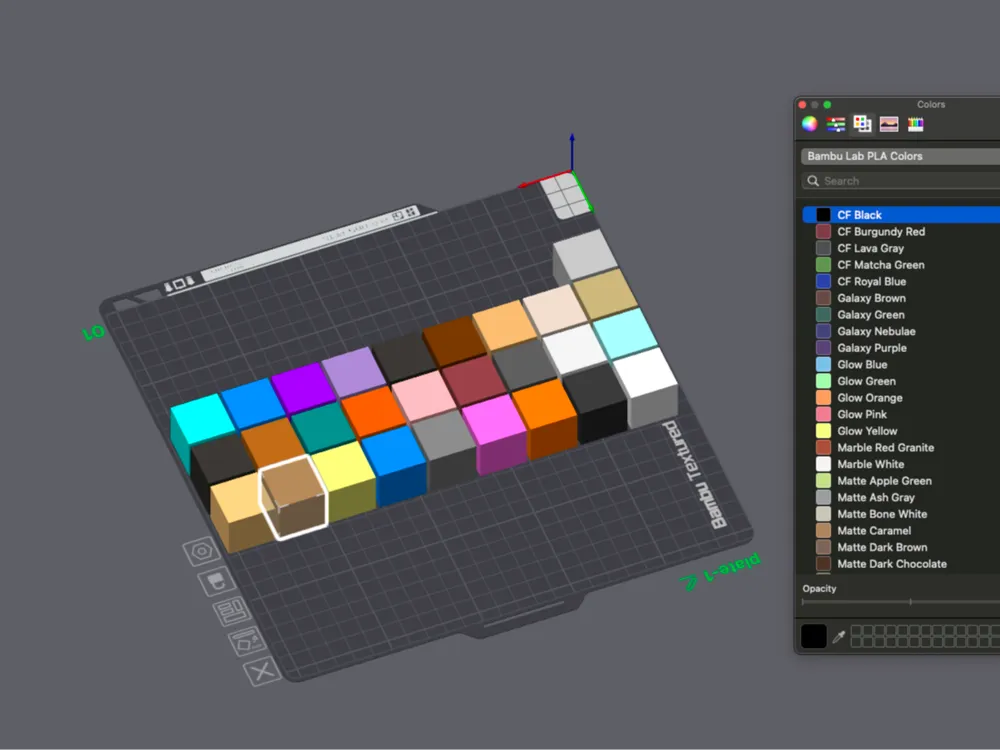
Print Profile(1)

Description
UPDATED 05/03/2024: ALL PLA COLORS:
Bambu Lab Filament Colors for macOS 🎨
This repository provides a macOS color palette for all Bambu Lab PLA filament colors, including the PLA Wood series, Basic series, and Gradient basics. Use it in your favorite design tools like Xcode, Sketch, or any app that uses the macOS system color picker.
📂 What's Included
- bambu_clr.m – Objective-C script that generates the .clr file.
- Bambu Lab PLA Colors.clr – Precompiled macOS color palette.
🎯 Color Coverage
Includes:
- Matte
- Silk
- Metal
- CF (Carbon Fiber)
- Marble
- Glow
- Galaxy
- Wood Series (Black Walnut, Rosewood, Clay Brown, Classic Birch, White Oak, Ochre Yellow)
- Basic Colors (White, Black, Red, Yellow, Blue, Green, Orange, Purple, Gray)
- Gradient Basics (Blue, Green, Yellow, Orange, Purple)
- (Other types coming soon)
🚀 How to Use
Option 1: Use Precompiled .clr
- Download Bambu Lab PLA Colors.clr.
Move it to your macOS colors folder:
~/Library/Colors/
- Open BambuStudio, click the color swatch next to filament. (Works in any macOS app using the color picker, e.g., TextEdit, Pages).
- Go to the Color Palettes tab and select Bambu Lab PLA Colors.
Option 2: Build It Yourself
Clone this repo:
git clone https://github.com/yourusername/bambu-lab-pla-colors.git cd bambu-lab-pla-colors
Compile and run:
clang -framework Foundation -framework AppKit -o bambu_clr bambu_clr.m ./bambu_clr
The palette will be generated at:
~/Library/Colors/Bambu Lab PLA Colors.clr
📦 Also Available On
- MakerWorld [(https://makerworld.com/en/models/1346953-bambu-lab-pla-colors-for-macos#profileId-1388737)]
🛠️ License
MIT License. Free to use and modify.
This is a macOS color palette (.clr) featuring all the Bambu Lab PLA filament colors, including:
- Matte
- Silk
- Metal
- Carbon Fiber (CF)
- Marble
- Glow
- Galaxy
- Wood Series (Black Walnut, Rosewood, Clay Brown, Classic Birch, White Oak, Ochre Yellow)
Perfect for designers, makers, and anyone working with Bambu Lab filaments who wants a consistent color reference across their macOS apps like Xcode, Sketch, or Pages.
🔧 How to Use:
- Download the .clr file included here.
- Move it to your macOS colors folder:
~/Library/Colors/
- Open Bambu Studio, click on the color swatch next to any filament. ( Or any app with a color picker (TextEdit, Pages, etc.).
- Select Bambu Lab PLA Colors from the Color Palettes tab.
💻 Open Source:
Want to generate the palette yourself or tweak the colors?
Check out the full project on GitHub:
Documentation (2)
License



Comment & Rating (3)