
Charli XCX 2025 Grammy Awards
Print Profile(1)

Description
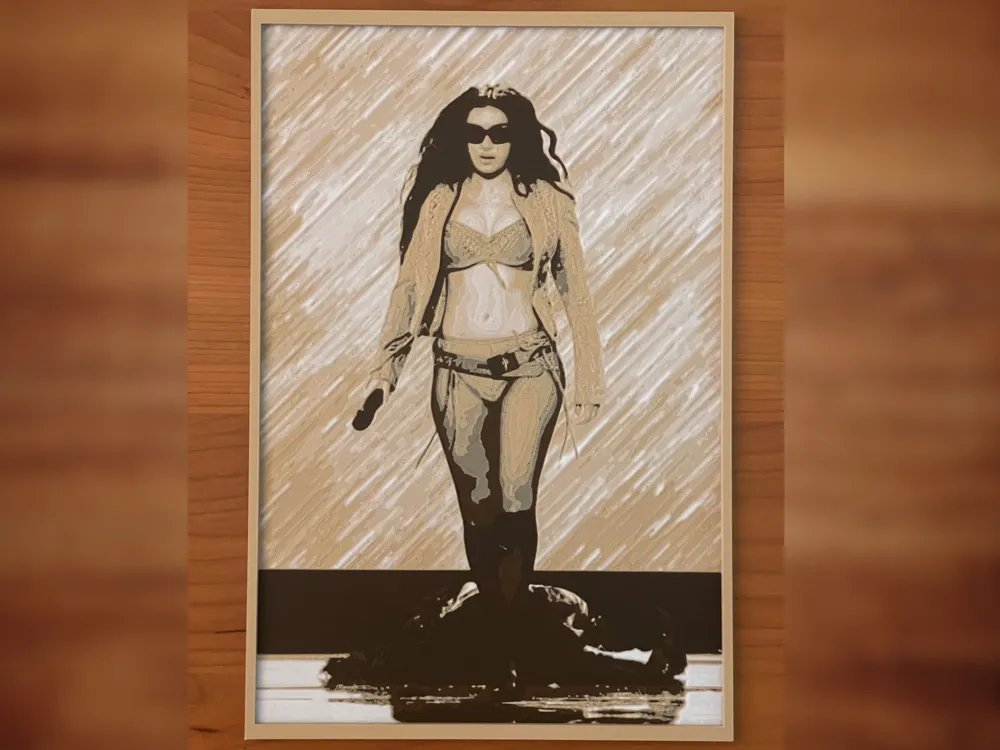
I created this model using HueForge (https://shop.thehueforge.com) which is a “filament painting” application that generates 3D models from images. I sliced the model using Bambu Studio for Mac, and relevant settings are as follows:
- Infill 100%
- Layer height 0.08 mm
- Initial layer 0.16mm
- Layer #1 (0 mm): Start with black
- Layer #4 (0.4 mm): Swap to dark brown
- Layer #7 (0.64 mm): Swap to light brown/beige
- Layer #12 (1.04 mm): Swap to white for the rest
Optional: Layer 24 is the top layer of the photo, whereas layers 25-43 are the frame which I added to give the print some rigidity so it can stand on its own. If you want to change the color of the frame to something other than white, simply add another filament change at layer 25 or above.
This photo of Charli XCX was taken at the 2025 Grammy Awards and was obtained at https://x.com/RecordingAcad/status/1886276125577335190. The background was pure white so it looked somewhat bland in HueForge. Therefore, I modified the original photo by adding texture to the background to make the print more visually appealing.
IMPORTANT: Model dimensions are 167x250 mm. If you resize the model (e.g., for a smaller print bed), and you want to get the same look using the filaments that I’ve described above, make sure to resize only the X and Y dimensions and leave the Z height as is. There is no single “correct” way to print this model, so have fun experimenting with different filament colors and layer changes. The .3mf file was created with Bambu Studio for Mac. If you use another slicer, you might have to manually adjust some settings.
License



Comment & Rating (0)