Search models, users, collections, and posts

A1 Build Plate Aligner

Print Profile(2)

All
A1
P1S
P1P
X1 Carbon
X1E
X1
A1 mini
H2D
H2D Pro
H2S
P2S
H2C
X2D
A2L

Firmware Version 01.01.01. and below
Designer
28 min
1 plate
4.2(689)

0.2mm layer, 3 walls, 15% infill PETG
24 min
1 plate
4.2(189)

Open in Bambu Studio
Boost
3652
9629
973
221
12.7 k
8.4 k
Released 

Description

Boost Me (for free)

I am having issue with put my build plate on my A1.

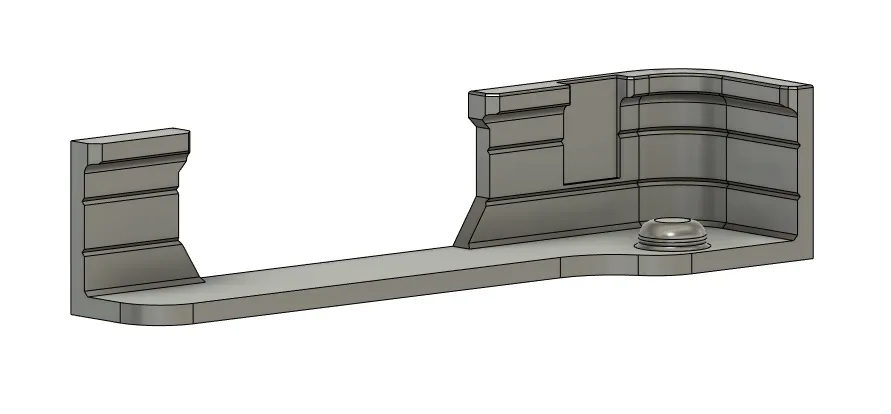
The original guide does help aling the build plate, but I feel like those two on the side does not help that well, since it is so low to the printer bed. So I made this build plate aligner deisgn to help easier put you build plate down.


Due to the nozzle prime brush located on the left, and nozzle have travel a lot of the left, I don't think it worth the risk to put anything on the left. Plus, this one on the right side is already good enough to help you locate the build build.


It cost very little filament, less than 5g. Around 19m printing time. Suggests print at least with PETG, or ABS.


ATTENTION! If you are firmware version 01.01.50.24 or above, do not use other people's printing profile, model is not longer compare after firmware update. 


Update 1/27/2024: New model updated, name “for 01.01.50.24 firmware”. 

New firmware version: 01.01.50.24(beta) will cause issue. I have found nozzle clumping detection cause the issue. It is automatically enabled after firmware update. But no option to disable it currently. More information from Bambu Wiki: 

https://wiki.bambulab.com/en/a1-mini/manual/nozzle-warp-detection 


Issue description: 

After update firmware 0.1.01.50.24. Print stops randomly in the middle and error note shows: 
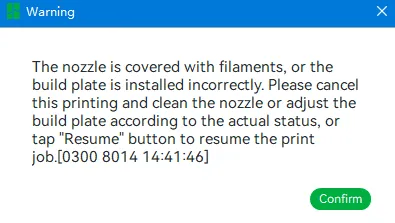
 Nozzle will park on the aliger area and cuase issue. 
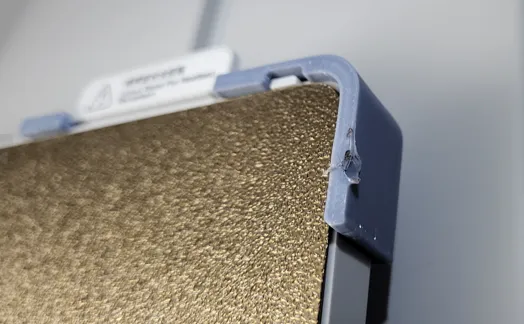
 According to BBL Wiki: 

"1. After printing all the walls of the first object on the third layer of this plate, the tool head will move to the position of the purge wiper for the first detection. The specific coordinates of the nozzle during detection:  A1 mini (X-6, Y 170, Z-1); A1 (X 261, Y 250, Z-1). The detection process is shown in the following figure. " 



Install guide:

Align from the back, push the aligner pin into the bolt hole under the build plate.

Confrim top part is all the way in.


Many revisions was made and many tests was done to confirm it not only works but also get good fit and finish:
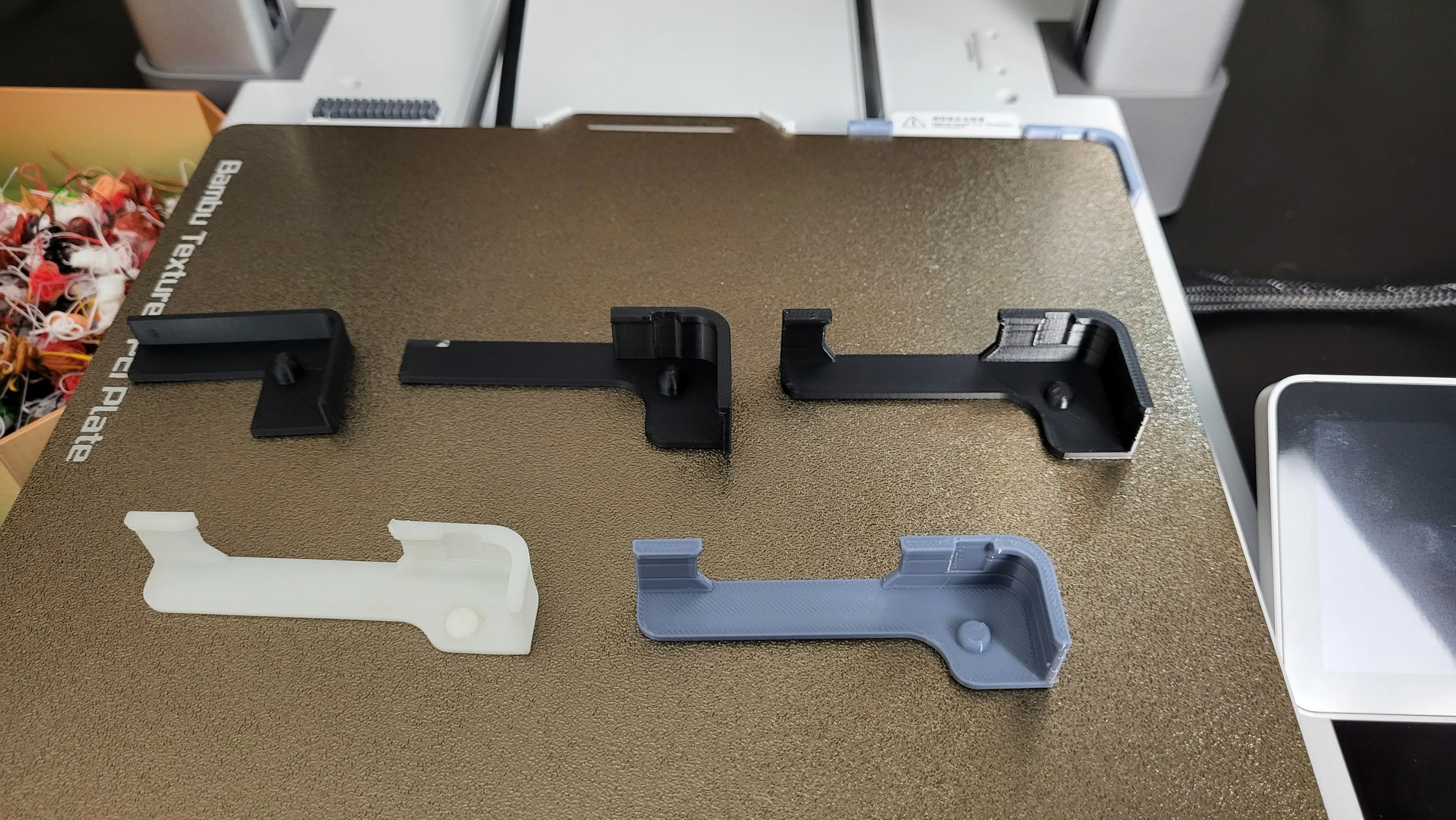
 

Material:

Highly suggest to print with ABS or better heat resistant material. PETG Will works. PLA is not recommaned.

I also made cut line design on alginer, those cut slots should help guiding the direction when thermal expansion and retraction happen. Which it should bond on the printer bed more if thermal deformation occurs.
Comment & Rating (973)

(0/1000)

Print Profile
Firmware Version 01.01.01. and below
The hotend will collide with the bed during probing and report an error, requiring modification
Show original
9
Reply
I believe it's simply for placing the table Then remove it
(Edited)
Show original
1
Reply
Boosted
where did you post "A1 Build Plate Aligner 01.01.50.24 firmware"
10
Reply
would like to know it too
1
Reply
Print Profile
Firmware Version 01.01.01. and below
Printed with ABS.
profile
4
Reply
Great at what temperature nozzle/bed and speed
Show original
0
Reply
Replying to @rudymotors :
I have used 250C nozzle and 150mm/s speed :)
0
Reply
Print Profile
Firmware Version 01.01.01. and below
Other Issues:The tool head rests on this when it's doing the nozzle clump detection causing the printer to error.
7
Reply
Print Profile
Firmware Version 01.01.01. and below
good print profile as long as you remove the end that goes pst the wipe you can use on the other side to
(Edited)
The profile uploader has replied
profile
2
Reply
Great, I just feel a bit uncomfortable to put on the left since nozzle have travel a lot around that area before every print.
(Edited)
1
Reply
the left side can't setup . when you printing, the nozzle some time move left side , impact it. Don't ask me ,why i konw.
(Edited)
profile
1
Reply
Replying to @SavageLau :
stl left ?
0
Reply
Print Profile
Firmware Version 01.01.01. and below
Other Issues:unfortunately, whilst the design and print is lovely, it gets in the way of the nozzle and causes errors.
5
Reply
Print Profile
Firmware Version 01.01.01. and below
came off and did not stay on the build plate. it printed out fine but did not work
3
Reply
Print Profile
Firmware Version 01.01.01. and below
It fit perfectly and was printed perfectly.
profile
2
Reply
Print Profile
Firmware Version 01.01.01. and below
Printed from the app using white pla on the A1, everything came out perfect.
1
Reply
Print Profile
Firmware Version 01.01.01. and below
Good quality, fits perfectly
profile
1
Reply