
Ifixit Mako Driver label


Print Profile(3)


Description
UPDATE 1: It was brought to my attention that my template and kit is possibly newer and different than some older kits. You may notice you don't have the Magnet, Oval, or Standoff bits. This has been fixed with the profile “Older kits (no magnet)”
UPDATE 2: I am making labels for the other kits, such as Minnow, Moray, and Manta. Please check my profile for the other models.
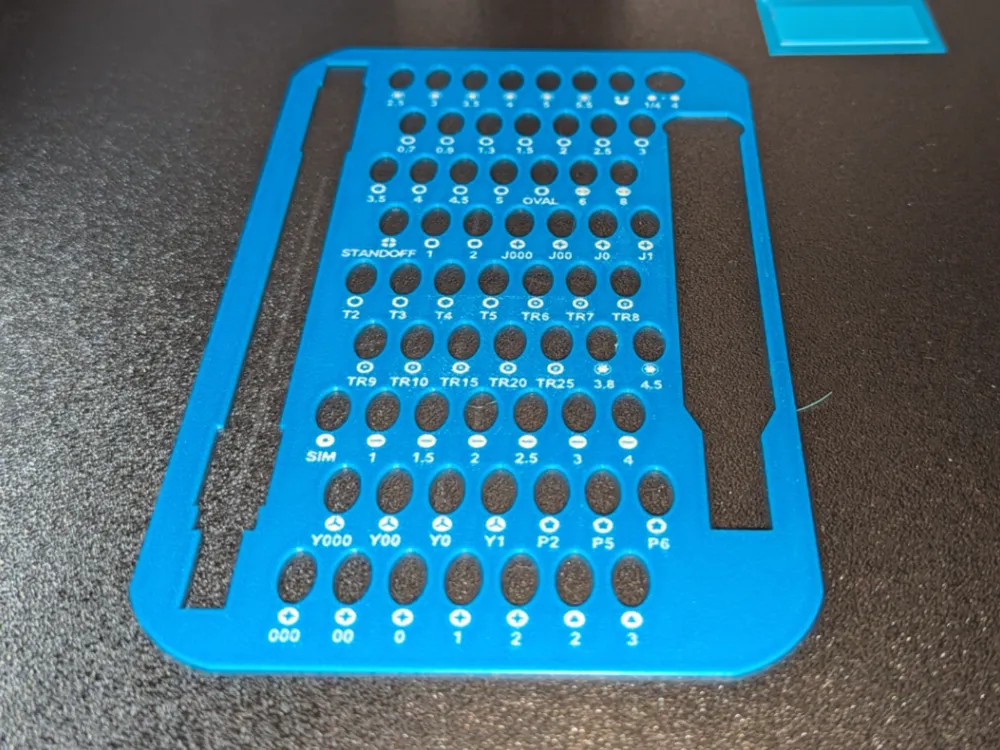
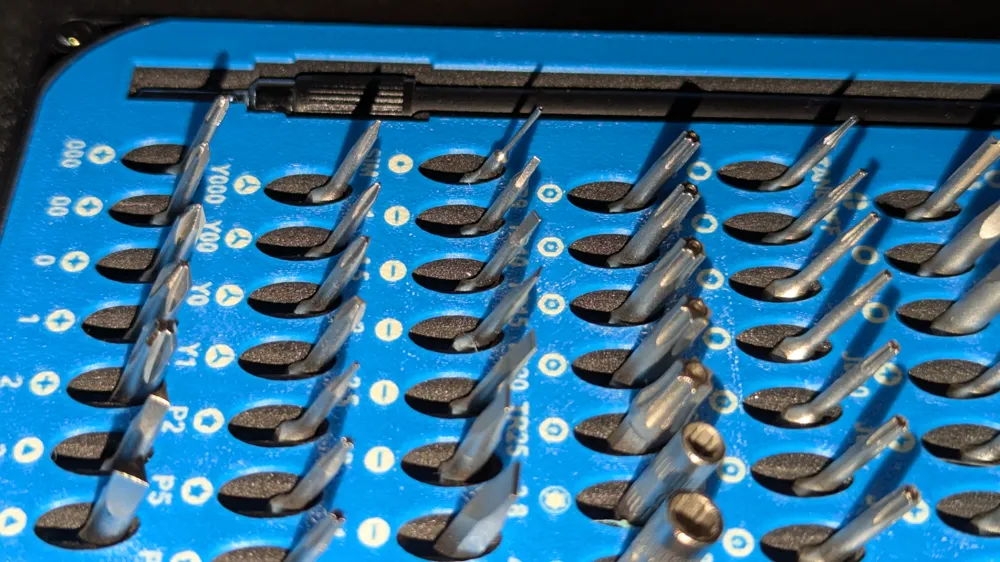
I found the Ifixit Mako driver kit to be insanely hard to read the driver shape or size imprinted on the included foam, so I designed a template that can be printed with the text and symbols for the kit, which will fit inside the case with the lid closed. There are other models out there for this idea, but they replace the foam (that holds the bits in place), or use way more filament. This design is meant to sit on top of the foam and just label the bits so they can be found a little easier.
To achieve the print detail of the text, you will need to use the 0.2mm nozzle. I was able to get most of the symbols to print with the 0.4mm, but none of the text was big enough to print or look good. That is why I am offering the .3mf with the settings to print with text/symbol details, or the .STL can be printed without any details. If you choose the model without text/labels you can then print the symbols and text from the Ifixit PDF file, cut to size, and glue the paper to the card (possibly - I haven't tested that).
https://www.ifixit.com/Wiki/Driver_Kit_Bit_Layouts
Please share, like, or boost if you like this model.
I have other Ifixit toolkit labels under my profile. Thanks!
Some other notes, and settings (what makes this work):
- I have had good luck using the Bambu PETG cream and blue colors. During testing there were issues with the text using another brand of white PETG with the Bambu blue PETG, it was like the white just blended into the blue and the text was barely readable - some brands of filament may not be compatible with other brands.
- I have had issues with the text sticking to the plate. To solve this, I am using a P1S that is enclosed, but also I would pre-heat the bed to the temp the filament likes, for about 3-5 minutes before hitting print. This would ensure the plate was fully warmed up, and that allows the filament to stick better on the first layer.
- On the plate, choose the settings (GEAR/TARGET icon below the LOCK), on “First layer filament sequence” change so you print the color for the text and sybols first, in my example I used Cream → Lake Blue.
- I chose to print with Arachne walls for the “wall generator” and outer/inner settings for the “order of walls”
- You may need to adjust the colors of filament to your available options. I used Lake Blue and Cream colors.
- While my print worked, it may not be ideal for quality of the text/symbols. You could change the layer height or width, and speed settings, which may help or make things worse.
- I printed this on a P1S in Bambu PETG-HF, but could be done in PLA as well.
- Printing the .3mf version with text/symbols using the 0.2mm nozzle will take roughly 4 hours on the P1S.
- Printing the STL without details using the 0.4mm will take roughly 50 minutes on the P1S.
- The plastic label is only 0.75mm thick, so allow the plate to completely cool before attempting to remove it from the build plate. Using one of the available low profile scrapers will help get underneath it and pry it off the plate, or by flexing the build plate, if it's a little stuck. When I let the plate cool overnight, the piece just falls off. As another user commented, I have tried isopropyl alcohol aroud the print and that also helps relese the print from the plate.
License

You shall not share, sub-license, sell, rent, host, transfer, or distribute in any way the digital or 3D printed versions of this object, nor any other derivative work of this object in its digital or physical format (including - but not limited to - remixes of this object, and hosting on other digital platforms). The objects may not be used without permission in any way whatsoever in which you charge money, or collect fees.


Comment & Rating (135)