Search models, users, collections, and posts

"Fissure" - Parametric Wall Art

IP Report

Print Profile(2)

All
A1
P1S
P1P
X1 Carbon
X1E
X1
H2D
H2D Pro
H2S
P2S
H2C
X2D
A2L
A1 mini

A1/P1/X1 - 0.2mm layer, 2 walls, 0% infill
Designer
26.3 h
6 plates
5.0(5)

A1 Mini - 0.2mm layer, 2 walls, 0% infill
Designer
27.8 h
11 plates
5.0(1)

Open in Bambu Studio
Boost
362
885
43
35
279
82
Released 

Description

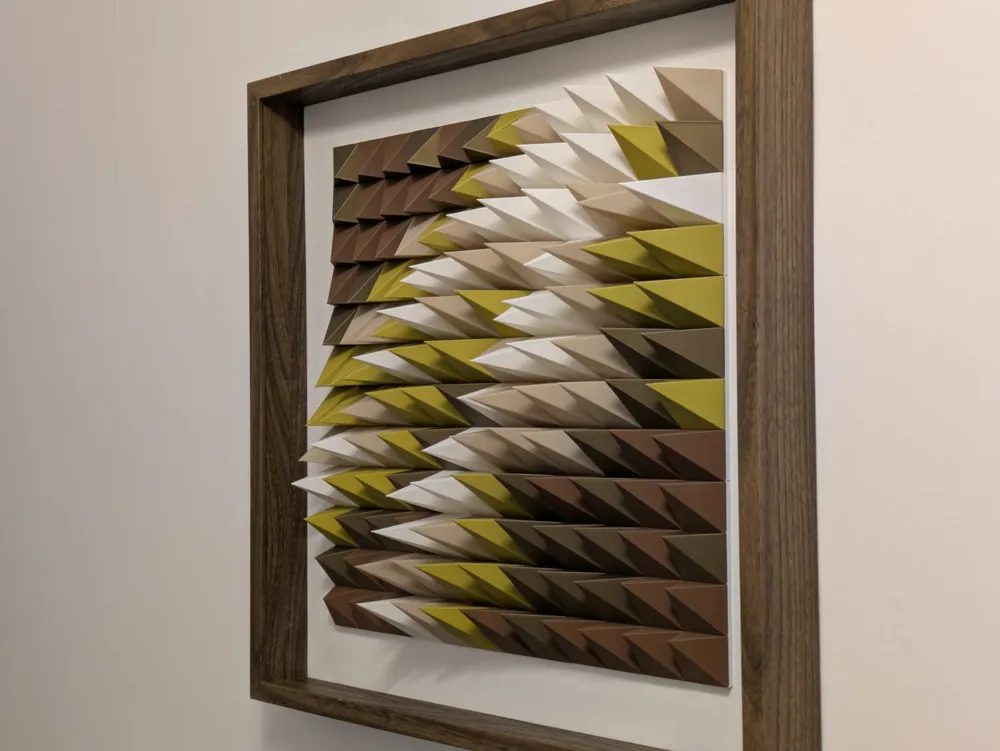
“Fissure” - Parametric Wall Art

Inspired by the earth's natural processes, "Fissure" is a stunning three-dimensional wall art piece that adds depth and texture to your décor.  144 pyramids are arranged to evoke the appearance of a fractured landscape. The varying depths and angles create a dynamic interplay of light and shadow, enhancing the artwork's visual intrigue. When set within a simple wooden frame, "Fissure" offers a sophisticated blend of organic and contemporary design.


40x40x10cm

5 colours, no AMS required.


Another chapter in the evolution of my OpenSCAD-designed, pyramid-based 3D wall art. The pyramids have now been designed to work in conjunction with a mounting grid, allowing for easier & more accurate assembly.


Two print profiles included :

  • A1/P1/X1 - print each plate of pyramids once, and the mounting grid 4 times
  • A1 Mini - print each plate of pyramids once, and the mounting grid 9 times

Assembly Instructions

  1. Apply a tiny amount of glue (e.g. UHU) to the intersections of each square of the mounting grid, except any which form the outer edge of the whole grid. Remember, it will be inverted whilst applying the glue! 


    Taking care not to bend, twist, or skew the grid, arrange them to form the complete 12x12 grid, ensuring each grid piece is accurately & tightly aligned with any adjacent pieces.

    The assembly timelapse shows the 4x4 mounting grid from the A1 Mini print profile. The 1st 4x4 grid should be placed centrally in the frame.

    If using the 6x6 mounting grid from the A1/P1/X1 print profile, the 4 pieces should meet at the centre of your frame.


  2. Mark the start and end of each row with the corresponding number, starting with 0 in the bottom left corner.


  3. Apply a small drop of glue to the base of each piece, and click into its respective position on the grid. 
    I found it easier to work through each colour in turn, as per the timelapse. 
     
  4. If using something like the IKEA Sannahed frame (as pictured), install the outer frame over the frame back.
     
  5. Mount on the wall. Enjoy!

Boost Me (for free)

All boosts gratefully received :-)

Filaments used:

Overture Cream PLA, white

eSun PLA+, bone white

Overture Matte PLA, olive green

Bambu PLA Basic, bronze

Overture Matte PLA, chocolate


Other materials used:

IKEA Sannahed 50cm walnut frame

Snow White Murano card

UHU glue

Comment & Rating (43)

(0/1000)

Boosted
Pinned by Designer
lovely design. wish there was a way to join more grids and make it bigger 😃
The designer has replied
designer
3
Reply
Great colour selection!
0
Reply
Boosted
Very happy with this print. My wife loves it!
The designer has replied
designer
4
Reply
Beautiful colours! Amazing :) Thanks for the boost too.
0
Reply
What kind of frame is that? I want to do the same thing
0
Reply
This looks excellent, what are the exact colors or filaments used? Thank you
Show original
0
Reply
Boosted
Very nice, thank you. Resized to 70cm. Used Bambu PLA Matte in Ivory White, Bone White, Terracotta, Dark Brown, Dark Chocolate.
The designer has replied
designer
3
Reply
@damasus32 Beautiful, love the colours!
0
Reply
Boosted
Beautiful print! Could you tell me how you resized it to 70cm? 175%? Thank you.
0
Reply
Cool print! I like the colours that you have picked and I used the exact same colours for mine. I am now going to make the Vortex you designed with the same colours!
The designer has replied
designer
4
Reply
Looks fantastic, great work!
0
Reply
Boosted
Print Profile
A1 Mini - 0.2mm layer, 2 walls, 0% infill
absolutely amazing thank you!!! very smooth printing process ( looks intimidating but everything prints so easy ) printed on a1 minis filament I used all Bambu in order - marble white - dual sink pink/gold - sparkle green - sparkle grey - matte black Ended up using a piece of 1/4” I had to glue the frames / wrote numbers / glued pieces in not sure if anyone else noticed but the sounds they make while printing is so freaking cool because they are hallow and the down fan blows into them!
The profile uploader has replied
2
Reply
Looks great, thanks for sharing. But I think you've got a few pieces orientated incorrectly...
0
Reply
Boosted
Replying to @3dprintedartuk :
i definitely put some in the wrong spot yes 😂 was too late w the glue though lol
0
Reply
Print Profile
A1/P1/X1 - 0.2mm layer, 2 walls, 0% infill
Superb design, thank you for that. One or two components have issues. Perhaps an adjustment to the print profile is possible?
The profile uploader has replied
Show original
profile
1
Reply
Thanks! Increase the # walls and reduce wall speed, should help.
0
Reply
About 50 hours to print, though that includes one of the colours that failed when a spool tangled. Pretty happy with the outcome.
The designer has replied
designer
1
Reply
Amazing 😍
0
Reply
Hello, the painting is superb, but why are numbers 1, 2, and 11 particularly difficult to print? I have already tried three times, but unfortunately, the results were always poor, see image
The designer has replied
Show original
0
Reply
Maybe it's the filament. Try adding modifiers to these pieces to add an extra wall and a slower outer wall speed.
0
Reply
I've tried to print these like 5 times in different filaments and still cannot get a good print...it is so frustrating
0
Reply
Boosted
using white as an example, does location #4 on your grid picture mean the first white piece on the plate - ie the front left - then #28 is the second white piece on the plate, an so on?
The designer has replied
0
Reply
#3 (which is the 4th one along the bottom row) is the first white piece, then #28. Colours 1 to 5 to help.
1
Reply
Boosted
Replying to @3dprintedartuk :
yeah the 4th one from the start, which is #3 when indexing from zero. thanks for adding the extra pictures!
designer
1
Reply
Boosted
Replying to @warkolm :
oh the pieces have numbers on them, I didn't see that in the pictures. makes it heaps easier!
designer
1
Reply
Just curious but did you take inspiration from Paragami or come up with it on your own?
The designer has replied
designer
3
Reply
Yes, I'd seen Paragami and other similar pieces, and wrote/designed my own in OpenSCAD.
(Edited)
2
Reply
I've had such an easy time printing this. Will come back with pics once I get it all assembled
The designer has replied
designer
1
Reply
Good to hear. Can't wait to see the final result!
0
Reply

License

This user content is licensed under a Standard Digital File License.

You shall not share, sub-license, sell, rent, host, transfer, or distribute in any way the digital or 3D printed versions of this object, nor any other derivative work of this object in its digital or physical format (including - but not limited to - remixes of this object, and hosting on other digital platforms). The objects may not be used without permission in any way whatsoever in which you charge money, or collect fees.