
Running Medal/Bib Plaque and PR Display
Print Profile(1)

Description
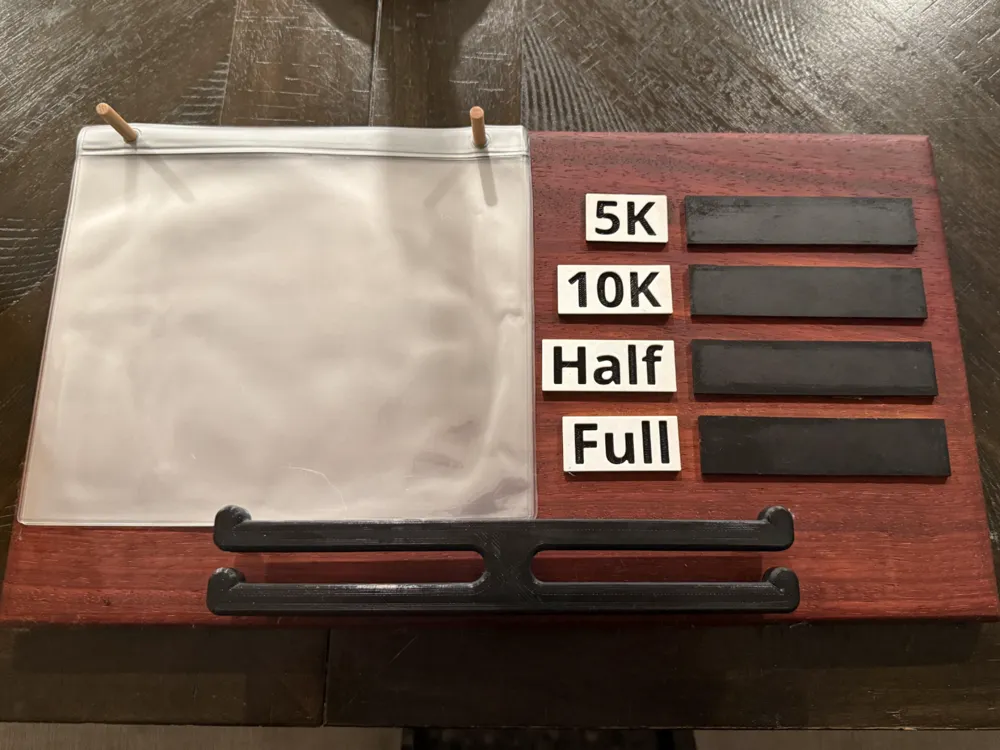
A display plaque for runners to show off their bibs and medals and to record their various PRs!
This project is not 100% printable, but fear not - the woodworking portion of the project is dead simple - all you need is a dill, sand paper, and some kind of saw (even a hand saw will do!).
The printable components are dead simple - no supports or fancy tricks required - I do reccomend using multi-color printing for the race labels to make them easier to read, but this can also be done without an AMS using the “Add Pause” trick just before the layer with the numbers on those labels (Info below).
For the Wood backing of the display, simply cut a piece of wood to 16"x9", and use the printed drill guide to drill the holes (using a ¼" bit) in which the printed components will slot in. I used a router to round off the edges, but you can also use sand paper and some elbow grease!
A little dab of glue on each peg and the pieces should slot in snugly to your components! For the “chalkboard” bits, you can either use chalk tape, or buy a small desktop chalkboard and cut it into segments using a saw, then simply glue them into place.
I just used 1/4" wooden dowels to hold the bib holders in place, but you could also just keep it simple and use screws.
Please feel free to leave a comment if you have any issues!
PRINTING WITHOUT AN AMS
If you don't have an AMS, don't despair! You can still print this. Simply slice the plate with the labels (don't have anything else on the plate). Then using the bar on the righthand side, scroll the top circle until you find the layer just before when the back of the letters get filled in (at 0.2 layer height this should be layer 8). Right click on the circle and select “Add Pause”. Start the print with a white filament, then when you hit the pause, change filaments to black (make sure it's the same material type!) and viola! Multi color printing without an AMS!
License



Comment & Rating (1)