Search models, users, collections, and posts

Fritz!Box 5590 – Correct Wall Mount
Print Profile(2)

All
A1 mini
P1S
P1P
X1
X1 Carbon
X1E
A1
H2D
H2D Pro
H2S
P2S
H2C
X2D
A2L

A1 Mini
A1 Mini
Designer
1.9 h
1 plate
5.0(10)

X1C, X1E, P1P, P1S, A1
Designer
1.7 h
1 plate
5.0(9)

Open in Bambu Studio
Boost
23
75
26
13
270
122
Released 

Bill of Materials

Bambu Filaments
Select all
Matte Charcoal (11101) / Refill / 1kg
List other parts
  • Schraube x 4: je nach Untergrund
  • Dübel x 4: je nach Untergrund

Description

Content has been automatically translated.
Show original

V2 with Smart Home Upgrade Now Available

https://makerworld.com/de/models/1409176-fritz-box-5590-v2-smarthome-upgrade#profileId-1462642


-----------------------------------------------------------------------------------------------------------------------------------

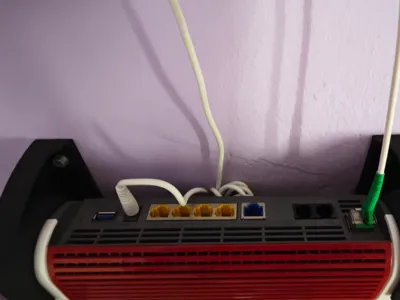
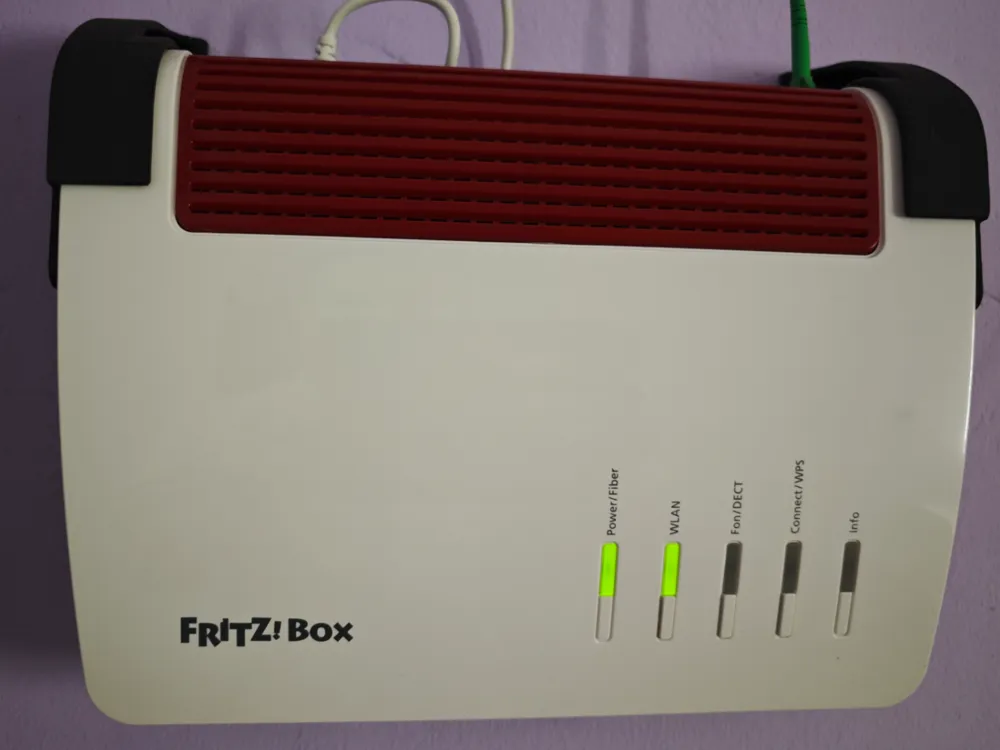
This is a wall mount for the Fritz!Box 5590 (fiber optic) in the correct orientation


It was frustrating not to find a wall mount in the correct orientation

This needed to be:

  • robust
  • securely mounted
  • childproof (playing children)
  • some distance from the wall (cable routing + heat dissipation)


What can I say? The search is over 😉


Only 4 screws + possibly 4 wall plugs are required, depending on the surface on which the Fritz!Box is to be installed

Installation:

  • Hold the mount with the box against the wall and mark it
  • Drill holes (I assume no liability for any damage)
  • Now loosely screw on one mount with 2 screws and the other with one screw for now
  • Now the box can be inserted and the second mount folded down
  • Insert the 4th screw and screw everything on evenly
  • Done^^

As you can see in the photos, I deliberately avoided countersunk screws to avoid “blowing” the layers


The orientation of the respective profiles is deliberately chosen to keep the Z-seam as invisible as possible 😉

Comment & Rating (26)

(0/1000)

Print Profile
X1C, X1E, P1P, P1S, A1
Thank you! I was so annoyed by the position of the standard mount. It looks great now!
Show original
profile
1
Reply
Wow, cool, finally the right Fritzbox bracket for my needs... there it is, top left
Show original
0
Reply
you belong at the very top!!!! Finally someone who understands what you actually need to assemble such a thing correctly.....Great and Thank you very much
The designer has replied
Show original
1
Reply
Thank you for this cool comment. That's exactly what motivates one. I'm really happy about it. Have a pleasant week✌️
Show original
0
Reply
Print Profile
X1C, X1E, P1P, P1S, A1
Great idea. However, it detached from my print bed. But I do not think it was due to the file or the profile. Still 5 stars. 🌟
The profile uploader has replied
Show original
0
Reply
Hey thanks for your review A clean or grease-free print bed is essential 😀 Depending on the print bed and filament it can sometimes be frustrating 🙈 Did it work afterwards
Show original
0
Reply
I didn't try it again It had only lifted slightly, causing it to warp I was still able to use it
Show original
0
Reply
Print Profile
A1 Mini
Super! An elegant solution for the Fritzbox!
Show original
profile
1
Reply
Print Profile
A1 Mini
Perfect mount, finally tidy in the tech room
Show original
0
Reply
Boosted
Top Model, if printed at the size of 70% it fits the 5530
0
Reply
Print Profile
X1C, X1E, P1P, P1S, A1
Great Printed with white PLA
Show original
0
Reply
Print Profile
A1 Mini
Super
0
Reply
Print Profile
X1C, X1E, P1P, P1S, A1
Okay Thanks!!!
Show original
0
Reply

License

This user content is licensed under a Standard Digital File License.

You shall not share, sub-license, sell, rent, host, transfer, or distribute in any way the digital or 3D printed versions of this object, nor any other derivative work of this object in its digital or physical format (including - but not limited to - remixes of this object, and hosting on other digital platforms). The objects may not be used without permission in any way whatsoever in which you charge money, or collect fees.