Search models, users, collections, and posts

AMS Lite SAVER + DUST CAPS -- avoid blockage of motors and anti-wear on the filament feeds port

Print Profile(1)

All
A1 mini
P1S
P1P
X1
X1 Carbon
X1E
A1
H2D
H2D Pro
H2S
P2S
H2C
X2D
A2L

0.24mm layer, 2 walls, 15% infill
Designer
45 min
1 plate
4.7(21)

Open in Bambu Studio
Boost
60
150
34
7
195
116
Released 

Description

This coupler for the AMS Lite connectors helps you guide the filament and slows down wear on the feed connector of the ams , also has a slot to add small sponge to collect debris instead of blocking the motors of the ams. this solution reduce the wear of the ams and avoid blockage of the extruder. This small part will save you money for new AMS motors and save stress of fixing your clogged printer.


This is to avoid specifically this
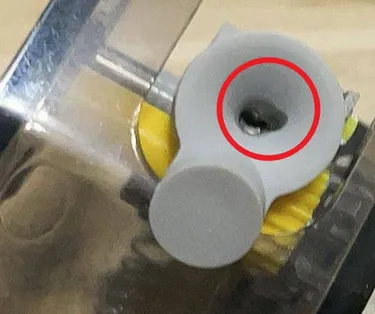
And if you check your AMS lite you can already see ( after couple of days of usage) heavy dust in the connector that will reach the extruder and clog it.


How to use it :

  • Print all connectors
  • attach them to the ams lite feed port ( bottom part)
  • add the lid to the filament BEFORE feeding to the AMS
  • feed the filament
  • add a small sponge to collect the debris
  • close the connector pressing the lid ( pressure fit)


To remove/change the sponge in the the coupler :

  • REMOVE THE CONNECTOR FROM AMS LITE
  • Use a flat screwdriver to open the coupler
  • DO NOT OPEN THE COUPLE WHEN CONNECTED TO THE AMS


If any of my work helped you and you wish to support me please follow & Like , or buy any of my 3d models on Cults3D : https://cults3d.com/en/users/OlleAdventures/3d-models


Enjoy!

Comment & Rating (34)

(0/1000)

I spent half an hour cleaning my extruder . hope it helps because my A1 the last days F##s up most prints with bad extrusion and clogs . So i was looking something like this. it printed with supports and inverted the Big caps on Bambu studio. less support that way. I also (Like JetSerge) had to rotate the small caps inside the big one to Lock so, not to come off when it retracts filament back . But seems to work like a charm. Thank you very very much dude. very Clever. i Believe you should post this on the Facebook group for everyone to see. i believe its essential part of A1 now.
(Edited)
The designer has replied
designer
1
Reply
thabk you, yes this is saving me hours of stress avoiding clogs :) 0 so far after installing . only occasionally the filament broke in the sponge caps, better there than inside the extruder
1
Reply
Boosted
Print Profile
0.24mm layer, 2 walls, 15% infill
Works way better than other dust covers. The eccentric assembly method is very handy. I added a negative part to the print because otherwise there was a collision while the filament was engaged.
(Edited)
0
Reply
Unfortunately the parts come loose, as with the other versions on MakerWorld
Show original
0
Reply
Print Profile
0.24mm layer, 2 walls, 15% infill
Printed perfectly
0
Reply
Print Profile
0.24mm layer, 2 walls, 15% infill
great print very helpful
(Edited)
0
Reply
Print Profile
0.24mm layer, 2 walls, 15% infill
0
Reply
Print Profile
0.24mm layer, 2 walls, 15% infill
0
Reply
Theres not many caps for the AMS lite unfortunately. This is my second model I've tried and it seemed like it was working well but the cap kept coming off when the ams would retract. Tried many times to get it to stay on inlcuding shrinking the size but it doesnt want to stay on.
The designer has replied
0
Reply
please try to rotate the cap to lock in place, they are ovalized to allow this lock
0
Reply
Replying to @OLLESTORE :
sorry i meant the entire thing kept coming off. the caps for the dust section fit fine but no matter what direction or how hard I pushed it wouldn't stay snapped onto the feeding tunnel
0
Reply
Pressure fit didn't work for me, only turning the cap can fix it (since it has an oval shape). Bottom part supports also didn't work with the current slicer version. Had to change from tree supports to standard ones to make it work, otherwise the hole circle was printed in the air.
The designer has replied
designer
1
Reply
yes its oval for lock the cap with the sponge inside , the supports I didn't find issues on my print but maybe was a case. thank you for your feedback
0
Reply
I have printed this and you can get it to work kind of, however I have to agree with some of the comments. The tree supports do not properly support the first layers of the hole and makes for extra cleanup post print but the filament should never touch this hole and it is hidden inside so not too big a deal. The clips that hold "Filament Wiper" to the AMS lite do not match the AMS very well. The Filament cones where the filament enters the AMS are skewed and the clip is not, causing only a very small area of the clip to engage the cone making for a looser fit. I could see adding just a small amount to the tab to give more engagement with the cone but this entire engagement area should be on a pitch to match the cone allowing for a much more solid attachment. Now on to the caps the design is a friction fit based on an ovel design and it does work however over time that friction interface is going ware and it will at some point not hold any more it would be nice to dump the ovel design and use a twist lock like the BL spools use or add threads to both parts. I would like to see the OP address some of the issues that have been brought to lite as a R1 or the get a remix by someone that understands the issues and knows the 3D programs to be able to make the adjustments. I only know very little about the 3D programs and can only make very basic objects to print so this is why I'm asking, Other wise I would do the remix myself and post it. This basic design is a great starting point for what could be as popular as a poop Shute.
1
Reply

License

This user content is licensed under a Standard Digital File License.

You shall not share, sub-license, sell, rent, host, transfer, or distribute in any way the digital or 3D printed versions of this object, nor any other derivative work of this object in its digital or physical format (including - but not limited to - remixes of this object, and hosting on other digital platforms). The objects may not be used without permission in any way whatsoever in which you charge money, or collect fees.
