Search models, users, collections, and posts

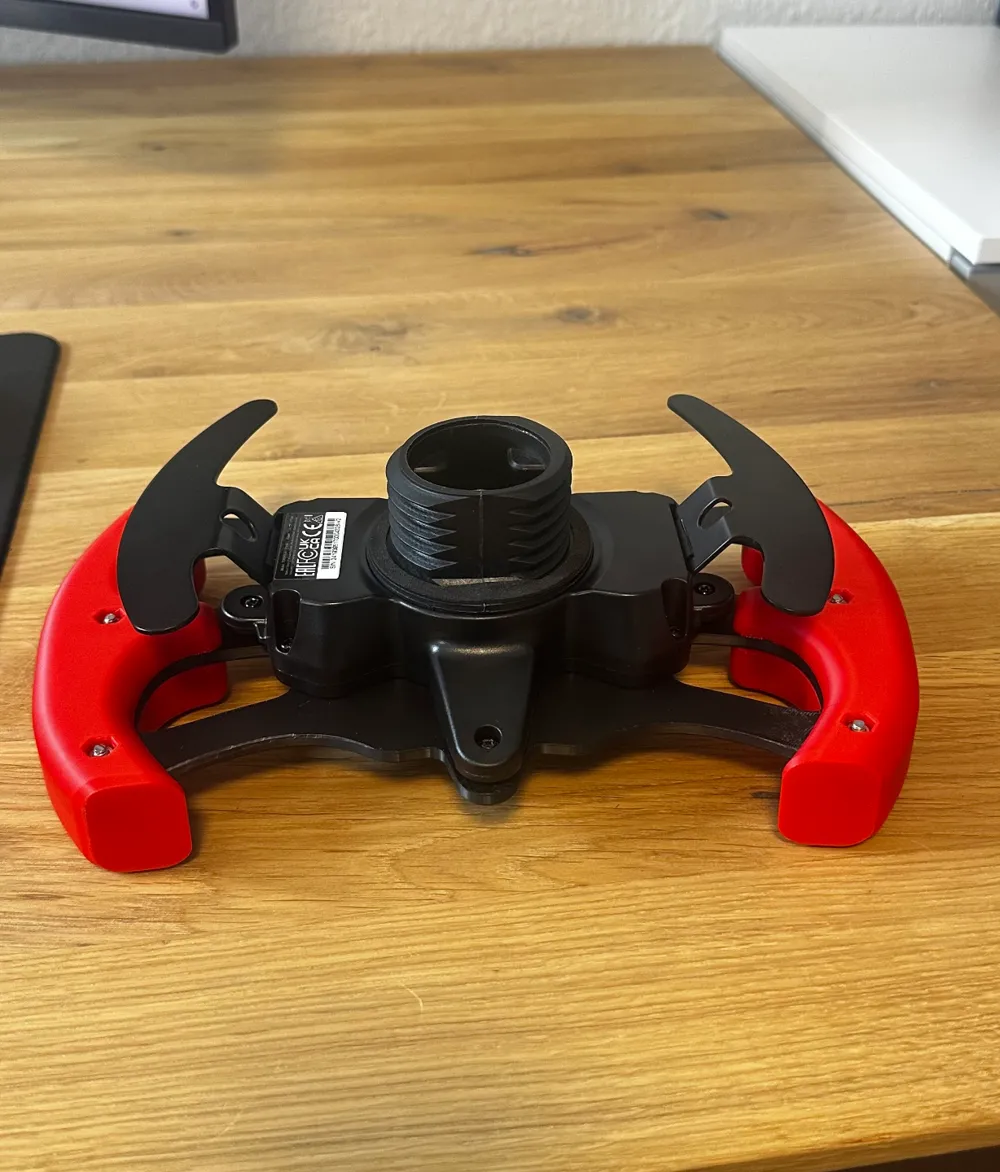
Thrustmaster T300 Steering Wheel F1 / Gt Style

Print Profile(2)

All
P1S
P1P
X1
X1 Carbon
X1E
A1
H2D
H2D Pro
H2S
P2S
H2C
X2D
A2L
A1 mini

Middle Plate / PLA / 0,15mm 40% Infill / 240x148x5mm
Designer
2.7 h
1 plate
4.9(27)

Handles / PLA / 0,2mm 25% Infill / 55x35x150,5mm (each)
Designer
3.5 h
1 plate
4.9(26)

Open in Bambu Studio
Boost
236
419
115
49
734
339
Released 

Description


Boost Me (for free)

In return I would be happy about a BOOST! :D


3-part steering wheel for the Thrustmaster T300 


Thanks to the well thought-out modeling work, the steering wheel can be manufactured in 3 parts without any problem on standard p1 or x1 printers, this guarantees high strength and low torsion when driving! 


6x m4x20 screws and 6x M4 nuts are needed


How To Mount:

The front 6 and rear 3 screws must be removed and the old steering wheel can be dismantled.

The new steering wheel can then be assembled in the same way backwards. I hope you have fun and you are satisfied with my work. Real recognize real buddy's! Don't be fooled by the Expensive STL's.


Comment & Rating (115)

(0/1000)

Boosted
Print Profile
Handles / PLA / 0,2mm 25% Infill / 55x35x150,5mm (each)
Love the way it came out, made some changes of my own, fully covered the original wheel & letters in the bottom holes, adjusted the X, square, triangle and circle holes, covered some screw holes on the front and added reinforcements to the back of the wheel, Used 15% infill TPU for the handles.
(Edited)
The profile uploader has replied
profile
2
Reply
Great work Buddy👏🏻
(Edited)
1
Reply
do you have the file just for the reinforcements?
0
Reply
beautiful wheel design, thanks to the creator of this. imma say its almost perfect model but I couldn’t get the left and right back screws in place properly so i use only the middle screws at the back, in front it work perfectly fine.
The designer has replied
designer
1
Reply
Yes, it's kind of difficult to attach the right and left screws ideally to the steering wheel, then every printer has different tolerances and uses different filaments. Just a bit tricky 😅 Thank you very much! I appreciate your kind words
0
Reply
added a bit of upgrade😍
0
Reply
Boosted
Great print, very easy to both print and assemble. Will probably not improve my driving though 😅
The designer has replied
designer
2
Reply
thank you for the boost! :D
0
Reply
Great design, the holes for the square, triangle, circle and X could be a but wider but work fine. thank you! also the print profile needs the handles mirrored, I had to reprint one of the handles and mirrored it in the studio.
(Edited)
The designer has replied
designer
1
Reply
you mounted the handles on the wrong Side😅 on this way Paddels should be in crappy near reach. In the .3mf the Handles should be Mirrord🤔😅
0
Reply
Replying to @Tekk3D :
Yeah I mounted them the wrong way for a photo, since been fixed once.
designer
1
Reply
I have converted the steering wheel into a BMW design. The BMW lettering and the fuzzy skin surface provide better grip. I have also added button labels for the PC. Thank you for the super template.
Show original
designer
2
Reply
I personalized the steering wheel a little because I’m a McLaren and Lando fan. Thank you very much for the base model.
(Edited)
The designer has replied
designer
1
Reply
this one is sick
0
Reply
Flawless print Very cool design thank you for it Only the middle screws I haven't been able to secure yet But I think that's more my fault 😅
The designer has replied
Show original
designer
1
Reply
Thank you very much Loosen the 4 outer screws again and check if the center position is shifted and causing any binding, otherwise you could try to use the steel screws as self-tapping screws and screw them into the plastic :D In the worst case, drill them out if possible Have fun
Show original
1
Reply
Print Profile
Middle Plate / PLA / 0,15mm 40% Infill / 240x148x5mm
great wheel very comfortable to use and assemble, handles are indeed tight to get on as someone else said, rubber mallet helped. only issue with the print is area between the circle buttons layers don’t seem to stick, saw same issue in another print so maybe settings should be slowed down.
The profile uploader has replied
profile
1
Reply
i think its just a small Spot which is in contact with the Plate, should have consteucted it a Bit different😅
0
Reply
Boosted
I love it ❤️
The designer has replied
designer
1
Reply
Looks sick buddy!
0
Reply
Hello, I have a small problem. There are large gaps around the rear left and right screws, and the screws are too short to function. Do you have any suggestions?
The designer has replied
Show original
0
Reply
this is what I mean
0
Reply
Do you mean the six in the middle? Those have different lengths and must be used in specific positions I have a tutorial video and I don’t currently recall which goes where Best regards
Show original
0
Reply
Replying to @Tekk3D :
I mean the small ones on the left and right
Show original
0
Reply

License

This user content is licensed under a Standard Digital File License.

You shall not share, sub-license, sell, rent, host, transfer, or distribute in any way the digital or 3D printed versions of this object, nor any other derivative work of this object in its digital or physical format (including - but not limited to - remixes of this object, and hosting on other digital platforms). The objects may not be used without permission in any way whatsoever in which you charge money, or collect fees.