
ENDER 3 PRO PSU RELOCATION


Print Profile(1)
Description
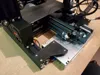
I didn't like how the PSU looked in the stock configuration. I designed this using AutoCAD.
The bottom of the PSU is approx. 1/4" off the surface when the stock rubber feet are used. I recommend using a different type of feet to raise the whole printer off the surface.
You will need extra bolts and nuts to mount.
Simply remove PSU from structure. Remove plastic housing from PSU. Remove 3 wires from switch and run thru small square hole in back of switch box. Reconnect wires and mount switch box. Mount left and right supports to PSU, using stock holes. Then mount to structure.
Enjoy!!
License

You shall not share, sub-license, sell, rent, host, transfer, or distribute in any way the digital or 3D printed versions of this object, nor any other derivative work of this object in its digital or physical format (including - but not limited to - remixes of this object, and hosting on other digital platforms). The objects may not be used without permission in any way whatsoever in which you charge money, or collect fees.


Comment & Rating (2)