
Rotating Base



Print Profile(2)


Bill of Materials





Description
Link new improved rotating base:
https://makerworld.com/en/models/1391956-rotating-base-2-0#profileId-1442324
4/1/2025 - UPDATE TO VERSION 2
I revised the external wall to give it a minimum of texture, as it was before it did not convince me being too smooth, everything else remains as before, so the changes made are only aesthetic, they do not compromise the operation using the components in the previous version, the base and the cap have been modified. The assembly video tutorial always remains the same since the assembly is always the same.
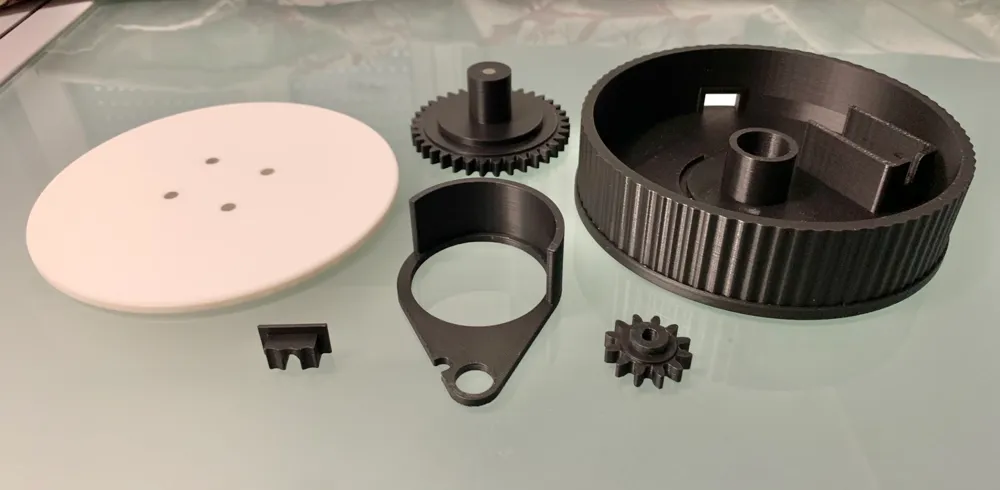
Rotating base designed entirely with Fusion 360, printable in two plates, the necessary to assemble this piece can be found on the Bambulab website, I leave you the links in the list to quickly reach in case of purchase. I thought of keeping everything blocked with 6x2 magnets, to keep them in their position I put a tip of liquid glue, in total you need 10 6x2 magnets, you can also find those on the Bambulab website, very easy to assemble. Before starting, glue the 10 magnets in their position, as I said there are 10 in total, in the 36-tooth gear there are 5 magnets, 1 below and 4 above, another magnet must be glued in the base where the shaft of the 36-tooth gear goes and the last 4 magnets must be inserted into the support base of the rotating platform which in this case I printed in white, the next steps are these:
Rotating base Assembly:
https://youtu.be/OBkdo8f3uN4?feature=shared
1- Insert the motor into the base seat by letting the USB power cable come out in the hole in the wall of the base.
2- Insert the Gear stop by making the small circle rest inside the white motor pin and insert the other side into the groove of the base.
3- Insert the small 12-tooth gear into the white motor pin and push it all the way in so that it also enters the gear stop.
4- Insert the 36-tooth gear into the other large hole of the gear retainer and push this all the way in so that the two magnets stick together
5- Position the support base over the 36-tooth gear so that the magnets stick together
6- Place the hole reducer cap from the inside out
I hope you enjoyed this project, if so, download it and comment with a nice photo and the relative rating stars, it is important not to forget =)
Happy Printing!
License

You shall not share, sub-license, sell, rent, host, transfer, or distribute in any way the digital or 3D printed versions of this object, nor any other derivative work of this object in its digital or physical format (including - but not limited to - remixes of this object, and hosting on other digital platforms). The objects may not be used without permission in any way whatsoever in which you charge money, or collect fees.


Comment & Rating (49)