
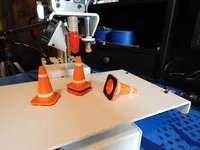
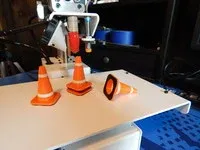
traffic cone
Print Profile(0)
Description
This was my first attempt to print multiple colors by pausing the print and changing filament colors. To get a clean and sharp color change, first
pause the print and then quickly move the Z up about 30 mm to remove the hot nozzle from the part. Then change the filament color. Purge about 100 mm to clear the old color from the extruder and prime the new color. Press "resume print" and wait for the next color change.
I printed these from Hatchbox PLA at 208 degrees on a Printrbot Metal Simple using Slicer and Repetier software. The parts were designed in AutoCAD
This remix is based on


License

You may create derivative works based on this object, provided that all such derivative works are published exclusively on the MakerWorld platform and include proper attribution to the original creator. You may not share, upload, host, distribute, or publish this object—or any derivative work of this object—on any other digital platform, marketplace, or distribution channel. Commercial use of this object and any derivative works is strictly prohibited. This includes, but is not limited to, selling, renting, sublicensing, or using the object in any context in which you receive monetary compensation or other financial benefits.


Comment & Rating (0)