Search models, users, collections, and posts
Recommendation
Creator’s Club
Creators & Fans
Show Your Make
Off Topic
Post Details

#PrintClinic
p1s not printing, literally.
Its not grinding
its not printing to fast
i hear the extruder motor clicking
thats it, itss all i hear and idk what to even do.
just see the video, itss fine for the first layer, then it stops, then in the air it starts again.
I just want to end this.(Edited)
Share
7
43
1
Comment (43)
Pinned by Poster
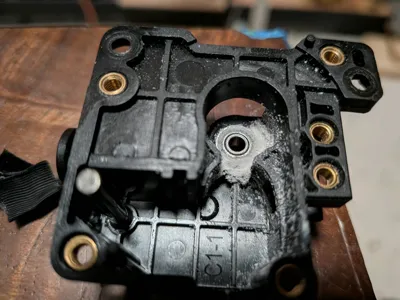
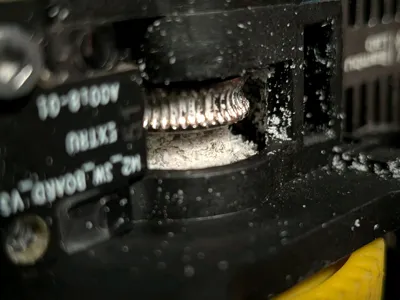
@_printer__ : i took it apart and guess what i found, i think it was heat creap on other prints and the dust made it worse
The poster has replied
3
Reply
@_printer__ : : it was to hot in the cold zone of the nozzle so it comepltely jammed. i ended up taking the glass top off conpletely and it seems to work. When i descovered this i had been printing with the glass lid cracked but i now know it needs to be off
1
Reply
@Printing3DFun : Was some of the extruder enclosure melted or was that just melted filament from heat creep? Some people like to crack the door open during printing to try and avoid heat creep but I haven't had that issue yet so I usually leave the door closed.
1
Reply

@user_698356840 : new nozzle and re tension extruder wheel or new extruder gear
2
Reply

@user_1247297404 : i think you should take it apart
The poster has replied
2
Reply
@_printer__ : take what apart? extruser Assembly?
1
Reply

@Aaron987B : Before continued trouble shooting, I would move the printer to a better location. Garages have really bad insulation so temperatures vary greatly and dust and debris are inevitable.
The poster has replied
2
Reply
@Aaron987B : : thats rough man hope you solve the printing issue
1
Reply
@_printer__ : i even proved that the air inside is clenaer than ourisde ( i have a hepa filter mod) but still no 😞
1
Reply

@blufufuf3D : Look like you opened the door lol.
The poster has replied
1
Reply
@blufufuf3D : : Yeah that could be why it was failing.
1
Reply
@_printer__ : yeah, garage is 30c, i have to open it, idea, that could be why its failing
1
Reply

@lootlabs : ohhh thats happened to me yiu ned to heat the nozzle after unloadibg filliment and then take filliment out of the nozzle with needle nose plyers, ( there will be a little peice of filliment stucking out) then after you pull it out, your printer will be all good!
The poster has replied
1
Reply
@_printer__ : : thank you, im just as confused as you
0
Reply
@lootlabs : : ah sorry man j have no ideas then
0
Reply

@user96 : This happened to me once on my P1S, “Air-printing”. For me what worked to fix it was as simple as replacing the nozzel, but there can be many causes for air-printing.
The poster has replied
0
Reply
@_printer__ : thx, illl take note, mine might be a bit to old
0
Reply
@lootlabs : how did the ai detection not pick that up?
The poster has replied
0
Reply
@CHOB123 : : oh. nevermind then.
0
Reply
@lootlabs : : i dont thonk the p2s has pne but the x2s has one cause i have the p2s and i dont remember there being a camera kn the tookhead
0
Reply

@waylaidwanderer : Welcome to the Print Clinic! That clicking sound from the extruder means the motor is slipping because it can't push the filament through, which is usually caused by a partial clog in the nozzle or debris jammed in the extruder gears.
Have you tried performing a cold pull on the nozzle to see if it clears any debris?
The poster has replied
1
Reply
@waylaidwanderer : : Let me know if you run into the problem again then, and we'll figure it out :)
1
Reply
@_printer__ : : i think? it was hot today, 35c so i did not print, i think for now its good
0
Reply
No more data
Trend
PrintClinic
HideAndSeekChallenge
Weekly Roundup
1
the Great Benchy Nations
3.2 k
2
Theprintertribes
2.8 k
3
Questions
1.3 k
4
Renew MakerWorld
967
5
Face Reveal
762
6
Newmodel
741
7
Revivemakerworld
675