Search models, users, collections, and posts

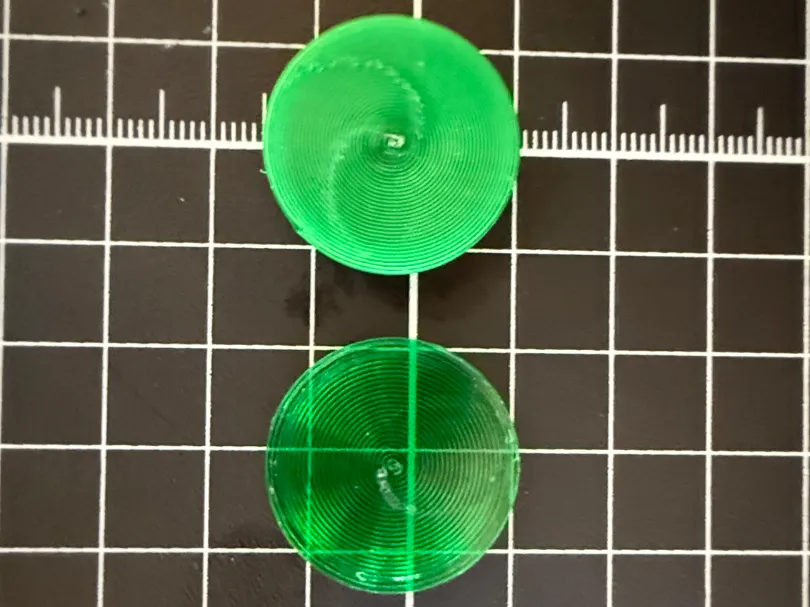
Translucency Test Model
IP Report
Print Profile(1)

0.4mm nozzle, 0.1mm layer, 0 walls, 100% infill
Designer
14 min
1 plate
Open in Bambu Studio
Boost
25
93
16
4
282
162
Released
Description
Use this model to test translucent prints of solid objects.
See the following companion post:
https://forum.bambulab.com/t/how-to-print-with-translucent-filaments/128728
Getting optimal results will depend on the layers fusing together and cooling slowing to allow for crystallization. This will optimize molecular arrangement and allow for greater translucency.
The following should be a good starting point for non-Bambu filaments:
Global Settings
- set print speed to 20mm/s
- set layer height to 0.1mm
- print without top or bottom layers, as well as without walls
- set infill to 100%
- set infill to have a single direction
- use a hot, smooth build plate
- use the the largest nozzle possible that still satisfies your quality requirements
- set all line widths to [nozzle width] * 0.9
Filament Settings
- set print speed to 20mm/s
- turn off all fans
- increase the temperature as high as possible without burning or bubbling; for PETG this might be between 260 and 270C
- set flow rate to 1.01
- make sure PETG has less than 15% humidity
Custom Adjustments
- after slicing review the layer time view and try to keep layer times below 80s (need to verify the exact threshold)
- after print completion let it cool slowly on the printer
Things still to be figured out:
- Minimize top layer extruder tracks.
- Improve 0.2mm nozzle results, problem seems to be too narrow of a line width, especially on the bottom and top layers, which creates a lot of diffusion. This may be able to be slightly compensated by improving #1.
- Verify layer time threshold to promote fusing of layers; may be able to compensate higher layer times with higher nozzle temps.
License

This user content is licensed under a
Creative Commons Attribution-Noncommercial


Comment & Rating (16)