
Enhancing Bottom Layer Print Quality - First Layer Flow Calibration

Print Profile(7)

![[tagged] 0.99~0.95 & 1.01~1.05](https://makerworld.bblmw.com/makerworld/model/US1db58026745c36/184023848/instance/2024-12-23_92cf12da2622b.jpg?x-oss-process=image%2Fresize%2Cw_100%2Fformat%2Cwebp)
![[tagged] 0.99~0.93 & 1.01~1.07](https://makerworld.bblmw.com/makerworld/model/US1db58026745c36/186266745/instance/2024-12-23_8d023bd97afd.jpg?x-oss-process=image%2Fresize%2Cw_100%2Fformat%2Cwebp)

Description
Save this project; you'll find it invaluable, as many models require inverted printing to avoid or minimize supports
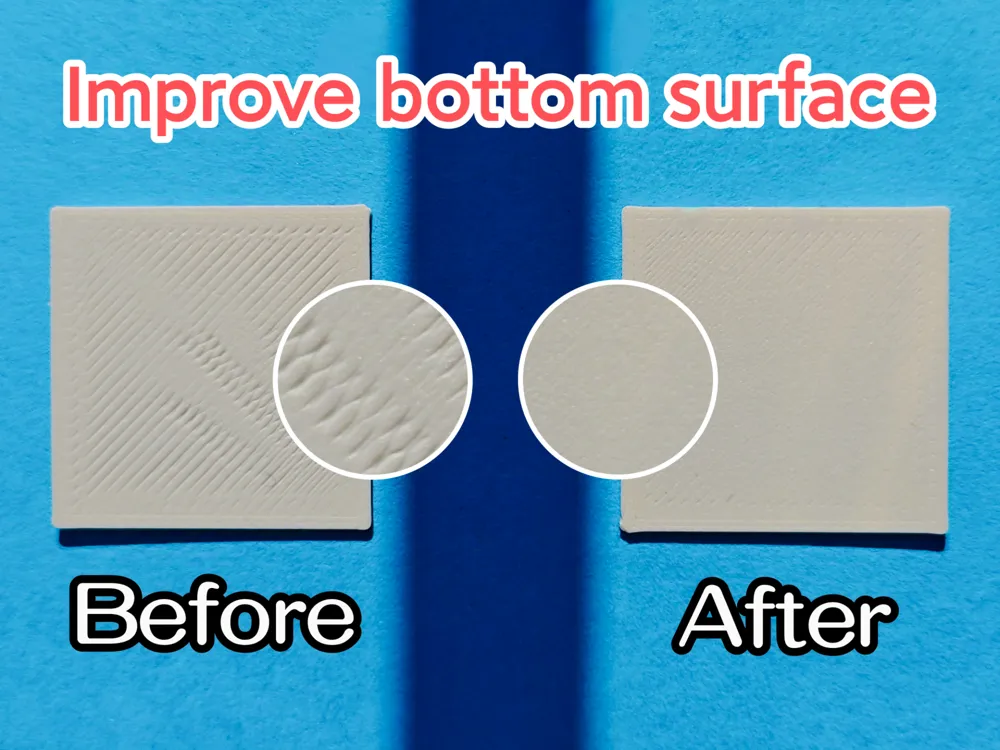
When I needed to invert-print models, I found the base quality unsatisfactory, exhibiting noticeable surface imperfections, especially using the SuperTack low-temperature build plate. The textured plate showed less obvious issues due to its texture, but still required optimization.
After a week of troubleshooting, I achieved excellent results. The key was the initial layer flow ratio, and this model helps you quickly find the optimal value.
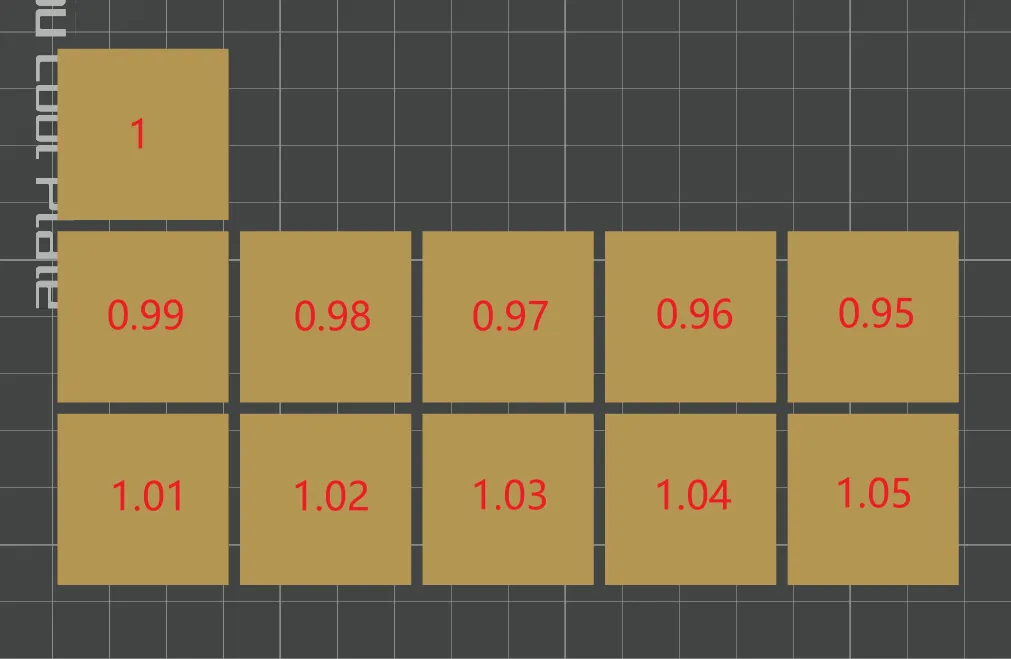
Each square in the model uses a different initial layer flow ratio. After printing, remove the squares from the build plate and identify the best one, noting its corresponding value.
You can also test with your own initial layer flow ratio settings (requires enabling developer mode: Menu -> Preferences -> Developer mode).
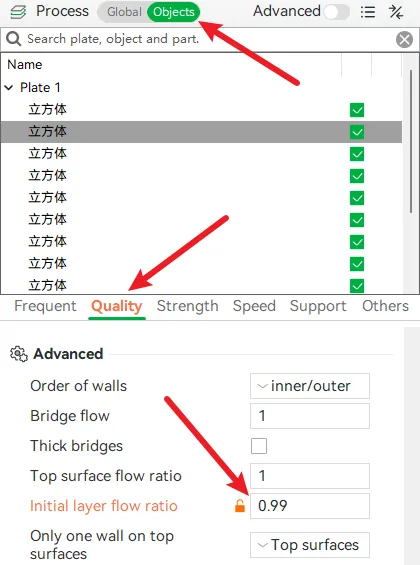
The configuration file uses the SuperTack low-temperature build plate; adjust it to match yours.
Below are several factors impacting base print quality.
Dynamic Flow Calibration
Utilize Bambu Studio's dynamic flow calibration feature to optimize the smoothness of edges, corners, and lines.
During calibration, it's recommended to perform both pattern types (pattern and lines). If the results differ, consider using the average.
Flow Ratio Calibration
Employ Bambu Studio's flow ratio calibration function to enhance the surface smoothness of your prints.
Print Speed
Troubleshooting suggested reducing the first layer print speed, but slower speeds yielded poorer results for me. This is for reference only: I adjusted both the first layer and first layer infill speeds to 30mm/s.
Initial Layer Flow Ratio
This is the model's primary function. For me, this provided the most noticeable improvement. Initially, the defects suggested insufficient flow, and troubleshooting suggested increasing the ratio. Unexpectedly, increasing flow worsened the results. Decreasing it, however, yielded significant improvement. I use Bambu PLA Basic with an initial layer flow ratio of 0.95.
Nozzle
This is a hardware optimization. For A-series printers, consult A1 Series First Layer Print Issues - First Layer Too Low, Hotend Moving | Bambu Lab Wiki (click the globe icon in the upper right corner to change languages). This improved my results.
Z-Axis Compensation
I didn't use this, but it was suggested during troubleshooting.
A1 | A1 mini: In the printer G-code > printer start G-code, scroll to the bottom, then slightly upward to locate G29.1 Z{-0.02}. Adjust -0.02 to -0.04 or -0.05. Higher values increase nozzle height relative to the bed.
With this, I wish you smooth base prints. Thank you for reading.
License

You shall not share, sub-license, sell, rent, host, transfer, or distribute in any way the digital or 3D printed versions of this object, nor any other derivative work of this object in its digital or physical format (including - but not limited to - remixes of this object, and hosting on other digital platforms). The objects may not be used without permission in any way whatsoever in which you charge money, or collect fees.


Comment & Rating (993)