
Space Navigator (3D mouse) Joystick V1

Print Profile(2)


Description
(There is also a V2 here that has a flexible grippy cover.)
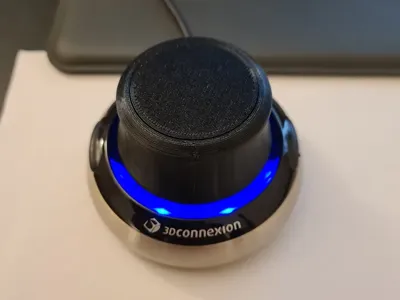
This part was made to replace the original control joystick on my old 3dconnexion space navigator. The original rubber coating started to break down one day and was sticky to the touch/falling off the exterior. NOTE: There is a textured version STL provided too if the smooth version is too slippy in your hands.
I modelled this to fit with the original hardware so all that needs to be done is to remove the cap from the original joystick (shiny plastic circle on top, can be pried off by lifting it up from the seam at the edge with a screwdriver) and removing the hardware keeping it in place. Then it is as simple as dropping in this replacement part and screwing it in place. There is also a 3D printable top cover to go with it. Depending on your fitment from the printer it might hold itself in with friction or some glue would secure it, don't use too much in case you want to replace things later. The replacement joystick should only be able to go on properly in one orientation as there are small notches modelled to make it fit with the underlying PCB, simply twist the part with very gentle downwards pressure and it will drop in to place. If the screw holes don't line up then try again with 180 degrees more rotation. Below is a photo of the alignment notch in question.
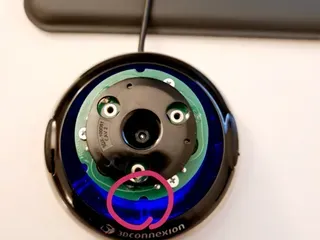
The main joystick prints upside down with minimal supports underneath but the modifier stl should be used in order to block support for the screw mounting channels as these are modelled to print support free using bridging. The top cover prints with no supports.
Print settings
The base settings I used are in the attached .3mf file, feel free to edit them to your liking/to match your printer.
The general details are, 0.2mm layer height, supports on (angle threshold set to only support flat top section, none of the sloping exterior walls), support blockers used to keep screw channels clear, printed using generic PLA. I used 3 walls for strength as well.
Boost Me (for free)
If you like the model please consider boosting, it helps me design and make more stuff! Thanks :)
License



Comment & Rating (9)