
Support Interface Test


Print Profile(2)


Description
Wanted to make a quick and easy print for testing support interface to get cleaner supported areas on my prints.
This is a basic model but works great for this, if using bambu/orca slicer, you can set up multiple for one print and change the z contact interface of each one, then take them off and see which distance gives you the desired result.
I have added a rounded model as well for those who tend to print more organic models.
I have attached photos as well of how to change each objects support settings for those who aren't aware.
Print Settings I used
Bambu Optimal Settings (0.16 layer height)
If wanting to do multiple in one print, simply import file, right click, “Clone” then add desired amount of tests.
To change the z contact distance for each, click here
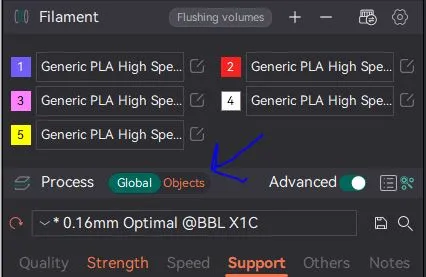
then click on each object and select support below
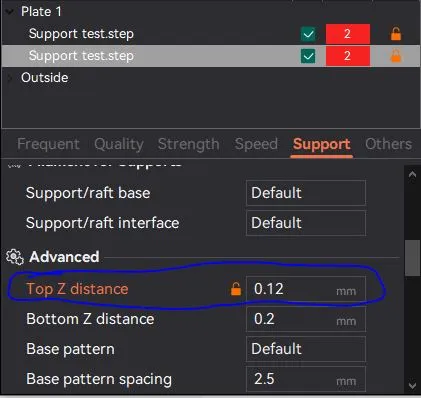
Once the tests are complete, take the supports off and you should see a difference in the support spacing and the overall finish on the under side.
Hope this helps and happy printing!
License



Comment & Rating (20)