
Filament Creator - Tricolor


Print Profile(5)


Description
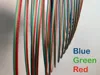
Here’s a unique model that allows you to create your own tricolor filament. Instead of purchasing pre-made filament rolls, you'll use your 3D printer to directly print a filament-like structure. This process involves printing a model that itself functions as 3D printer filament. You choose three colors to incorporate into the model—designated as top, middle, and bottom layers. These layers are fused during the printing process to form a continuous, multicolored filament strand. Once printed, this custom filament can be used just like standard filament to add a personalized touch of color to your 3D printing projects.
When used in your 3D printer, the tricolor filament exhibits unique characteristics similar to commercial dual and tricolor options. Depending on the arrangement of colors and the orientation of your print model, you can predictably influence where colors appear on your final print. For example, you can anticipate your three colors (top/middle/bottom) to show up in consistent bands throughout your printed model, blending beautifully from front to back. This arrangement offers a degree of control over the visual outcome, allowing for creative and stunning effects in your printed objects.
Printing Hints
- To reduce adhesion issues, especially with materials like PLA and PETG, consider using a Bambu Textured PEI Plate.
- Clean your printer bed with soap and water before attempting to make this filament to ensure flawless adhesion and pristine print quality.
- Make sure the Bed Leveling option is selected for a solid first layer.
LARRY the tiny Dino has been the featured subject in the photos showcasing the multi-color filament that I’ve been creating. All the filaments I used to create the multi-colored effects were made from matte PLA. The multicolor appearance is somewhat more subtle than what you might see in pre-made dual-color filaments, which often use silk-type filaments for a more pronounced effect.
Happy printing!
Check out these other custom filaments you can make: Quad-Color, Custom Colors, Stratified and Dual Splice.
Boost Me (for free)
Fuel the Filament Fund!
License

You shall not share, sub-license, sell, rent, host, transfer, or distribute in any way the digital or 3D printed versions of this object, nor any other derivative work of this object in its digital or physical format (including - but not limited to - remixes of this object, and hosting on other digital platforms). The objects may not be used without permission in any way whatsoever in which you charge money, or collect fees.


Comment & Rating (199)