
Parametric Hose Adapter Model


Print Profile(1)

Description
Background
I started this project because I needed an adapter to fit my 1-7/8" shop vac accessories on my 2-½" shop vac. If you're interested in that specific model only, you can go here. However, as I designed the adapter in Fusion 360, I realized I could generate a parametric model that would let others customize their own hose adapters for dust collection, HVAC, vent lines, etc.
The Parametric Model:
I have included both the Fusion 360 .f3d file and general .step file to use in whatever CAD program you might like. The model has User Parameters defined that enable changes to the following:
- End diameters and lengths
- End tapers (inward or outward)
- Distance between fitting ends
- Offset between the two fitting ends
- Wall thickness
The dimensioning is set up to be inputted as inside dimensions for the ends, but if outside dimensions are the critical measurements for your adapted, simply decrease the needed outside dimensions by 2 times the wall thickness you intend to use and enter this as your inside dimensions. This will give you precise outside dimensions and it's what I did for one end of my shop vac adapter.
If you want the adapter to have smoother corners, just add fillets or chamfers to outside and/or inside corners after all dimensioning is complete. Doing this prior to dimensioning may result in errors during dimensioning.
Modifications In Fusion360
If you're familiar with Fusion360, skip this section.
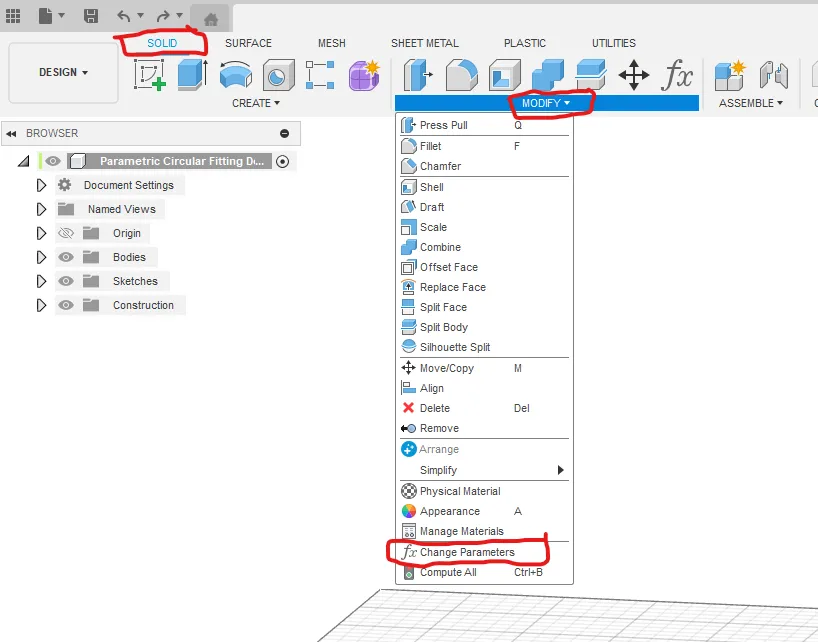
I have included the STEP file, which I believe (?) maintains User Parameters for use in other CAD program, but I am only familiar with Fusion360. If you're new to Fusion360, it's a free download from Autodesk for non-commercial use and making User Parameter changes to make a custom STL file pretty straight forward. Once you open the attached the .f3d file in Fusion360, go to the menu Solid > Modify > Change Parameters. This will open the Parameters window. Under the User Parameter section, simply modify the measurements in the Expression column and the drawing will update on the fly. Once changes are made, save the new model and export the STL file for 3D printing. If you run into issues with User Parameters, this is one YouTube video I found that explains them, but there are many others.
3D Printing Your Model
My shop vac adapter needed no supports for printing, but every new adapted will need to be studied in your slicer to determine where supports might be needed, especially in the case of offset adapters. I also printed my model with a brim since the end face, at least in my model, did not have a significant amount of bed contact area.
I hope others find this useful.
License

You shall not share, sub-license, sell, rent, host, transfer, or distribute in any way the digital or 3D printed versions of this object, nor any other derivative work of this object in its digital or physical format (including - but not limited to - remixes of this object, and hosting on other digital platforms). The objects may not be used without permission in any way whatsoever in which you charge money, or collect fees.


Comment & Rating (18)