
ACE PRO - GUIDE
Print Profile(0)
Description
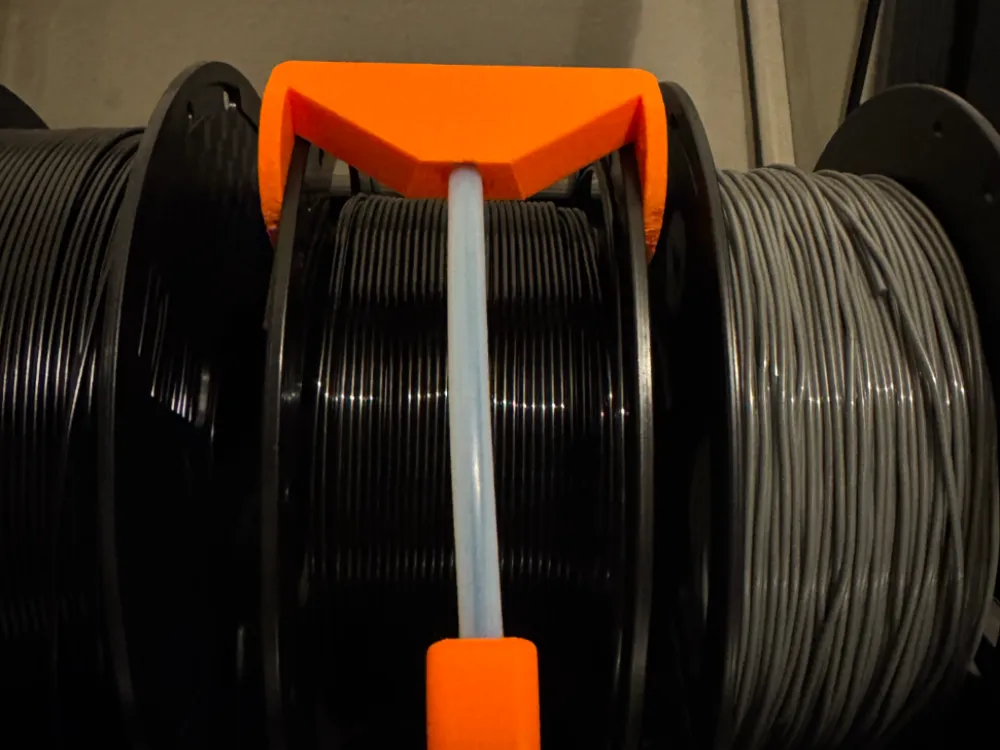
This 3D model is designed to solve the common filament tangling issue on the Anycubic ACE Pro.
The original filament guide insert of the ACE Pro can sometimes allow the filament to twist or form knots during feeding. This replacement insert improves the filament path and stabilizes the feed.
Installation instructions:
- Remove the original insert from the ACE Pro.
- Install the replacement insert from this model.
- Attach a 6 mm diameter PTFE tube (length 15–20 cm) to the new insert.
- Connect the other end of the PTFE tube to the second printed part included in this model.
This modification creates a controlled filament path and completely eliminates the knotting problem during printing.
License

You shall not share, sub-license, sell, rent, host, transfer, or distribute in any way the digital or 3D printed versions of this object, nor any other derivative work of this object in its digital or physical format (including - but not limited to - remixes of this object, and hosting on other digital platforms). The objects may not be used without permission in any way whatsoever in which you charge money, or collect fees.


Comment & Rating (0)