Search models, users, collections, and posts

Parametric spacer for Gridfinity push together baseplate
Remixed by
IP Report


Print Profile(1)

0.2mm layer, 2 walls, 15% infill

48 min
2 plates
Open in Bambu Studio
Boost
53
247
13
8
501
64
Released
Description
Description
Some extra space on the side of your drawer? Customize and print these spacers so you can fit your baseplate perfectly.
The design is parametric so you can specify the perfect width and length for your spacer.
Customizing
- Download the .f3d file and open it in Fusion360
- In the top bar, go to Modify > Change parameters
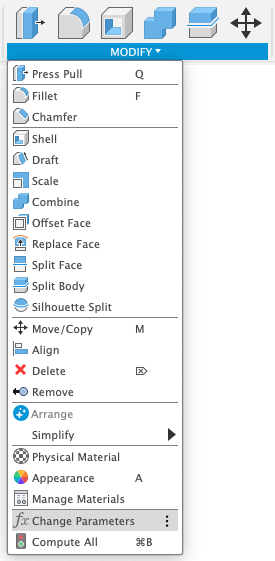
- In the parameters window, set the two values as you need:
- SpacerWidth: how much the spacer should be wide (recommended not less than 5mm)
- GridfinityUnits: how much Gridfinity units length the spacer should have (max. 7)
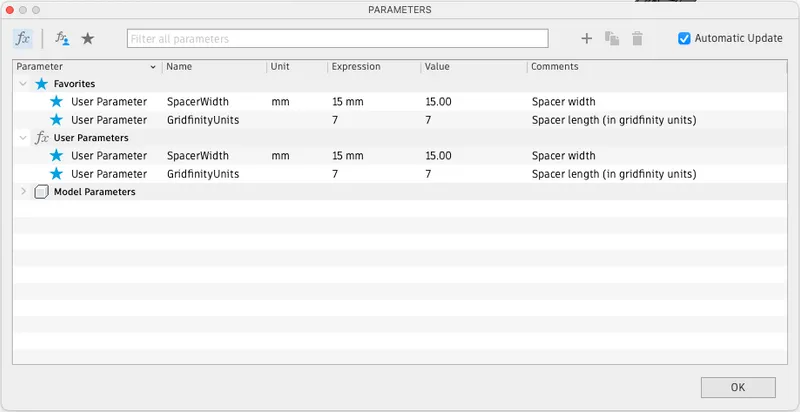
- Click “OK”
- On the left side bar, right-click on Bodies > Gridfinity spacer and choose “Save as Mesh"
- A popup will open on the right side of the Fusion360 window, choose the following options:
- Format: STL
- Refinement: High
- Unit type: Millimeter
- Click “OK”.
- Choose the folder you want to save the STL to
- Print and enjoy!
This remix is based on

License

This user content is licensed under a
Creative Commons Attribution-Noncommercial-Share Alike


Comment & Rating (13)