
Anycubic Kobra 3 Max profile 0.4 nozzle orcaslicer
Print Profile(0)
Description
I am adding my print profile for Kobra 3 max to the Orca slicer.
The print profile is constantly being improved.
How do you save the settings for other prints? Here is what you need to do.
Step 1: Download and open the 3MF file which I provided.
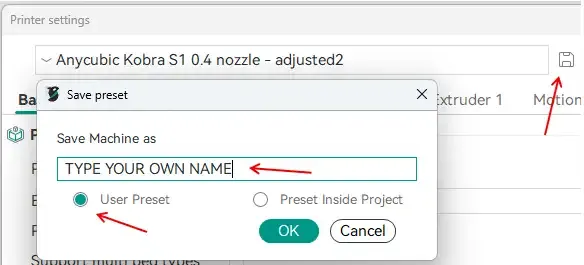
Step 2: Go to the printer settings -> klick on save -> !IMPORTANT! give the profile your own name and choose the user presets option
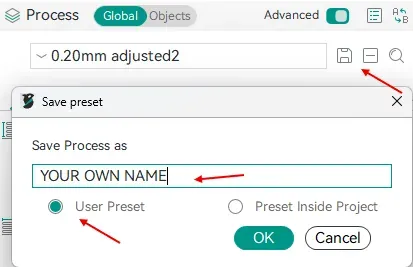
Step 3: select each process profil you want -> klick on save -> !IMPORTANT! type in your own name and choose the user presets option
And now enjoy your prints
License

You shall not share, sub-license, sell, rent, host, transfer, or distribute in any way the digital or 3D printed versions of this object, nor any other derivative work of this object in its digital or physical format (including - but not limited to - remixes of this object, and hosting on other digital platforms). The objects may not be used without permission in any way whatsoever in which you charge money, or collect fees.


Comment & Rating (20)