Search models, users, collections, and posts

Infinity Spool Holders - Stackable Storage Containers - Wire, Solder, Ribbon
IP Report


Print Profile(8)

Spool Tray - 0.2mm layer, 2 walls, 15% infill
Designer
6.1 h
3 plates

Spool Bin - 0.2mm layer, 2 walls, 15% infill
Designer
8 h
3 plates
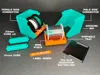
Spool Pin & Cores - 0.2mm layer, 2 walls, 10% infill
Designer
1.1 h
2 plates

Label Insert - 0.2mm layer, 2 walls, 15% infill
Designer
13 min
1 plate
Click to see more
Open in Bambu Studio
Boost
321
834
81
42
580
280
Released
Description
Infinity Spool Holders is a modular storage and management system for spools of wire, solder, ribbon, and more!
- Fully compatible with Infinity Bins!
Features:
- Infinite expansion vertically and horizontally
- Removable spool trays for portability
- Docking bins for storage
- Label insert to easily identify the contents of each bin (optional)
- Bottom TPU pad for slip reduction on smooth surfaces (optional, must print in TPU or similar material)
- Parametric spool core model provided
Use Cases:
- Spool storage and management (up to 70mm diameter)
- Office, home desktop
- Workshop workbench
- Crafting table
- Maker space
Notes:
- Enable support on the Spool Tray model for a flush bottom edge
- It's easiest to expand the bins horizontally from the right-hand side because you and slide the next bin into place top-down through the dovetail channel.
- Shown as printed at 0.2mm layer height.
- Bin dimensions: 81.9 x 85 x 85mm
- Label blank dimensions: 73.6 x 12.4 x 1mm
Parametric Spool Core Instructions:
- Open infinity_spool_core_parametric.f3d with Autodesk Fusion
- Modify > Change Parameters
- core_diameter is the measurement of the inner core of your spool
- core_length supports a maximum length of 64mm
Edit Label in Bambu Studio:
- Open infinity_bin_label_bambu_studio.3mf file
- Switch Process to Objects
- Right-click Label Text in the object list
- Select Edit Text
- Use the text dialog to modify the text
- Right-click Label Text in the object list
- Select Center

License

This user content is licensed under a Standard Digital File License.
You shall not share, sub-license, sell, rent, host, transfer, or distribute in any way the digital or 3D printed versions of this object, nor any other derivative work of this object in its digital or physical format (including - but not limited to - remixes of this object, and hosting on other digital platforms). The objects may not be used without permission in any way whatsoever in which you charge money, or collect fees.


Comment & Rating (81)