
Modular box generator
Print Profile(0)
Description
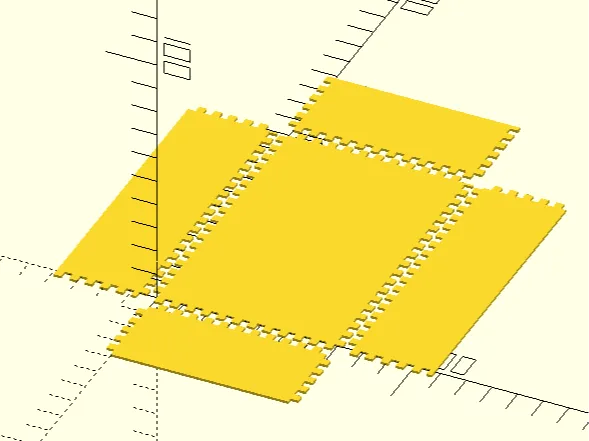
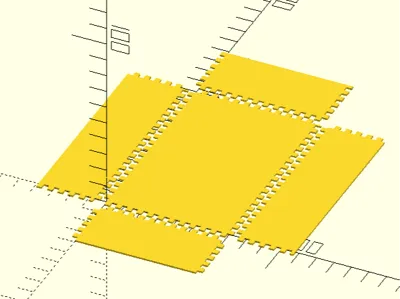
This is a fingered box generator module in OpenScad that can be used as a library or using examples provided as a script. Since laser section does not allow OpenSCAD files, here is the link to download it. Uploaded SVG files are just a few samples what this library can do. In the tutorial section I have described how to create your own customized boxes.
Use the following code to create an enclosed box, change the variables with desired values.
fingered_box([width, height, depth], thickness)
This is the first example in the script and you can also use it by uncommenting (removing // at the start of the line) line 258. Once comment is removed, you can change the variables between lines 252 and 255 to setup your box. Thickness is the thickness of the material. You can add an additional parameter by placing a comma after thickness to change finger width. If left empty finger width is the same as thickness.
This is a bit trickier as the dimensions you give to fingered_box module is inner dimensions. To get outer dimensions, you need subtract thickness. Additionally, top of the box should be removed. Number of parts can be specified as optional arguments with names x_parts, y_parts, and z_parts. The following is the second example and shows how to do this:
fingered_box([width - thickness*2, height - thickness*2, depth - thickness], thickness, z_parts = 1);
If you are creating a drawer, you may also want to cut a front face. Additionally, drawers should be smaller on the z-axis to move easier but the front face is created at the target size to ensure it will cover the drawer slot completely.
For this you may want to check example 3, 4 and 5. fingered_rect module can be used to create plates. This module is used by fingered_box module:
fingered_rect(size, thickness, finger_width = "", side_setup = [[0, 0], [0, 1], [0, 0], [0, 1]])
size is the dimensions in [width, height] form. thickness is the material thickness. finger_width is the size of fingers, if left as empty string instead of a number, thickness will be used instead. side_setup adjusts joints on each side, the ordering is top, bottom, left and right. In each side, the first number is the type, the second is whether to start with a blank or not. Type could be -1 for a straight edge, 0 for a regular one and 1 for reversed. If the size is divisible by finger_width, reversed and blank start will have same effect, making boxes much easier. Otherwise creating a simple box would require some planning. You may see the code for fingered_box module to see how it is done.
Function finger_joint can be used to generate coordinates for cutouts of a joint. fingered_box internally uses this function. You need to use difference to accomplish this. See OpenSCAD documentation to learn more. The following is how it can be used:
polygon([
each finger_joint(start = [0, 0], length = 200, dir = 0,offset = 4, size = 4, reversed = false,
blank = false)
[0, 200] //final point
]);
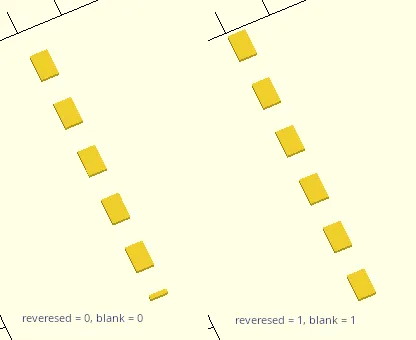
Let's go through these parameters, start is the starting location. length is the length of the joints. It is possible to do exact size, but that might require you to add two more points to the polygon manually. dir is direction, 1 is x axis, 0 is y. offset is the thickness of the material. size is the size of fingers, ideally this is same as material thickness. reversed reverses the cutouts. blank starts without a cutoff.
If final point should be [start[0], length] if dir is 0, [length, start[1]] if dir is 1.
In a simple cutout, reversed and blank should set to be the same but you might need to rotate the entire polygon 180 degrees for it to fit. If length is divisible by size, rotation will never be needed. When rotating, use rotate_around_2d module that is provided in the script use 180 for angle. If dir is 0, use start + [thickness, length]/2; if dir is 1, use start + [length, thickness]/2 for the pivot point.
The effect of reversed and blank can be seen in the following image:
You can use import to use this script in your own scripts, enabling the use of finger_box and fingered_rect modules and finger_joint functions. Do not use include as it might include any example models. If you use fingered_rect module and finger_joint function, I recommend doing a test fit using blender or similar software as the cutouts can get complicated. finger_box module handles these complications and create a fitting box no matter the size and if the size is divisible by twice the thickness.
You need to first build by pressing F6. If the object is a 2D system like in all examples except for #3, from the File menu > Export > DXF or SVG. If you have incorporated this work in 3D, simply press F7. Any parts you create with this script is your own work, you do not need to give attribution. However, if you incorporate this into another OpenSCAD script, you need to follow CC-BY rules (which allows commercial use).
License



Comment & Rating (6)