
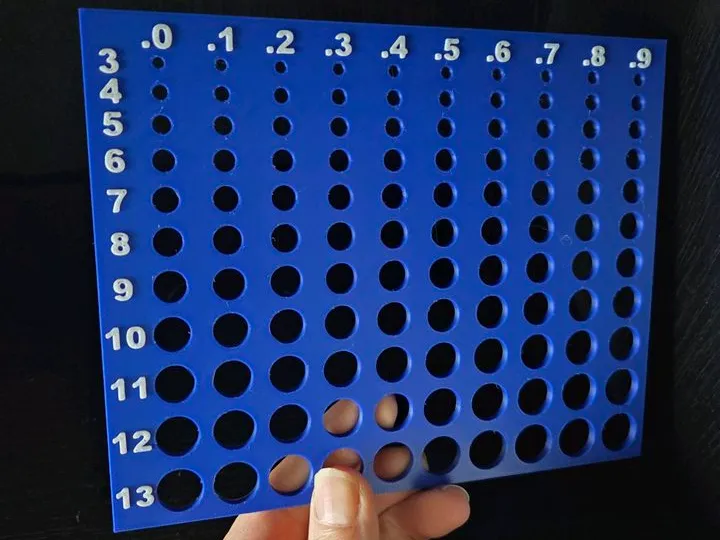
Hole size gauge 3mm to 13.9mm with raised numbers
Print Profile(2)



Description
Boost Me (for free)
If you find this useful, I would appreciate a boost! Even if you don't have a boost to give, don't forget to rate it and share a pic!
We all know that adding a 5mm hole to a project to include a 5mm magnet or pin doesn't always mean it fits perfectly. The 5mm magnets I use generally need a 5.2mm hole added to projects. I created this handy hole sizing guide to determine the size of a hole you need to include in your CAD drawing to include magnets, hinge pins, latch pins, etc. and make sure that your hole is the correct size.
To use, simply print this out, keep it on hand, and when you want to add magnet or pin to a project, you can test fit it on this template to make sure you're adding the correct size hole to your project the first time and save yourself from redesign work and reprinting projects.
The hole sizes start at 3mm, and increase by 0.1mm increments, so top row is 3.0 thru 3.9mm, and each row is an increase of 1mm all the way to the bottom row that is 13.0mm to 13.9mm.
Designed to fit on an A1 mini plate, so it will fit on all bambu model plates.
*There is an automatic pause inserted later in the print where you must switch your filament to the color you want the numbers*
- First filament - main color
- Second filament - number color
*Note that this model prints face up for raised numbers to be a different color*
For a 1 color model with recessed/debossed numbers instead, check out my other model here: https://makerworld.com/en/models/889637#profileId-845798
For a 2 color print with flush numbers for AMS users, check out my other model here:
License

You shall not share, sub-license, sell, rent, host, transfer, or distribute in any way the digital or 3D printed versions of this object, nor any other derivative work of this object in its digital or physical format (including - but not limited to - remixes of this object, and hosting on other digital platforms). The objects may not be used without permission in any way whatsoever in which you charge money, or collect fees.


Comment & Rating (16)