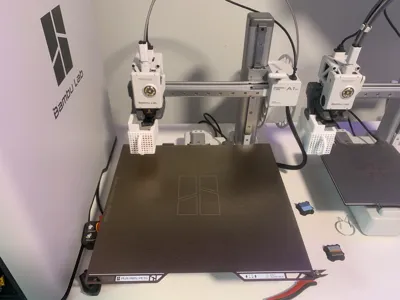
I’ve been using the Bambu Lab H2S Laser Combo for exactly one month now, and this isn’t a spec‑sheet review or a marketing recap — it’s just my real experience living with it day to day.
I bought this myself, I use it regularly, and I went into it mostly just curious. I didn’t expect it to change how I make things as much as it has.
How I Actually Think About It
I don’t really think of this as a 3D printer or a laser.
In my head, it’s just a box.
You put materials in one side… and finished things come out the other. That’s it.
Once I stopped thinking about what the machine is and started thinking about what it lets me make, it clicked. And since then, I’ve been using it for stuff I genuinely didn’t expect.
Using It (Software & Workflow)
The laser itself is very easy to use. The software is clean, makes sense, and doesn’t fight you. There’s a short learning curve, but once you’re past that, it feels smooth and predictable.
One feature I didn’t think I’d care about — but now rely on — is the bird’s‑eye camera. You can drop objects into the machine, see them live, and line everything up visually. From my testing, it’s accurate down to the millimeter, which honestly surprised me.
What I’ve Made So Far
I’ve already engraved and cut:
- Cork
- Wood
- PLA
- Metal
- Paper
And this is where things got interesting.
I started making random, useful things:
- Cork seals
- Small wooden “thank you” keychains
- Metal dog tags for friends
Stuff I never would’ve printed.
I ended up liking the results enough that I actually started an Etsy shop, selling items made only on this machine:
👉 (CustomCrafted314 - Etsy)
That alone should tell you how often this thing gets used.
Safety (Done Right)
This is one area where Bambu clearly didn’t cut corners.
There are a lot of safety features, and the enclosed design makes the laser feel controlled and approachable instead of sketchy. You can’t see through the top glass panel — which is intentional for laser safety — and while part of me wishes I could watch the laser directly, I’d rather not trade safety for vibes.
There’s also a physical E‑Stop button, which I honestly love. I’d recommend buying it even if you don’t plan on using the laser. If something ever sounds very wrong, you can just slam the button and instantly shut everything down. Way better than panic‑clicking through menus.
Ventilation
Ventilation is solid.
Smoke and fumes get handled well, and what’s left behind is basically just the classic burnt‑wood smell. If you’ve ever laser‑cut wood before, you already know what I mean.
Things I Really Like
- Very easy to use once you learn the flow
- Strong focus on safety
- Bird’s‑eye camera that actually works (and is accurate)
- Not locked to proprietary materials
- Lets you work with way more than just plastic
- The green glow from the laser panel (I don’t care — it’s cool)
If you want to put your name, logo, or branding on almost anything, you usually can. Just place it in the machine and go.
Things I Don’t Love
A few things genuinely bug me:
- The screen is plastic, and I really don’t like that
- You can’t see through the top glass panel (necessary, but still worth noting)
- There aren’t a ton of laser‑specific models on MakerWorld yet
That last point matters. If you don’t enjoy modeling or tweaking designs yourself, you might feel limited right now.
Is It Worth the Extra Money?
Honestly? It depends on what kind of maker you are.
If you want to make more things and expand into new materials, then yes — I think it’s absolutely worth it.
If you mainly love traditional 3D printing and don’t see yourself branching out, you might end up forgetting the laser exists once the novelty wears off.
Final Thoughts
For me, the H2S Laser Combo didn’t replace anything — it expanded what I can do.
It quietly became one of those tools that you keep reaching for because it solves problems you didn’t even realize you had.
If you’re thinking about getting one and have questions, feel free to ask. After a month of real use, I’ve got opinions — and I’m happy to share them.