
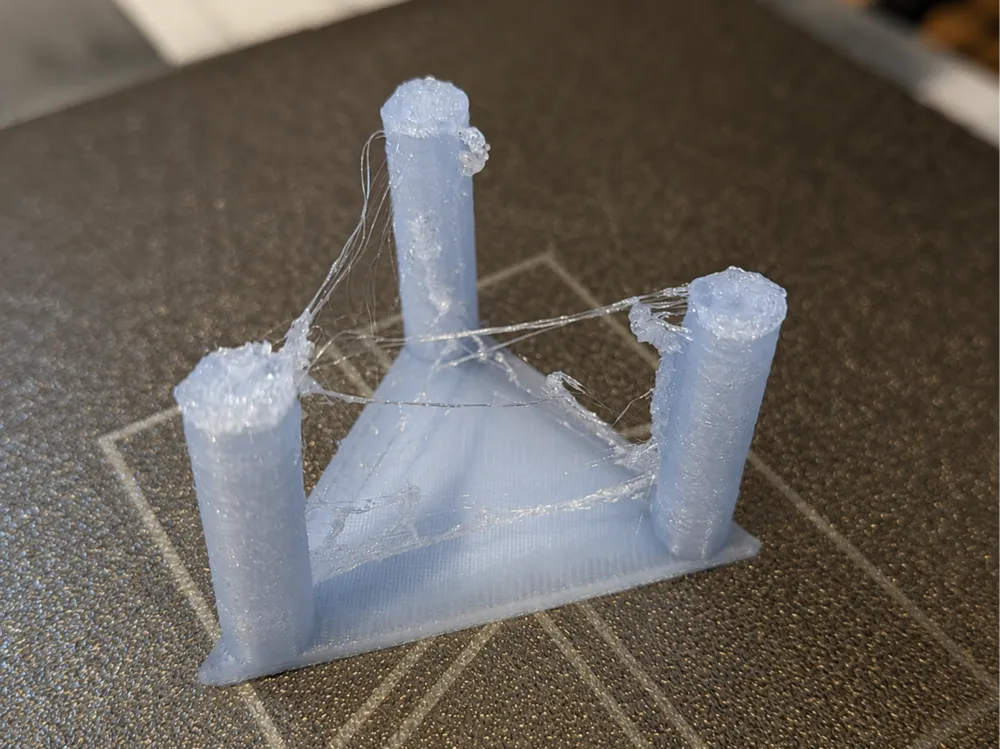
Stringing test !!!
Print Profile(2)

Bill of Materials

Description
THANK YOU
Boost Me (for free)
If you want to support me please BOOST
This is a "stringing" test for your 3D printer.
If, during printing, you notice the appearance of small threads between the layers of the printed object, I advise you to lower the temperature of your nozzle and switch to "sport" mode.
You can also test:
- flow compensation,
- printing speed.
How to recognize if the test is successful or not? Observe:
- underextrusion (there is a lack of material on certain parts)
- overextrusion (there is too much material in some places) or small threads between the layers
General advice:
- if you have a smooth PEI plate, increase the plate temperature by 10 degrees (75 degrees)
- perform a leveling and flow calibration before printing.
- avoid placing your printer in an environment that is too cold or exposed to drafts.
License

You shall not share, sub-license, sell, rent, host, transfer, or distribute in any way the digital or 3D printed versions of this object, nor any other derivative work of this object in its digital or physical format (including - but not limited to - remixes of this object, and hosting on other digital platforms). The objects may not be used without permission in any way whatsoever in which you charge money, or collect fees.


Comment & Rating (30)