Search models, users, collections, and posts


Bio
I have been 3d printing since long before the current era of consumer 3d printers. All my old printers were destroyed by vandals.

The supports seemed unneeded and causes a rough spot on the final print. Fun to play with!
Share
0
0
0
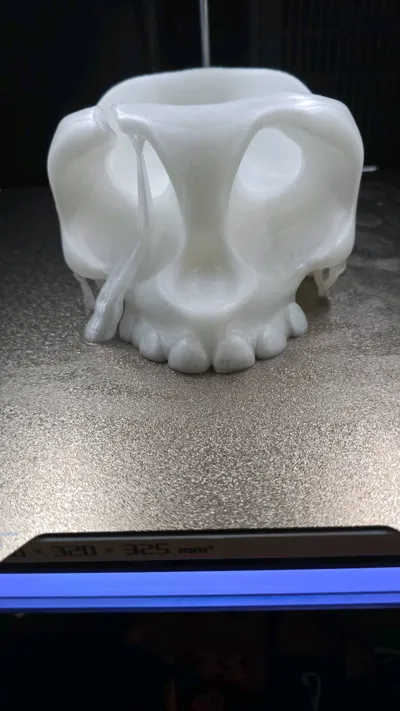
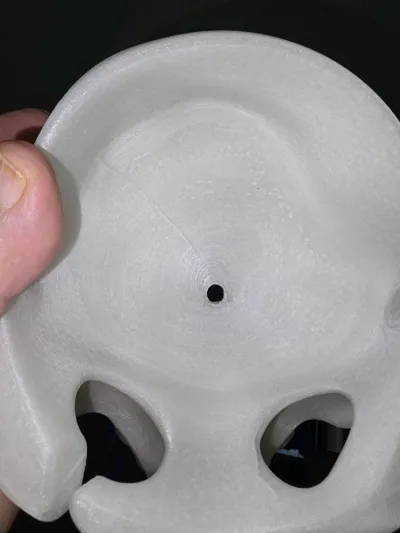
I printed it at 25% enlargement with glow in the dark PLA, I figured glow in the dark would be cool for a skull, The description says that it can be used as a candy dish, but the bottom has a hole, the candy will fall out. I wanted it for yarn so it does not matter. Little tree supports all over the bottom, you can see the larger support that insures the eye socket is empty. The temples are thin enough that they are a single layer. The second pic shows the hole, was it intentional?
Share
0
0
0
Two filaments, does the H2D need a purge tower?
I did some two color prints (actually two material prints, using petg for supports and one color of pla for the main body) of some spiral fidgets for an openSCAD spiral fidget generator I am trying to get to a publishable state. My first inclination when I did these prints was to kill the purge tower. I tried printing about three times with no purge tower. There was a taller piece (the spiral wrapper) and a shorter piece (the center spiral piece that slides inside the wrapper). The image is not underextruded, but it shows the sort of part I was having issues with. The thin slotted part you see near the top of the image would be badly underextruded, to the point where there would be visible cracks and gaps in the thin ribs, even to the point where the top of the model would crack off of the bottom. I tried several times with slightly different models, firmly of the belief that I should not need a purge tower with only two filaments and two extruders. Every time I would get bad underextrusion on the second half of the taller part. It seemed to happen when the level was above the shorter piece. This was black high speed PLA. I don't think I had any underextrusion in the PETG supports. I can only imagine that the shorter spiral was absorbing the lack of priming in the first half, but once the smaller spiral was done, it needed to be able to print fine detail in the inner spiral and the print just failed. Big cracks, bad underextrusion. I put the purge tower back in, and the underextrusion went away. I reduced purge volumes to about 1/4 of the Bambu ones - that saved time but still spent materials. However, I think that the issue is that when you print with a single extruder and filament, printing is a continuous process. Filament enters the hot end, absorbing heat. The filament is pushed into the nozzle area and out of the nozzle more or less in a single operation. Even during retraction and travel, the retraction and return of the filament is very dynamic and relatively fast. But with two extruders, it takes a relatively long time before normal operation (and repressurization) of the unused extruder resumes. The H2D allows breaks in the process that we are unused to with a single extruder, and during those breaks the unused nozzle cools and depressurizes. They cover the unused nozzle but it is not sealed. I believe that the purge tower allows the recreation of the dynamic environment that allows for excellent printing.
At least it is my experience that while I can get by with a small purge tower I can't get by without one at all. It seems that this is something that could be done automatically in the slicer. Two filaments, two extruder nozzles? Reduce the purge tower volume a whole lot. Thoughts?
Share
3
1
0
The post is no longer available
I printed this and I am using it with my H2D. But I notice that in the image it cleanly misses the chute on the back of the H2D. I attached the chute to my H2D and the bottom of the opening blocks the bottom edge of the chute.
Share
0
0
0
No more data