
ASTRO BOT SCREEN ACCURATE IN COLOR





Print Profile(1)

Description
Hello Astro Bot Fans,
First a small foreword:
The children love the game and the little robot that hops across the screen and I also think the little jump and run hero is just great.
So I thought, let's just print an Astro Bot figure ourselves.
There are some Astro Bot models on the internet, but unfortunately I couldn't find one that faithfully reproduces the colors. I wanted THE ONE Astro Bot: in color, as in the game, with cape, antenna, and jetpack and not just a simple white one.
So I picked out the model that visually excited me the most.
With a monochrome file from Thingiverse as a basis, I started my mission, my own remix.
It turned out to be more difficult than I thought, as I am still relatively new to the 3D world and therefore bring a certain inexperience with me.
The selected file didn't even have eyes and couldn't simply be colored with the paint bucket, because the fill areas I wanted to color were usually not recognized at all, and thus I could only color everything at once or far too much.
(I found the eyes on Printables, but they are also linked below as a remix basis)
But I absolutely wanted THE colored Astro Bot, no matter the cost.
So I sat down and colored all areas with hours of meticulous work using the freehand tool. My demands on myself were high, the model should be as clean as possible. I really colored it as best as I could, you can see the result in my pictures. Of course, it's certainly not always perfect, as one or the other professional among you might say now.
But I am very satisfied with my result.
Now for my remix:
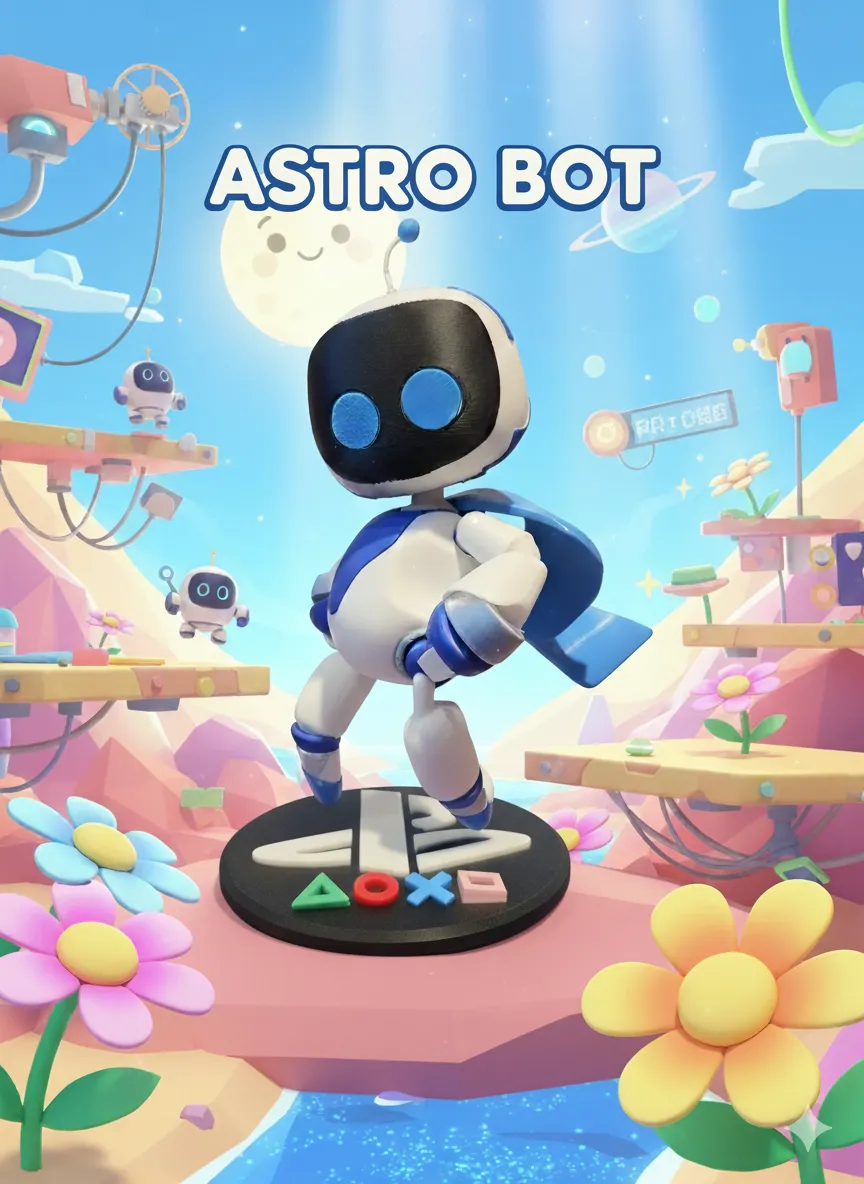
So here I offer you a colored, almost screen-accurate version of Astro Bot from the PlayStation game.
When assembled, the figure is about 16cm tall (with base) and stands on a round, beautifully decorated PlayStation base with a diameter of about 12cm.
I have combined some body parts on print plates to save time and filament. There are 2 different head variants, one with the circular standard eyes and one with the crescent-shaped smile eyes. Either print optionally or together. Together, the printing time only increases minimally and you can easily swap the head afterwards as you wish.
All individual parts can be easily assembled or inserted. However, a drop of superglue is needed for fixation (except for the head, if you plan to exchange it flexibly, and the cape can also be inserted without glue).
I could easily insert the round eyes, they hold without glue, the crescent-shaped eyes have slightly low tolerances, I had to tap them a bit with a rubber mallet here. The antenna can be easily inserted again.
I glued the bot to the base plate, there are corresponding recesses. The bot also has a small hole in its right foot, perhaps for a small screw.
Please observe the following order during assembly:
- First take the body and glue the jetpack to the back
- Now glue both legs to the body
- Now glue the arms to the body
- Place the cape in the recess, it does not need to be glued
- Insert the antenna into the recess on the head, it also does not need to be glued
- Finally, place the head, it does not necessarily need to be glued. This way you can switch between 2 faces
(Important: First the legs, then the arms!!!)
I tried to align the individual parts on the print bed in such a way that the print time is as short as possible and the scar from the support interfaces is as small as possible. This was also very difficult for me. Feel free to experiment with the orientation yourself. If you have problems with print bed adhesion, add a wide brim or simply lay the object flat. Please note that the support scar will then become larger.
For the head, I absolutely wanted to avoid an obvious support scar on the top, hence the standing orientation on the neck.
I also tried some prints here and lost a lot of time and filament. But all of it just to be able to show my personal best result here.
Please forgive my inexperience if it is not perfectly aligned for you.
The print time is still very long. You really have to have some patience and perhaps overcome yourself. But it's worth it, just look at the photo (-;
The little one is just waiting to move in with you.
I think it's because I colored everything with the freehand tool and therefore more frequent filament changes are necessary than with the paint bucket (which wasn't possible).
For me, the long print time was still not an obstacle, because I absolutely wanted THE colored, screen-accurate Astro Bot.
The support can be easily removed everywhere with my settings, of course you have to proceed carefully, especially with the antenna, which is very thin. Special caution and concentration are really required here, otherwise it breaks easily.
Furthermore, depending on your standards, I recommend smoothing the scars at the support interfaces with a little sandpaper to make the edges a bit smoother. I was able to conceal the scars from the support interfaces quite well this way. A lighter also served me well here.
A small post-processing is therefore recommended, unless you were able to align the parts better to minimize support.
With the jetpack, the small propeller is not completely printed, but this is already evident in the slice beforehand. I think the problem is simply due to the 0.4mm nozzle I'm using. The small details are probably lost as a result. Feel free to use a 0.2mm nozzle for the jetpack, but this will also extend the print time. I simply left it as is. So look at the slice beforehand so you don't get surprised or possibly disappointed.
Personally, it doesn't bother me (– but at least he has a jetpack) and it's covered by the cape anyway.
I printed on a P1S with PLA Basic from Bambu Lab. The silver color components are from the Silk series and the pink square on the base is PLA Matte sakura pink.
I appreciate appreciative comments, also gladly with photos of your little Astro Bot. Likes are also welcome, and whether it even gets a boost – I don't want to dream that far yet, even though I've invested a lot of work, time, and filament to present my result as best as possible.
I hope I can bring you joy with my upload.
Boost Me (for free)
Do you like Astro Bot? Cool, then do me a favor and give me a free boost.
Reminder: This model is considered fan art and is intended for personal use only. We are not affiliated with any official brand, and the sale of digital files or physical copies (creations) is strictly prohibited.
This remix is based on


License

You shall not share, sub-license, sell, rent, host, transfer, or distribute in any way the digital or 3D printed versions of this object, nor any other derivative work of this object in its digital or physical format (including - but not limited to - remixes of this object, and hosting on other digital platforms). The objects may not be used without permission in any way whatsoever in which you charge money, or collect fees.


Comment & Rating (224)