Search models, users, collections, and posts

Bambu Lab X1C Chamber Heater/Bauraumheizung

Print Profile(6)

All
X1 Carbon
P1P
X1
A1
P1S
H2S
X1E
P2S
H2D Pro
H2C
H2D
X2D
A2L
A1 mini

0.2mm layer, 4 walls, 20% infill
Designer
2.8 h
1 plate
5.0(12)

0.2mm layer, 4 walls, 40% infill
Designer
2.4 h
1 plate
5.0(7)

0.2mm layer, 4 walls, 30% infill
Designer
57 min
1 plate
5.0(6)

0.2mm layer, 4 walls, 30% infill
Designer
3.8 h
1 plate
5.0(6)
Click to see more

Open in Bambu Studio
Boost
202
412
121
75
391
143
Released 

Bill of Materials

List other parts
  • Controller Heater / Steuerung Heizung x 1: https://amzn.to/4bXRzP4
  • Heater / Heizung x 1: Cirrus 40/2 - www.schaltschrankheizer.de - 370090-01 Heater: 230W/230V Fan: DC 24V

Description

I have built a chamber heater for the X1C

There are also the Fusion 360 projects files for download. You can modify the parts für your need.
Please check my YouTube Video for more insights.


Boost Me (for free)

Thank´s for your support!


Print Notes:

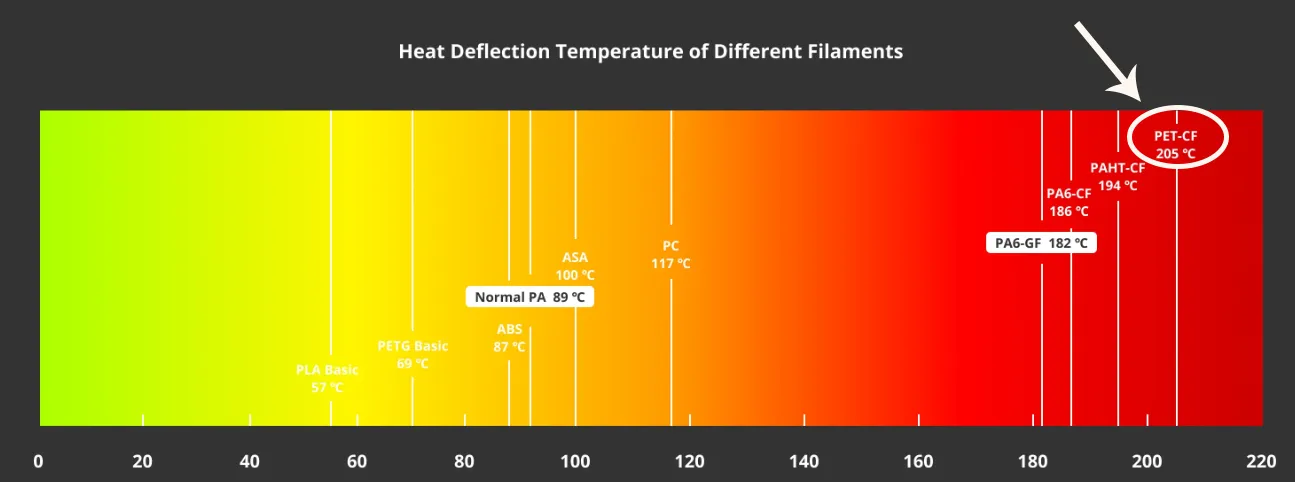
Filament: I use PET-CF as the material because of its temperature resistance. It is also quite easy to print.
 

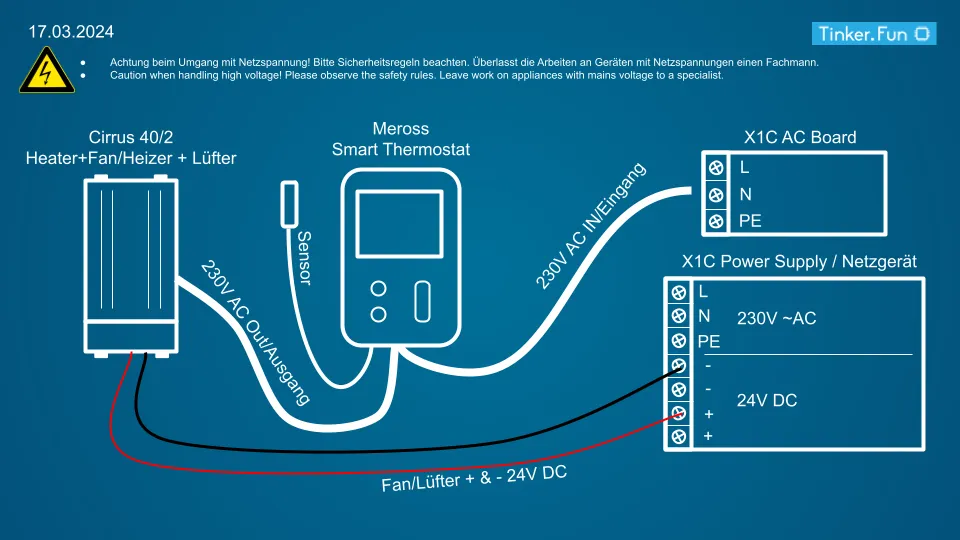
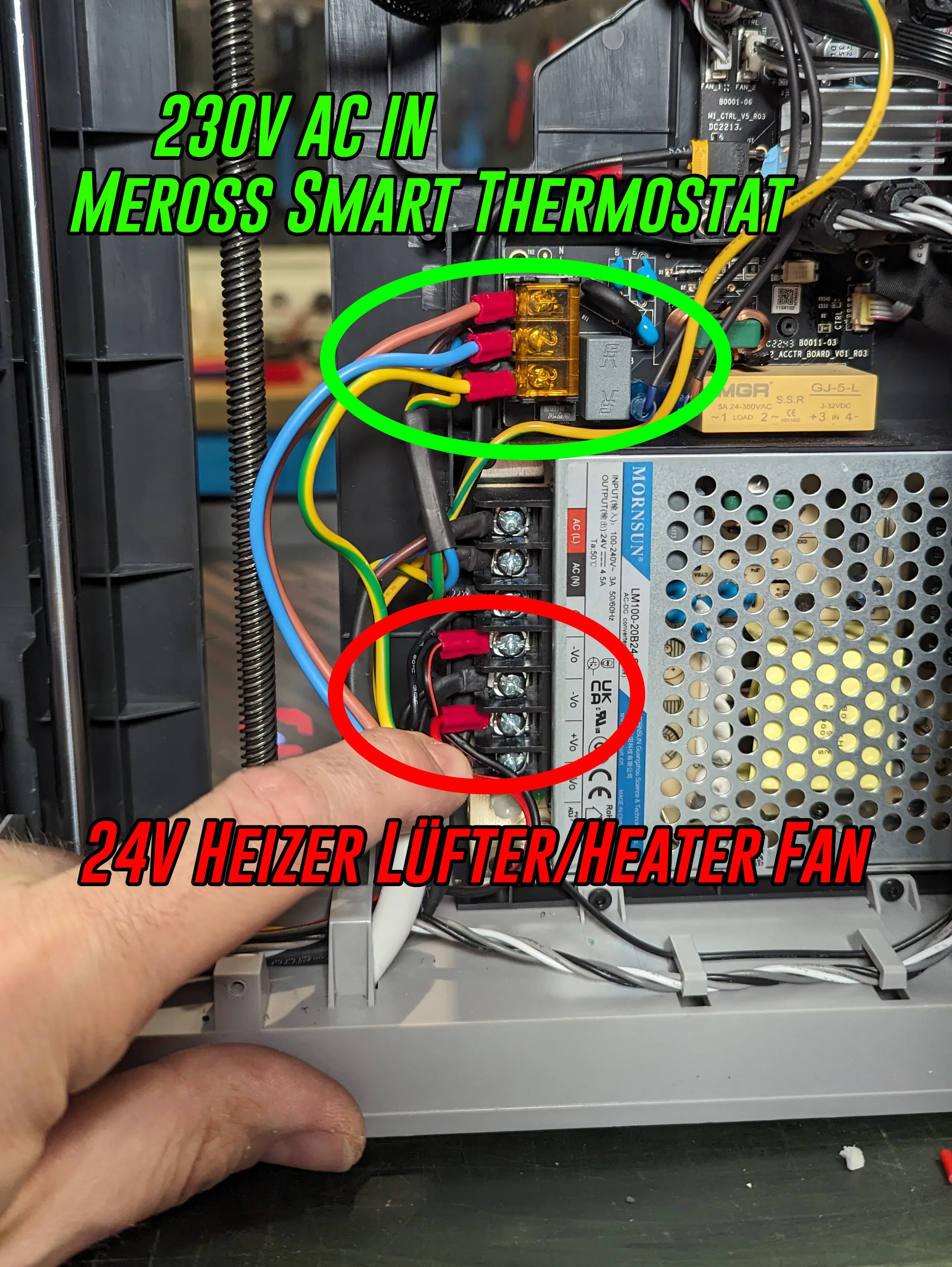
Current connection diagram. The fan of the chamber heater is always on when the 3D printer is switched on. You can also solve it otherwise if you want. The Meross thermostat receives power when the 3D printer is switched on and can then optionally heat.


AC Board: https://wiki.bambulab.com/en/x1/maintenance/replace-ac-board

Power Supply: https://wiki.bambulab.com/en/x1/maintenance/replace-power-module


Parts:

  • 230V Controller Meross Smart Thermostat: https://amzn.to/4bXRzP4
  • Chamber Heater: Cirrus 40/2 - www.schaltschrankheizer.de - 370090-01 Heater: 230W/230V Fan: DC 24V
 

Recommended Community Upgrade Part
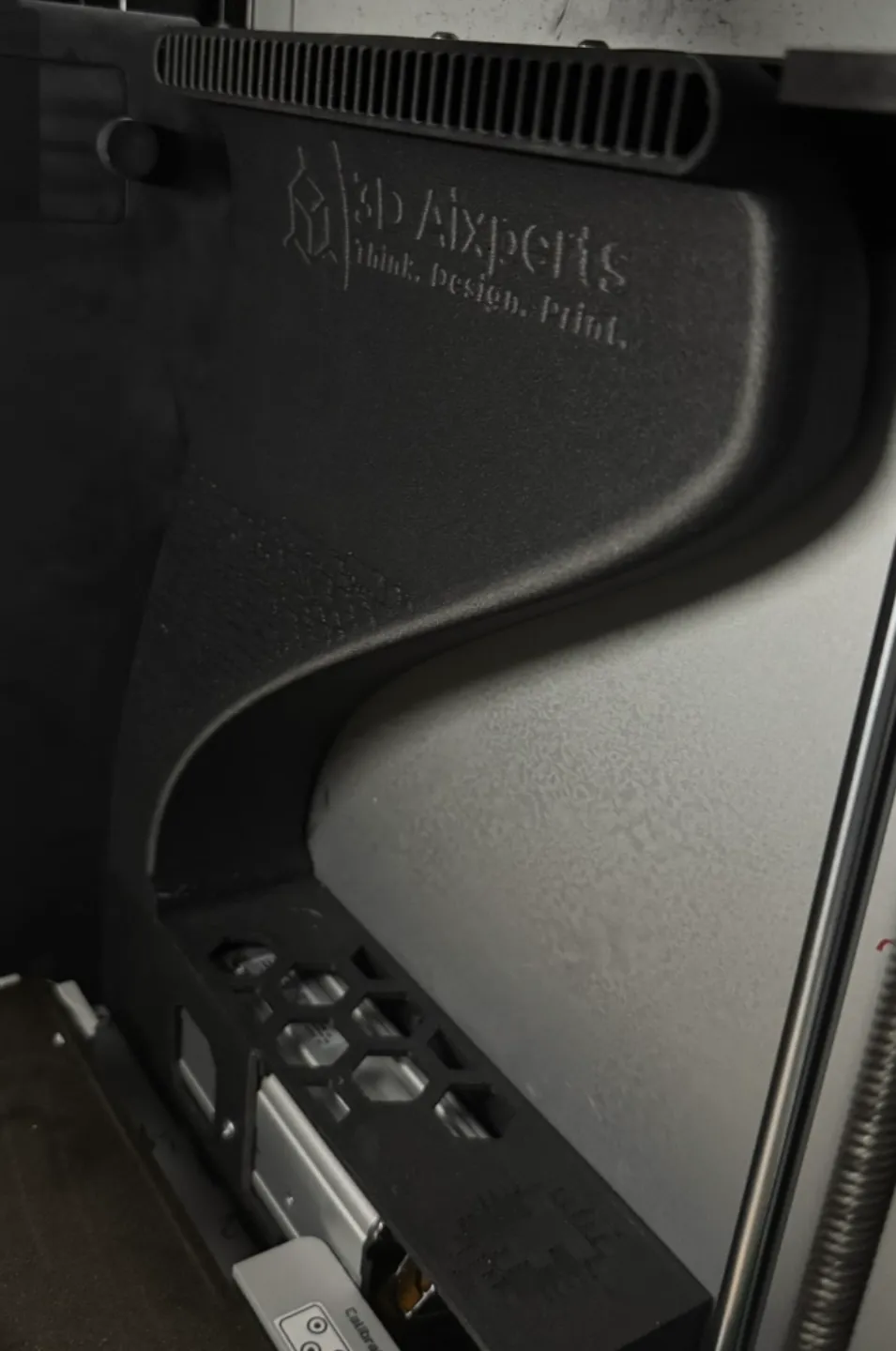
This makes it harder for filament waste to fall down to the fan, and the air can be sucked in even better from above.


Create by AC_3D_Aixperts:

https://makerworld.com/de/models/706244-bambu-lab-x1c-chamber-heater-air-collector#profileId-636196


Boost Me (for free)

I am very happy about your support, thank you!

Feel free to take a look at my other makerworld models

Tinker.Fun 3D Models


Examples from my models:
Washing Powder Dosing Spoon
Snail Collar/Schneckenkragen/Schneckenschutzring
A small nice Watering Can Pot
Grow Pot / Plant Pot / Anzuchttopf / Blumentopf


I would be very happy about your support: PayPal me

Tinker.Fun YouTube: https://www.youtube.com/tinkerfun

Tinker.Fun Instagram: https://www.instagram.com/tinker.fun


Documentation (1)

Bill of Materials (1)
parts_abd27e0a-9068-4c5a-b34c-9e5175491a85.pdf

Comment & Rating (121)

(0/1000)

Boosted
Finally I managed to install them. I still need to get to grips with the Meros a bit but otherwise it's top
The designer has replied
Show original
designer
1
Reply
Danke für das Feedback.
0
Reply
Super thanks for your feedback Best regards Benni
Show original
0
Reply
Boosted
Replying to @Tinker.fun :
Quick question, does your Meross device sometimes crash too So it stops responding on Wi-Fi
Show original
0
Reply
Print Profile
0.2mm layer, 4 walls, 30% infill
Printed well in PET-CF
The profile uploader has replied
profile
1
Reply
Thanks for the feedback and for the photos :-)
Show original
0
Reply
Print Profile
0.2mm layer, 4 walls, 30% infill
lässt sich super drucken
The profile uploader has replied
profile
1
Reply
Thanks for the feedback and the photo :-).
0
Reply
Boosted
I currently advise against installing this chamber heater. PA6 melted and the base plate deformed. The heating element became extremely hot because the fan was blocked by filament residue falling down the chimney. You might consider designing a sieve for the shaft to prevent residue from falling in.
(Edited)
The designer has replied
Show original
0
Reply
Hello. Yes, if the fan is off, I can well imagine it getting too hot. It would be cool if the heater didn't function if the fan is defective. A device to prevent filament residue from falling in is a good point. I have incorporated the following alternative air ducting from the community. It works well and filament residue should no longer be able to fall in. https://makerworld.com/en/models/706244-bambu-lab-x1c-chamber-heater-air-collector
Show original
0
Reply
Replying to @Tinker.fun :
I tried using the linked intake, but I still repeatedly found filament residue below the fan. I think only a filter or a fine, temperature-resistant mesh would provide complete remediation
Show original
designer
1
Reply
Greetings, First, many thanks for sharing this project. I can well appreciate the considerable time invested, especially with a heating element I trust implicitly. I have a few constructive comments: Build Plate to Aluminum Profile Clearance: The distance between my heating element and the build plate sensor mount was too small. The build plate lowered but wouldn't raise again; the sensor mount jammed against the aluminum block. (I suspect my tolerances differ slightly from yours). This was easily remedied by trimming a portion of the plastic mount. Fan Speed: You mentioned in your video running the build plate fan at 50% to 100%. This proved excessive for me. I attempted a reprint of the mount in Bambu PET-CF. With the build chamber at 60°C and 100% fan speed, the layers likely cooled too rapidly, resulting in the lower layers detaching. (My first attempt used ASA without the heater). Currently, I achieve optimal results without the top intake fan and without the build chamber fan—essentially, "still air" in the upper part of the print chamber. Build Chamber Heating: I find the fastest heating time by omitting the top intake for warm air. This also keeps outlet temperatures from the heater lower (only 80-90°C). I suspect the PTC heating element delivers its full power without entering "self-regulation" mode. Heater Control: A "non-smart" control system proved simplest for me. I switch the small heater fan using a toggle switch. Printer Elevation: I managed to neatly route the cables and small circuit board underneath the printer. A Personal Note: Avoid leaving PLA in the nozzle when the chamber is heated for extended periods; this invariably leads to a clogged nozzle. It's best to always load the final filament before heating. However, I am thoroughly impressed by your design and construction. I do not intend my comments as criticism in any way. Regards, Mitch
The designer has replied
Show original
designer
1
Reply
Hello Mitch, That's great, thank you for your detailed feedback 😃👍 It will certainly help others as well Kind regards Benni
Show original
0
Reply
Print Profile
0.2mm layer, 4 walls, 30% infill
Improvement will be truly difficult. A clean and precise construction combined with exceptionally high-quality PET-CF material yields a superb print. Excellent work, thank you.
The profile uploader has replied
Show original
profile
1
Reply
Great, thank you for your feedback 😃👍
Show original
0
Reply
Boosted
Great implementation, I'm currently replicating it. How did you attach the divider plates for the electronics shielding
The designer has replied
Show original
designer
2
Reply
Attach with double-sided tape to the ejection channel. Apply the tape to the rectangle/spacer from the upper part. Best regards
Show original
0
Reply
Replying to @Tinker.fun :
At the top of the spacer block to the ejection chute, Velcro also works very well and at the bottom I quickly attached it with a bag sealing wire to the cable eyelet and before that I filed a small notch for it into the stud of the wall, Many thanks @Tinker.fun for the instructions and the print data. Really great work! Only the distance to the plate is too small for me at 0-0.1mm and I made everything 2 mm narrower. The two walls made of ABS already worked great with raft and 55°C chamber heating (as it was still without shielding) and with minimal fan power. Also many thanks for the tip with PET-CF, that prints incredibly well if only it wasn't so expensive.
(Edited)
Show original
0
Reply
Replying to @user_2338885533 :
Great and thanks for your feedback. Best regards Benni
Show original
0
Reply
Print Profile
0.2mm layer, 4 walls, 40% infill
Printed well in PET-CF. Great Design
profile
1
Reply
Print Profile
0.2mm layer, 4 walls, 30% infill
Printed well in PET-CF. Great Design
profile
1
Reply
Hello, does the Cirrus heater have a fail/safe thermal protection switch built in? Something like this:
The designer has replied
0
Reply
I don't think so. Here is the data sheet from the manufacturer and a statement in the FAQ: Is it possible to operate PTC Fan Heaters without an additional temperature fuse? Due to the PTC effect, there is no need for a thermal fuse in most cases. However, an additional thermal fuse or limiter may be necessary in applications where the permissible temperatures are below the PTC self-limiting temperature. https://datasheets.dbk-worldwide.com/EN/Datasheets/PTCFanHeaters/DBKITM_Cirrus_40_eng.pdf
0
Reply