Search models, users, collections, and posts

Customizable Sliding-Lid Lock Box with Text

IP Report

Print Profile(2)

All
P1S
X1E
X1
H2D Pro
H2D
A1
H2C
X1 Carbon
H2S
P2S
A1 mini
P1P
X2D
A2L

Credit card box
Credit card box
Designer
1.1 h
1 plate
4.8(13)

Vertical Credit card box
Designer
1.3 h
1 plate
5.0(4)

Open in Bambu Studio
Boost
232
619
47
30
1.3 k
605
Released 

Bill of Materials

Bambu Filaments
Select all
Bambu Green (10501) / Filament with spool / 1kg

Description

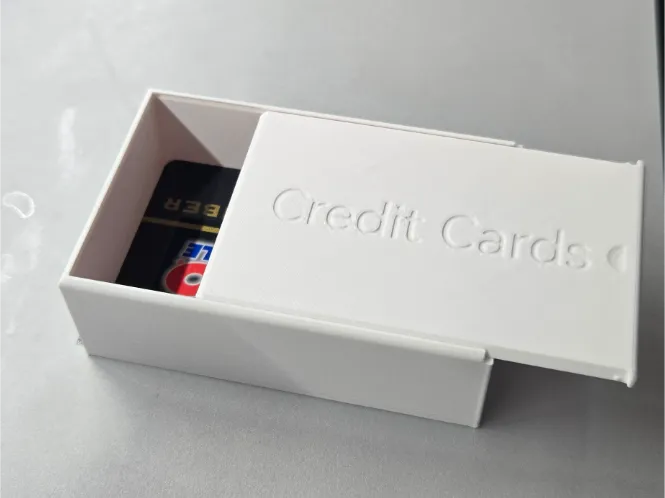
A customizable storage box featuring a smooth sliding lid, integrated lock-style mechanism, and optional embossed text for personalization.


Ideal for organizing small items, gift packaging, maker kits, or desk storage with a cleaner, secure look. You can customize labels, names, or short notes directly into the model for practical identification.


Print in PLA for crisp text detail or PETG for tougher daily use. Use fine layer height for cleaner lettering and a smoother sliding fit.

Comment & Rating (47)

(0/1000)

Boosted
I have the same issue that @PeterJohnson mentioned. It seems that once you go beyond 100mm in length the problem arises. Screenshot below shows the issue. It looks like the lid is raised off of the build plate and little pads appear for the sections on the ends in excess of 100 mm. Corresponding cuts for these pads can also be seen in the slots on the box portion.
The designer has replied
0
Reply
really sorry about that, should be fixed now. please check.
0
Reply
Boosted
Replying to @xiangyucao :
Yes, it is fixed now. Thank you! Printed well.
0
Reply
Great adjustable card box. I resized it with no text but then added two lines of text in BambuStudios
The designer has replied
0
Reply
thank you!
0
Reply
Minimalist design to my liking Very precise fit The instructions regarding the *2 walls were helpful I added openings on both sides to make it a beautiful cable holder Thanks
Show original
0
Reply
Printed two; the first "cards" was a straight print with 40mm height for more cards, which was a little tight for bank cards which need shaking out, so the second "business cards" was printed at size 104% which lets business cards that have more variety in size. Nice, clean print.
(Edited)
0
Reply
Hello, thank you for this lovely piece I have adjusted it to my size Is there a way to make the lettering flush with the first/last layer I would like to print the lettering downwards for a better surface texture but somehow it doesn’t look good Or is it due to Layer 9 the lettering becomes slightly wider there And in Layers 8 and 10 it is smaller again In Layer 10 it is merely covered by white
Show original
0
Reply
Print Profile
Credit card box
good size
0
Reply
I love your closing design. I have been looking for a design that is space efficient and yours is the best I have seen. I would love to use this for some of my own models I have for personal use. Would you be willing to share the details of your design? Specifically, I am looking for the difference between the lid and the opening that it slides into, as well as the geometry of the bump and indent that make it 'click' closed. My attempts at reverse engineering them have not worked out well.
The designer has replied
0
Reply
Thank you. You can see all the source code after click the customize button, right?
0
Reply
Replying to @xiangyucao :
I can, but I am having a hard time understanding the clearance component to it. It seems like you are scaling the box component but I am having a hard time understanding exactly how. The space gets larger for the top to slide in, but the indent also seems to be moving as well.
0
Reply
Replying to @user_900330819 :
so you can't get the size you want? what exactly you are trying to get to solve now? maybe copy the code to chat gpt to ask?
0
Reply
Print Profile
Vertical Credit card box
I scaled it to create a backpack box that protects my iPad However, I will not publish it out of respect for you
(Edited)
The profile uploader has replied
Show original
0
Reply
why not? share it out. it help everyone.
0
Reply
Replying to @xiangyucao :
But i only made it bigger. I dont think its enough for an remix.
0
Reply
Is there any way to print just the Lid or just the Box? I want to make some changes to the Lid without printing everything. In my "inexperienced" mind, it should export as 2 "objects".
(Edited)
The designer has replied
0
Reply
just split and mark the part non printable
0
Reply
Replying to @xiangyucao :
Thank you for the reply. And I absolutely love your model!!!! It was certainly easy to "split" the model. I was unaware of the "split" function because in the hundreds of models I have downloaded, all of the models have already included separate objects. Is there a reason you don't split the model into separate objects too?
(Edited)
0
Reply
Best customizable box I've printed, and I've tried a few. Prints quickly, lots of good parameters, and snaps in to lock closed.
The designer has replied
0
Reply
thank you!
0
Reply

License

This user content is licensed under a Standard Digital File License.

You shall not share, sub-license, sell, rent, host, transfer, or distribute in any way the digital or 3D printed versions of this object, nor any other derivative work of this object in its digital or physical format (including - but not limited to - remixes of this object, and hosting on other digital platforms). The objects may not be used without permission in any way whatsoever in which you charge money, or collect fees.
